

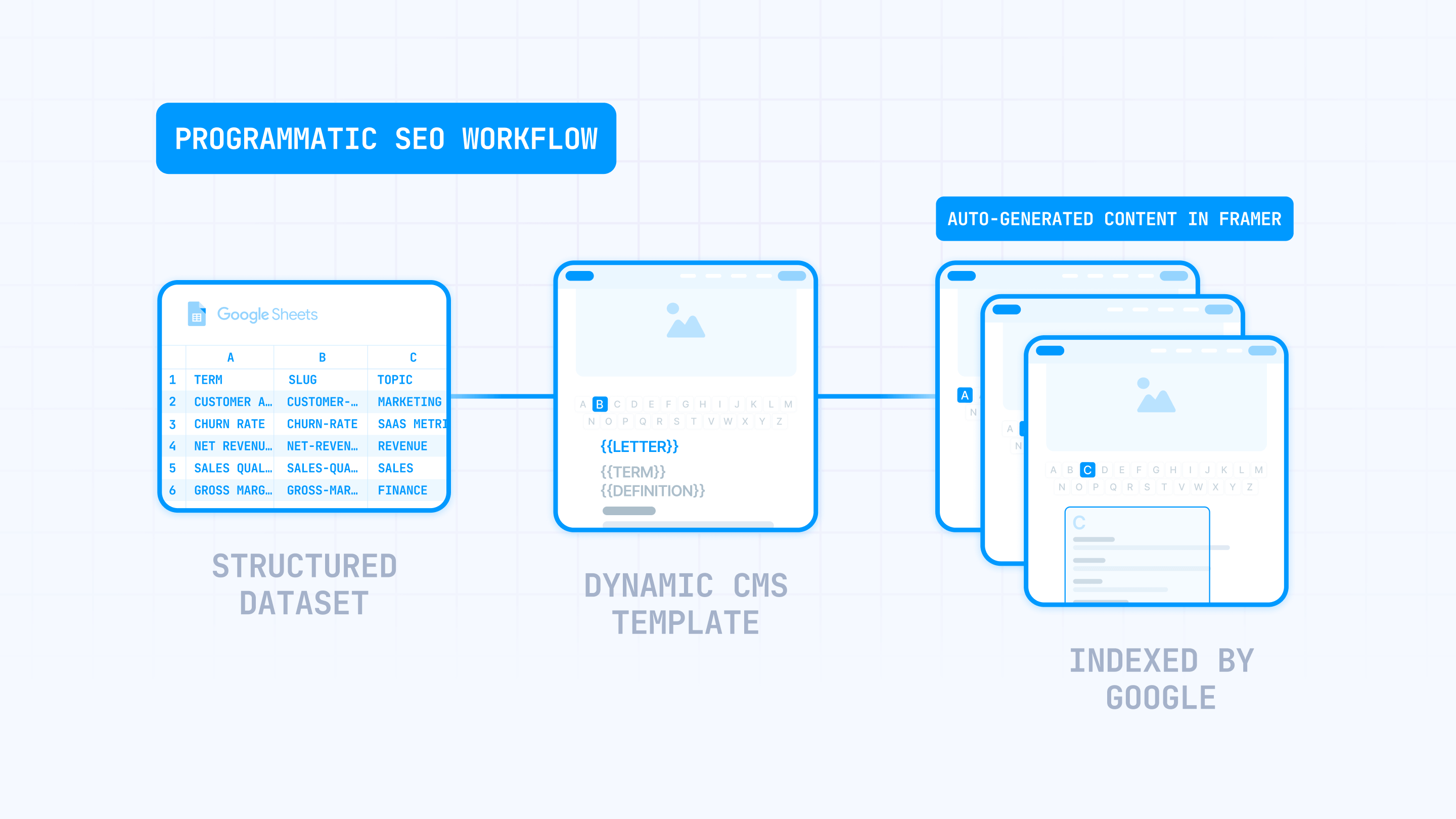
Programmatic SEO is a straightforward concept: you build one page template, connect it to structured data, and let Framer turn that data into hundreds (or thousands) of individual pages — each targeting a specific search query. Picture a SaaS product that needs a dedicated page for every integration it supports, or a B2B company that wants to rank for every industry term their buyers search for. Doing that by hand would take forever. With programmatic SEO in Framer, you can have it running in days — or if your content is already organized, in just a few hours.
The problem? Most people get the "generate pages" part right and everything else wrong. They end up with hundreds of near-identical pages that Google refuses to index, wasted crawl budget, and a site that looks spammy instead of authoritative. The issue isn't Framer — it's launching without a clear plan for data structure, template uniqueness, internal linking, and what actually gets published.
This guide walks you through the complete workflow — from choosing the right page types to syncing data through plugins, building templates that don't look cloned, and monitoring what Google actually picks up. Whether you're starting your first Framer CMS project or you've tried pSEO before and it didn't work, this is the playbook to get it right.
Why programmatic SEO matters for Framer sites
Knowing where pSEO actually delivers helps you figure out if it fits your project — and how to tackle it properly:
- Ship hundreds of landing pages without building each one: Design a single Framer CMS template and let structured data do the rest. A SaaS company can launch a full integrations directory without opening the editor for every new page.
- Convert structured data you already own into search traffic: Product specs, feature databases, industry terminology, partner lists — if you have it in a spreadsheet, Framer CMS can turn it into indexable pages that go after search demand you're currently leaving on the table.
- Distribute authority through hub-and-spoke internal linking: Framer Collection lists on hub pages push link equity down to your programmatic pages, helping them compete for terms they'd never rank for as orphan pages.
- Reach new markets with built-in localization: Framer supports 500+ locales with automatic URL routing, hreflang tags in the HTML, and AI-assisted translation — making multi-language pSEO possible without custom infrastructure.
1 - Plan your Framer programmatic SEO pages before you build
Jumping straight into Framer CMS without a plan is how you end up with duplicate pages, confusing URL structures, and wasted time. This section helps you decide which pages are worth creating, what data they need, and whether your Framer plan supports the scale you're aiming for.
Pick Framer programmatic SEO page types that are worth building
The first decision is which pages you can make genuinely useful at scale. Not just possible — useful. Each page needs its own intent and its own unique data, not just a different keyword in the headline.
The easiest wins come from single-dimension pages — one CMS Collection, one variable, many pages:
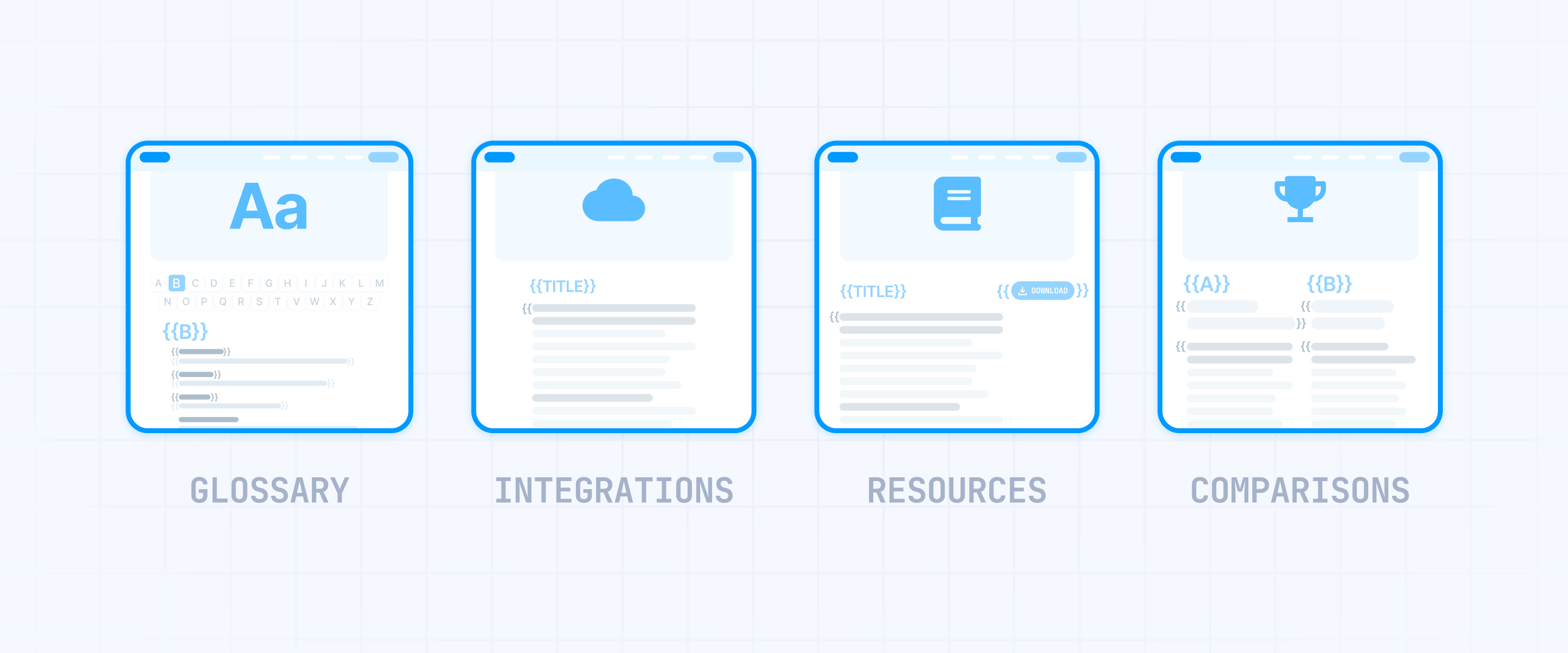
- Industry glossaries: A B2B SaaS company builds 300+ pages like "What is churn rate" or "What is net revenue retention." Each term has a unique definition, related terms, and practical examples. It works because every single term targets a different search query.
- Integration directories: Individual pages for "Salesforce integration", "HubSpot integration", "Slack integration" — each with distinct setup instructions, feature details, and use cases. Notion and Zapier have generated enormous organic traffic with exactly this approach.
- Template and resource libraries: A page for every downloadable asset — "Sales proposal template", "SOW template", "NDA template" — with unique descriptions, previews, and related downloads.
- Comparison pages: "Your Product vs Competitor X" pages where each matchup is its own CMS item with specific feature comparisons, pricing breakdowns, and recommendations.
A solid rule of thumb: if a page can't have at least 3 sections with genuinely unique content (not just a swapped title and intro), it shouldn't exist yet. The quickest way to tank your pSEO project is publishing pages where nothing changes except the H1 and meta description.
After single-dimension pages are live and getting indexed, you can explore multi-dimension combinations — pages built from two or more variables:
- Feature × Industry: "CRM for real estate agencies", "CRM for consulting firms" — each pulling unique industry context and tailored feature recommendations.
- Service × Vertical: A B2B agency building "Web design for fintech", "SEO for B2B marketplaces" — with distinct case studies and vertical-specific insights per page.
- Integration × Category: A filterable directory where each integration belongs to a type (analytics, payments, communication) and each combination page carries unique content.
Multi-dimension pages can be very effective, but only when there's proven search demand for those specific combinations and you have real content to differentiate each one. If you're creating 500 combos but most of them would just swap a city name inside a generic paragraph, those pages won't get indexed.
Even worse, they can damage your site's overall quality signals. Google sees a thousand pages with the same layout and nearly identical text, and it draws the obvious conclusion: low-quality content. Get single-dimension pages working first, then only expand to combos when the data backs it up.
Before building any page type, search Google for the exact query that page would target. If the top results are in-depth guides or established product pages, a thin programmatic page won't stand a chance. Put your effort into queries where a data-rich, well-structured page serves the searcher better than what's already ranking.
Know Framer plan limits and URL structure for programmatic SEO
Framer's pricing and CMS constraints should shape your project from the beginning.
Here are the current plans and what they offer for pSEO:
- Basic ($10/month): 1 CMS Collection, 1,000 CMS items, 30 site pages. Too limited for most pSEO projects, but could work for a very small glossary or resource library.
- Pro ($30/month): 10 CMS Collections, 2,500 CMS items, 150 site pages. Includes staging, redirects, and relational CMS. Covers most B2B pSEO use cases like glossaries, integration directories, and comparison libraries.
- Scale ($100/month): 20 CMS Collections, 10,000 CMS items (expandable to 40,000 with add-ons at $20 per 10,000 extra items). Flexible limits, priority support, premium CDN. Built for serious directory-scale projects.
- Enterprise: Custom pricing and limits. For teams that need more than 40,000 items or custom configuration.
An important detail: CMS pages don't count against the "site pages" limit — that limit only applies to custom-designed pages. Your CMS items are the real constraint, and for most B2B projects, 2,500 to 10,000 items is already a substantial content asset.
Framer CMS pages follow the pattern yourdomain.com/collection-slug/item-slug, so your pages automatically live at paths like /integrations/salesforce or /glossary/churn-rate without extra setup. Like Webflow, only the last segment (the item slug) is dynamic — the Collection slug before it is fixed and identical across all items in that Collection.
For more advanced URL structures, Framer includes Multi Site rewrites — essentially a built-in proxy that lets you mount separate projects or external origins under specific paths on your domain. This handles URL architecture problems that on other platforms would require Cloudflare Workers or Vercel.
What works natively in Framer:
- /integrations/salesforce — standard CMS route, the item slug is the only dynamic part
- /blog/post-name — mount a separate blog project under /blog using Multi Site rewrites, with CMS pages served at the matching route
- /docs/getting-started — same approach for documentation or any other content section
What doesn't work:
- Multiple dynamic segments in one URL: Just like Webflow, Framer doesn't support URLs where two or more segments change per page (like /services/{category}/{item}). Only the item slug is dynamic.
- Route mismatches in rewrites: If your rewrite points /articles/:slug to a project where CMS pages live at /blog/:slug, the paths won't resolve. The CMS route in the rewrite needs to match the origin project's actual route.
- Static folder nesting before the CMS path: Unlike Webflow's CMS Folders, Framer doesn't offer nested static folders before the Collection route. Your CMS pages live one level deep under the Collection slug.
2 - Structure your data and build your Framer CMS template for programmatic pages
The most common reason Framer pSEO projects fail isn't a design problem or an SEO settings issue — it's messy data. Your data is your content, and getting it organized before anything touches Framer CMS saves you from fixing everything later. This section takes you through the full process: define your fields, set up your Collection, configure your template, and validate on staging.
Define your fields and prepare your spreadsheet for Framer programmatic SEO
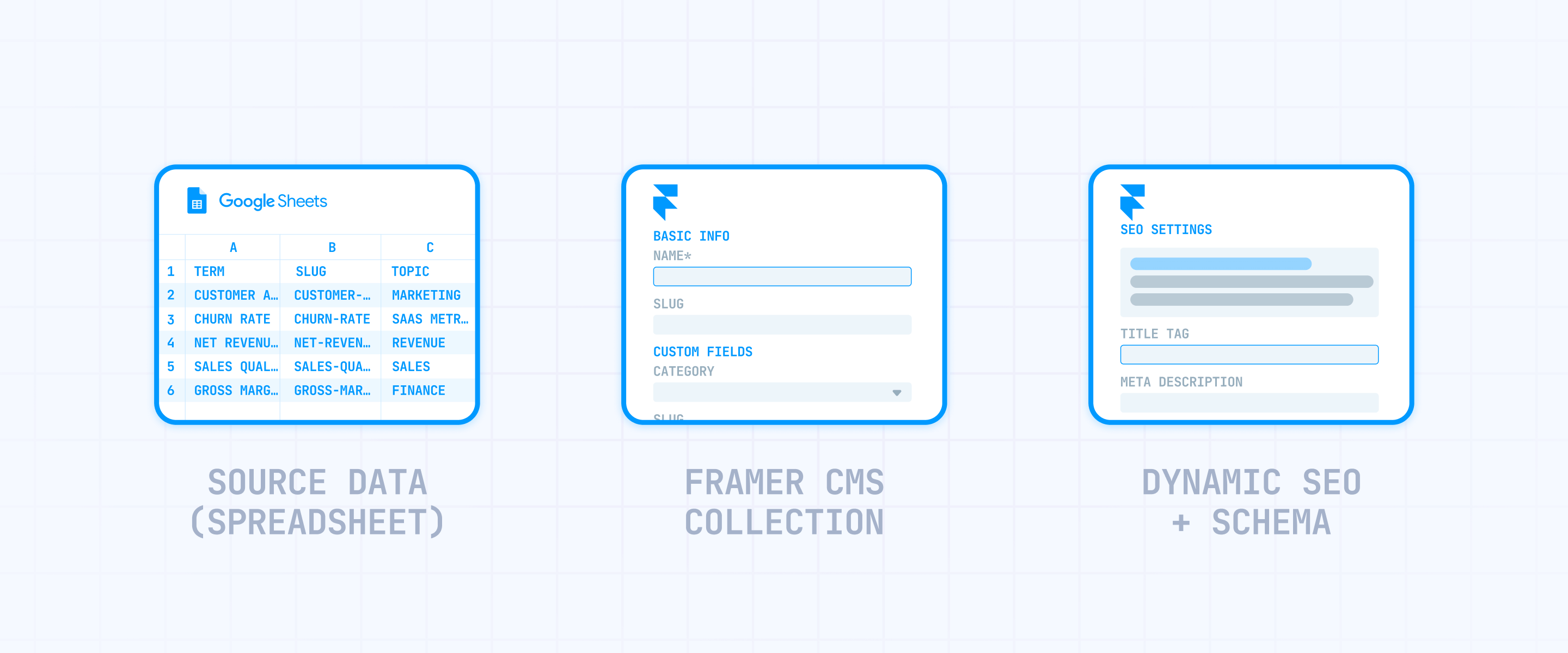
Use Google Sheets or Airtable as your central data source. Every column will map directly to a CMS field in Framer, so the structure you build here dictates what your template can display.
Your spreadsheet needs at least these columns:
- name: The display title for each CMS item (for example, "What is churn rate" for a glossary term)
- slug: The URL path — lowercase, hyphens only, no special characters (for example, churn-rate)
- summary: A unique 2-3 sentence overview per item — not optional for pSEO
- definition (or primary content): The main body that makes each page genuinely different. For a glossary, that's the full explanation; for an integration page, it's the feature overview and setup instructions
- category: Which group this item belongs to (this becomes a Reference field in Framer, linking to a Categories Collection)
- related-items: Names or slugs of connected items (maps to a Multi-reference field for cross-linking between pages)
- faq-q1, faq-a1, faq-q2, faq-a2, faq-q3, faq-a3: Unique Q&A pairs for each item — these also power FAQPage Schema markup, which makes your pages eligible for rich results in Google
- seo-title: A unique meta title per item (for example, "What is Churn Rate? | Definition & Calculation")
- seo-description: A unique meta description per item
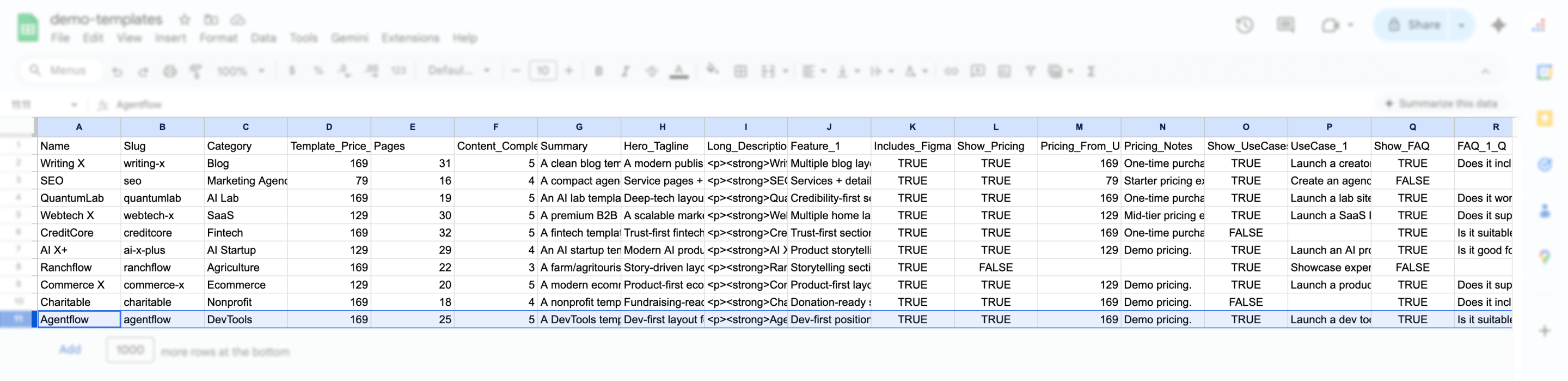
Before syncing anything, clean your data: check for duplicate slugs, empty summary fields, and rows where the only difference is the name. If two rows would generate near-identical pages, combine them or cut one.
Adding a "content completeness" score column is a smart move — even a basic 1-5 scale lets you quickly see which items are ready to publish and which ones need more work. Items scoring 1-2 stay as drafts; items at 4-5 go live.
Framer's CMS doesn't have a hard field limit like Webflow's 60-field cap, but keeping your schema focused and well-organized from the start prevents confusion when you scale to hundreds or thousands of items.
Build your Framer CMS Collection and sync a test batch with plugins
Take your spreadsheet structure and create the matching CMS Collection in Framer. Each column becomes a field with the right type:
- name → Title field (built-in)
- slug → Slug field (built-in)
- summary → Plain Text field
- definition → Rich Text field
- category → Reference field (pointing to a Categories Collection)
- related-items → Multi-reference field
- faq-q1, faq-a1, etc. → Plain Text fields
- seo-title → Plain Text field
- seo-description → Plain Text field
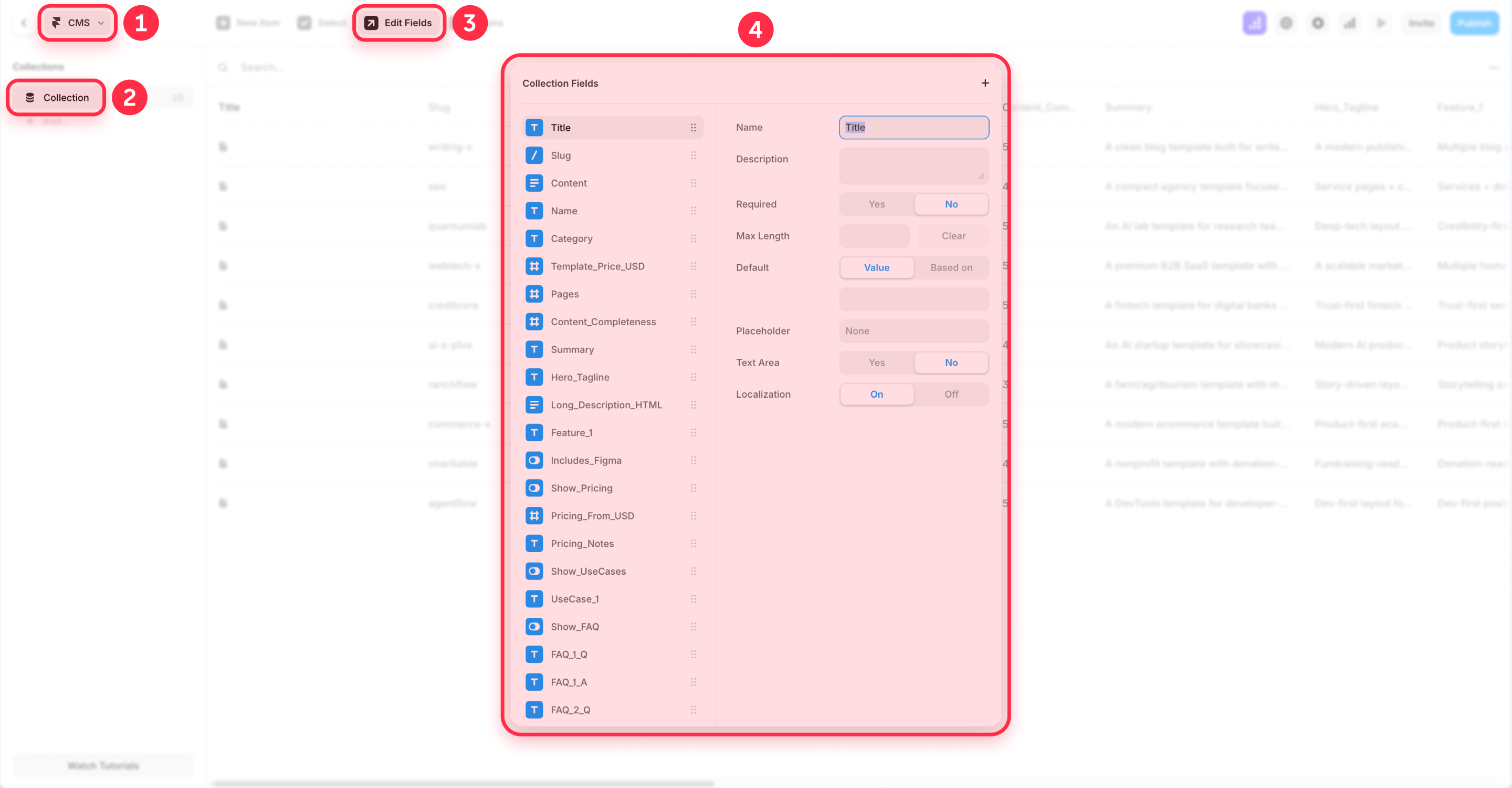
For a B2B glossary, your Glossary Terms Collection uses all of these fields. For an integration directory, you'd replace definition with something like setup-guide and add fields for supported-plans or integration-type — but the pattern stays the same.
Unlike Webflow, Framer's CMS workflow is plugin-first. Instead of importing a CSV, you install a sync plugin from the Framer Marketplace — like the Google Sheets plugin or the Airtable plugin — map your spreadsheet columns to CMS fields, and sync.
For your first round, don't sync your entire dataset. Start with 50 to 200 items that represent the range of your content:
- Create the CMS Collection with all your fields.
- Install the sync plugin, connect your spreadsheet, and map the columns.
- Sync the test batch into Framer.
- Publish to staging (available on Pro and above) and check: do pages render correctly? Does the layout hold up with different content lengths? Are any fields mismatched?
Only scale to your full dataset after the template works with real data on staging. Fixing design issues on 100 items is simple; fixing them on 5,000 is a headache.
Set dynamic SEO titles, meta descriptions, and FAQPage Schema on your Framer template
Once your test batch is synced and the Collection exists, configure the template so each page gets its own SEO metadata and structured data automatically.
Dynamic SEO titles and descriptions:
- Open the CMS detail page for your Collection.
- Go to Page Settings.
- In the Title field, use the CMS variable syntax: {{seo-title}} (or build a pattern like {{seo-title}} – Your Brand).
- In the Page description field, use {{seo-description}}.
- Click Save.
- Publish your site.
Since you created a dedicated seo-title field in your spreadsheet, every page gets a truly unique title — not a generic pattern like "{Term} | Glossary." That difference matters for how Google evaluates each page's distinctiveness.
FAQPage Schema markup:
If your CMS items have unique FAQ fields (and they should, based on the spreadsheet above), you can add FAQPage Schema so every programmatic page becomes eligible for rich results — automatically, at scale.
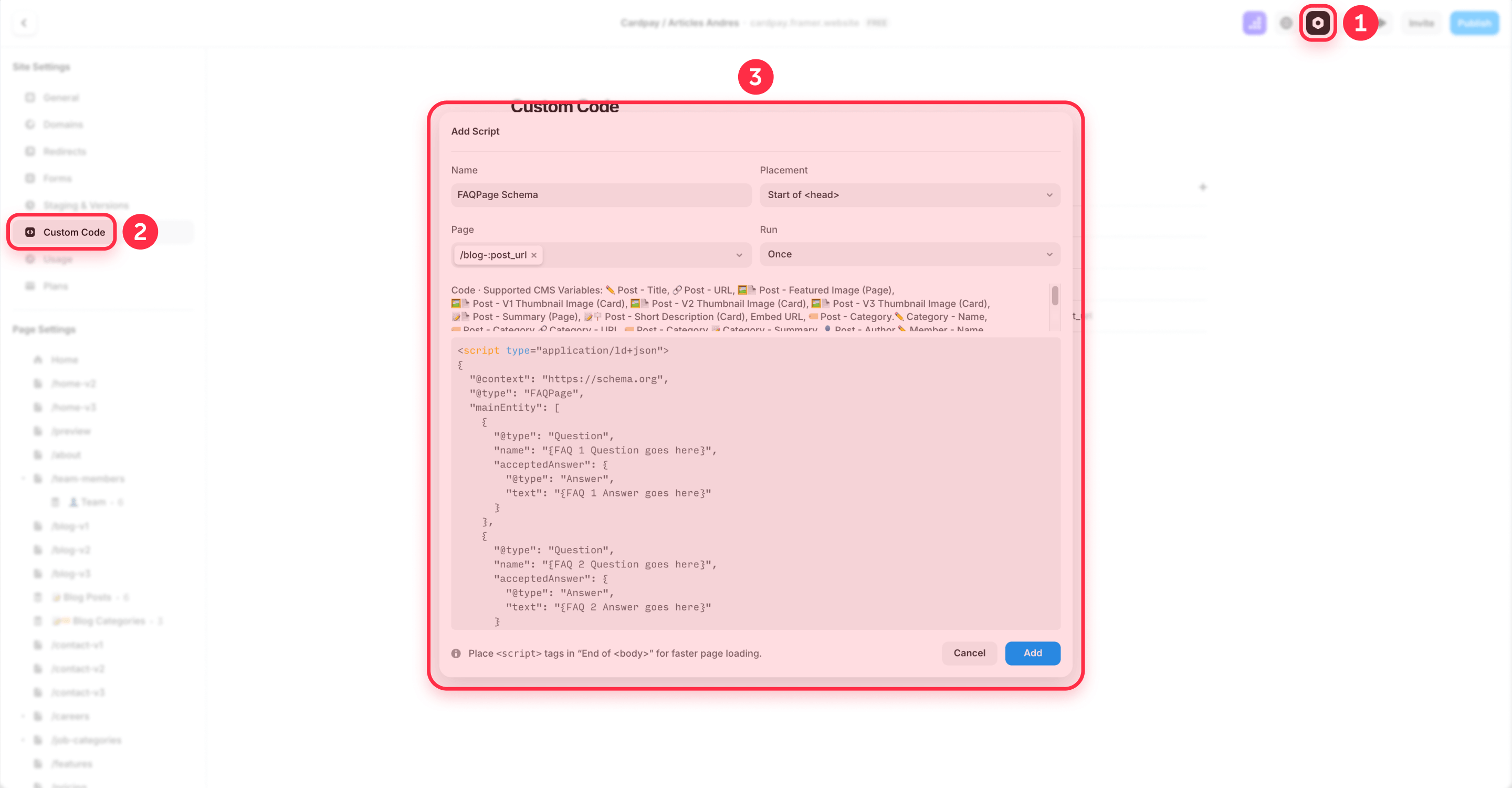
Go to your CMS detail page's Page Settings → Custom Code → Head tag, and add a JSON-LD script that pulls FAQ content from each item using Framer's CMS variable syntax:
<script type="application/ld+json">
{
  "@context": "https://schema.org",
  "@type": "FAQPage",
  "mainEntity": [
    {
      "@type": "Question",
      "name": "{FAQ 1 Question goes here}",
      "acceptedAnswer": {
        "@type": "Answer",
        "text": "{FAQ 1 Answer goes here}"
      }
    },
    {
      "@type": "Question",
      "name": "{FAQ 2 Question goes here}",
      "acceptedAnswer": {
        "@type": "Answer",
        "text": "{FAQ 2 Answer goes here}"
      }
    },
    {
      "@type": "Question",
      "name": "{FAQ 3 Question goes here}",
      "acceptedAnswer": {
        "@type": "Answer",
        "text": "{FAQ 3 Answer goes here}"
      }
    }
  ]
}
</script>
In Framer, replace each placeholder with a CMS variable using the {{field-slug}} syntax — for example, {{faq-q1}} and {{faq-a1}}. After publishing, every programmatic page outputs its own unique FAQPage Schema based on that item's specific Q&A content.
To confirm it's working, open any published page and run it through Google's Rich Results Test. Each FAQ pair should show up correctly. For a dedicated walkthrough, see our complete FAQ Schema implementation guide for Framer.
Use conditional design in Framer to make each programmatic page unique
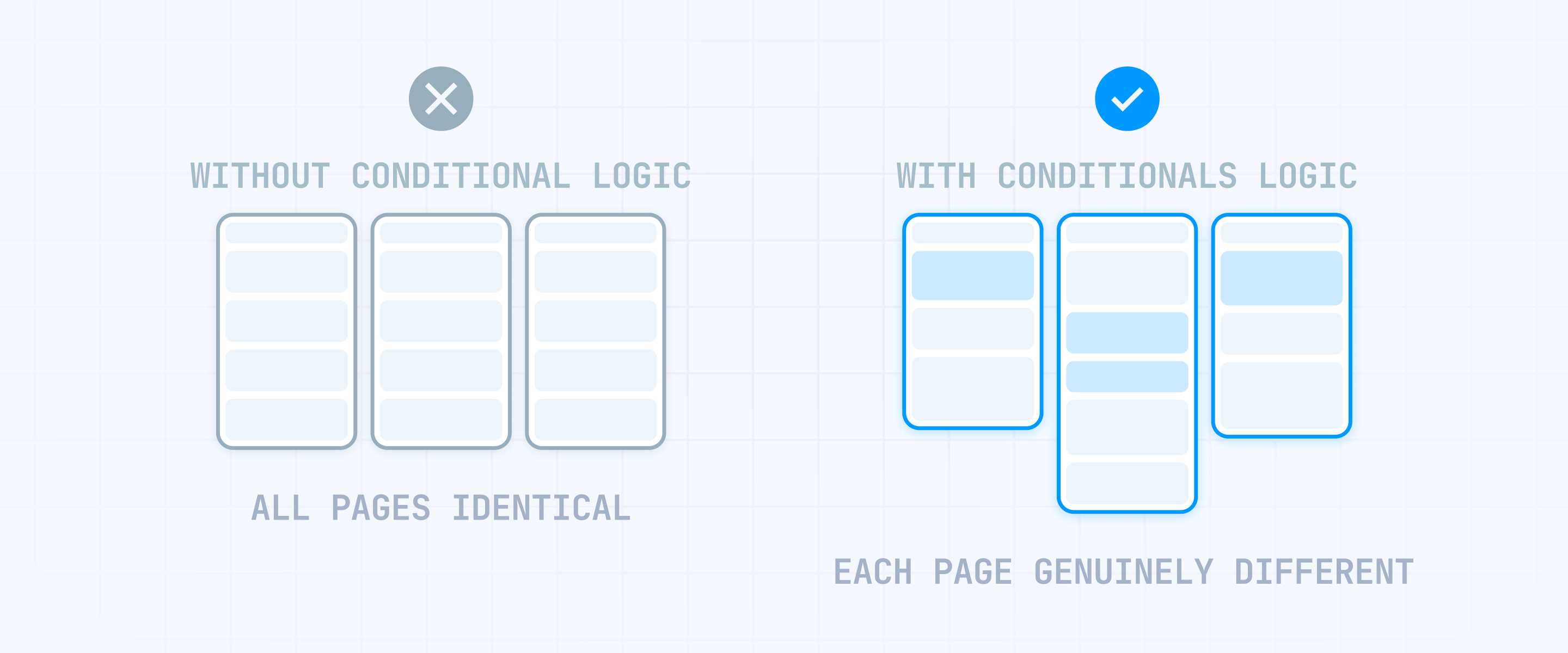
Conditional design is what turns a generic pSEO template into a real content engine. The concept: build template sections that only show up when the data for them exists. If a CMS item includes pricing information, the pricing module appears. If it doesn't, that module is simply not there — and the page ends up looking genuinely different from items that do include it.
Framer handles this through conditional visibility on CMS detail pages, using conditions like Is Set, Equals, Contains, and Option/Toggle-based logic. Here's how to set it up:
- In your CMS Collection, add fields that control what appears — like pricing-tier (Option), show-comparison (Toggle), or highlights (Rich Text).
- On the CMS detail page, select the section you want to conditionally show (for example, a comparison table module).
- In the right panel, find the Visible control and click the plus icon → Set Variable.
- Choose your condition: Is Set for "only show if this field has content," or use Equals / option-based logic for more specific rules.
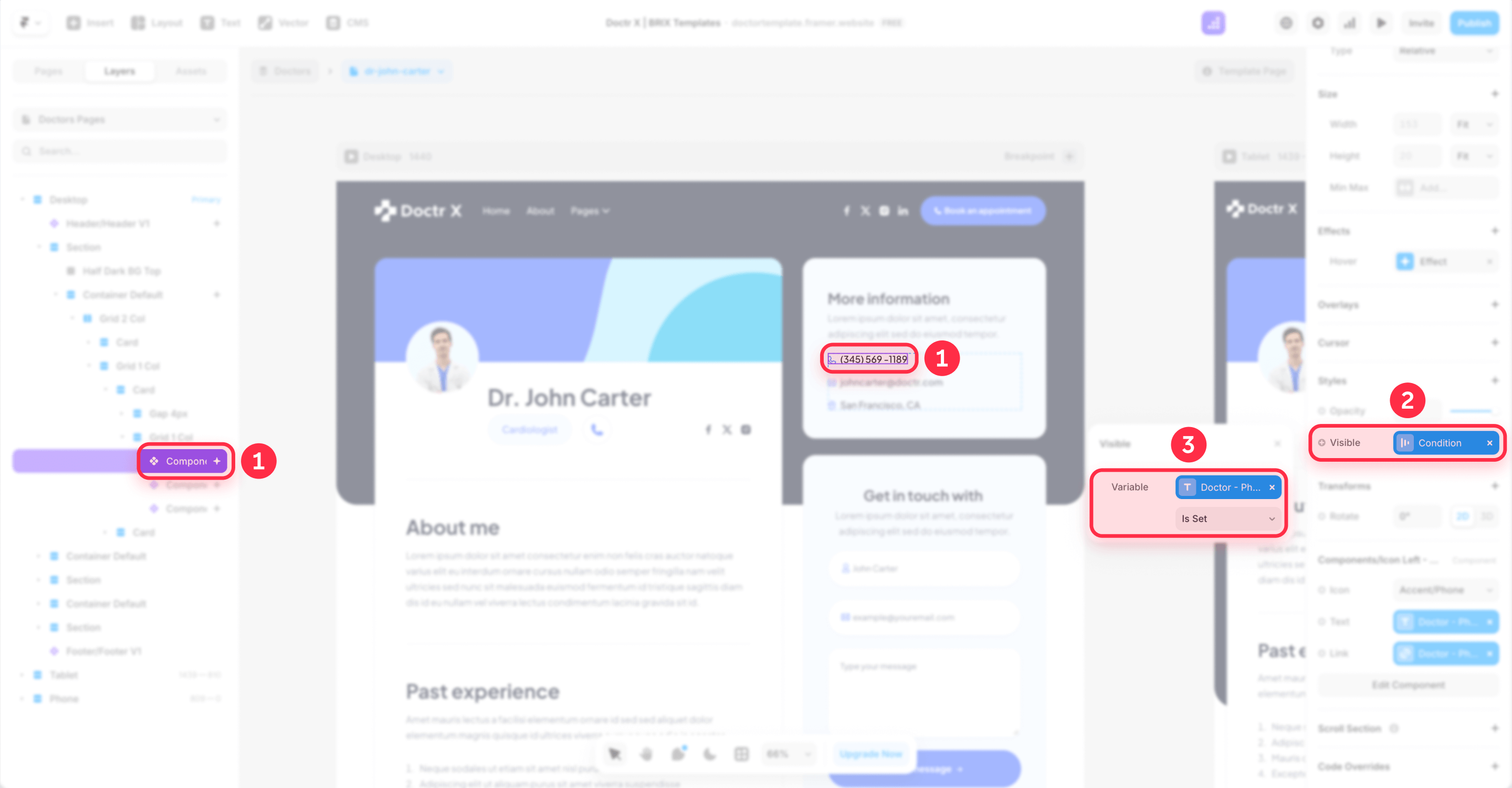
This prevents the "cookie-cutter page" problem where every page from the template renders identically because all sections appear regardless of whether there's actual content behind them. With conditionals, two pages from the same template can have completely different layouts — one might display a pricing table, a comparison chart, and FAQs, while another only shows a detailed description and related resources. For a deeper dive on this, see our tutorial on hiding empty CMS sections in Framer.
Add combo Framer CMS Collections only if you need multi-dimension pages
When one Collection isn't enough — usually when you need pages combining two entities like "Service in City" — you'll set up a combo Collection pattern.
In Framer, this works with three Collections:
- Areas Collection (city name, state, regional data)
- Services Collection (service name, description, key features)
- Area Services Collection — the combination, with Reference fields pointing to both parent Collections
Each item in the Area Services Collection represents a unique pairing (like "Web Design in Austin") with its own curated content, FAQs, and supporting data. The Reference fields bring in shared information from the parent Collections, while the combo-specific fields supply the unique content that keeps pages from looking the same.
Be thoughtful about this approach. Creating multi-dimension pages is a gamble if there's no real search demand for those combinations, or if you don't have enough unique content to fill each one.
If you're building 500 city-service combos but every page just swaps the location name inside a block of generic copy, those pages will almost certainly never get indexed. And they can actively tell Google that your site produces low-quality content at scale.
Begin with your best 20-50 combinations — the ones where you have real, specific data — and confirm they get indexed before expanding further. Multi-dimension pSEO is an advanced move for when single-dimension pages are already performing, not a starting point.
3 - Build internal linking in Framer for programmatic page discovery
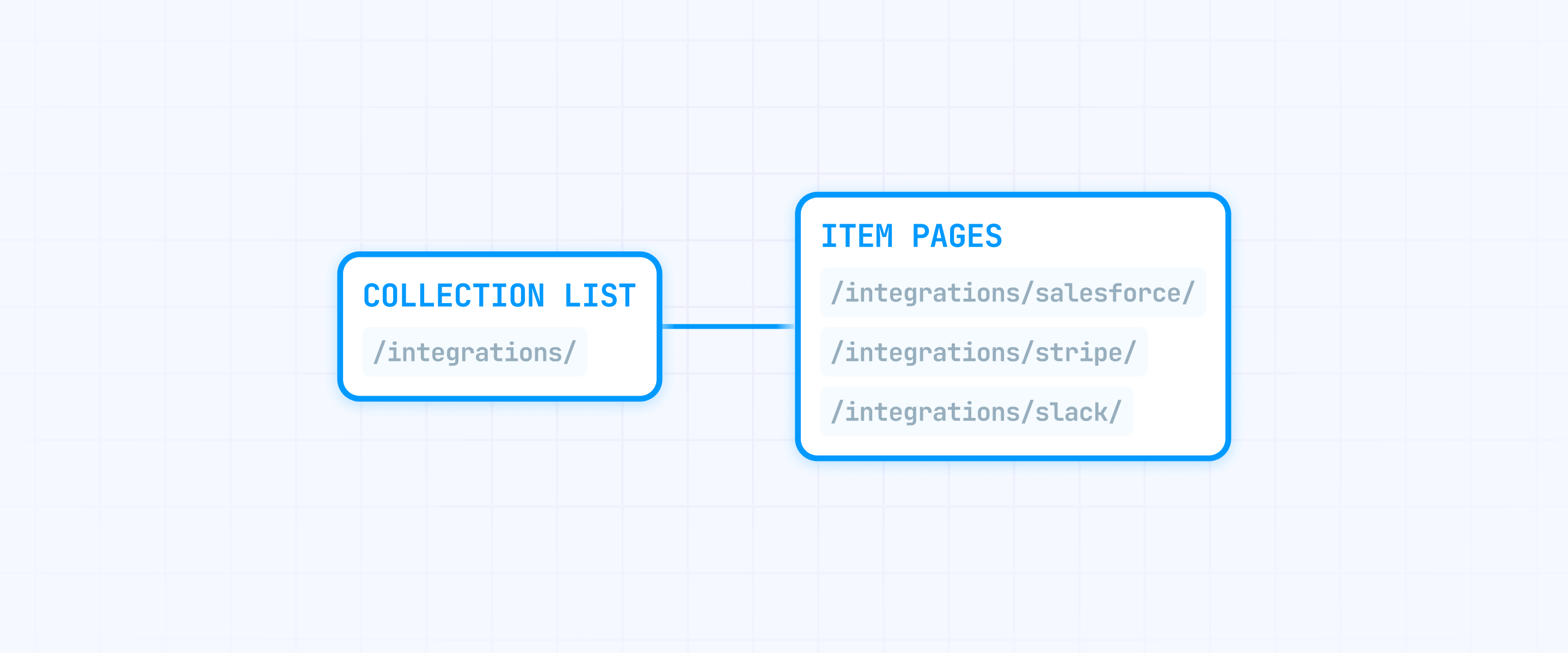
Submitting a sitemap tells Google your pages exist, but internal links are what signal they're worth ranking. The most effective Framer pSEO projects use a hub-and-spoke approach where hub pages funnel authority down to individual programmatic pages.
Create Framer hub pages that link to programmatic pages
Build hub pages as regular Framer pages (for example, /integrations/, /glossary/, or /services/) that display your content categories using Collection Lists. These hubs act as your linking engine — they're indexable, they concentrate authority, and they give Google a well-defined path to every programmatic page.
Organize hubs by category or type instead of listing every single item on one page. A SaaS integrations directory might have separate hubs for "Analytics integrations", "Payment integrations", and "Communication integrations" — each linking to only the relevant subset of CMS items.
Add related content modules on Framer CMS detail pages
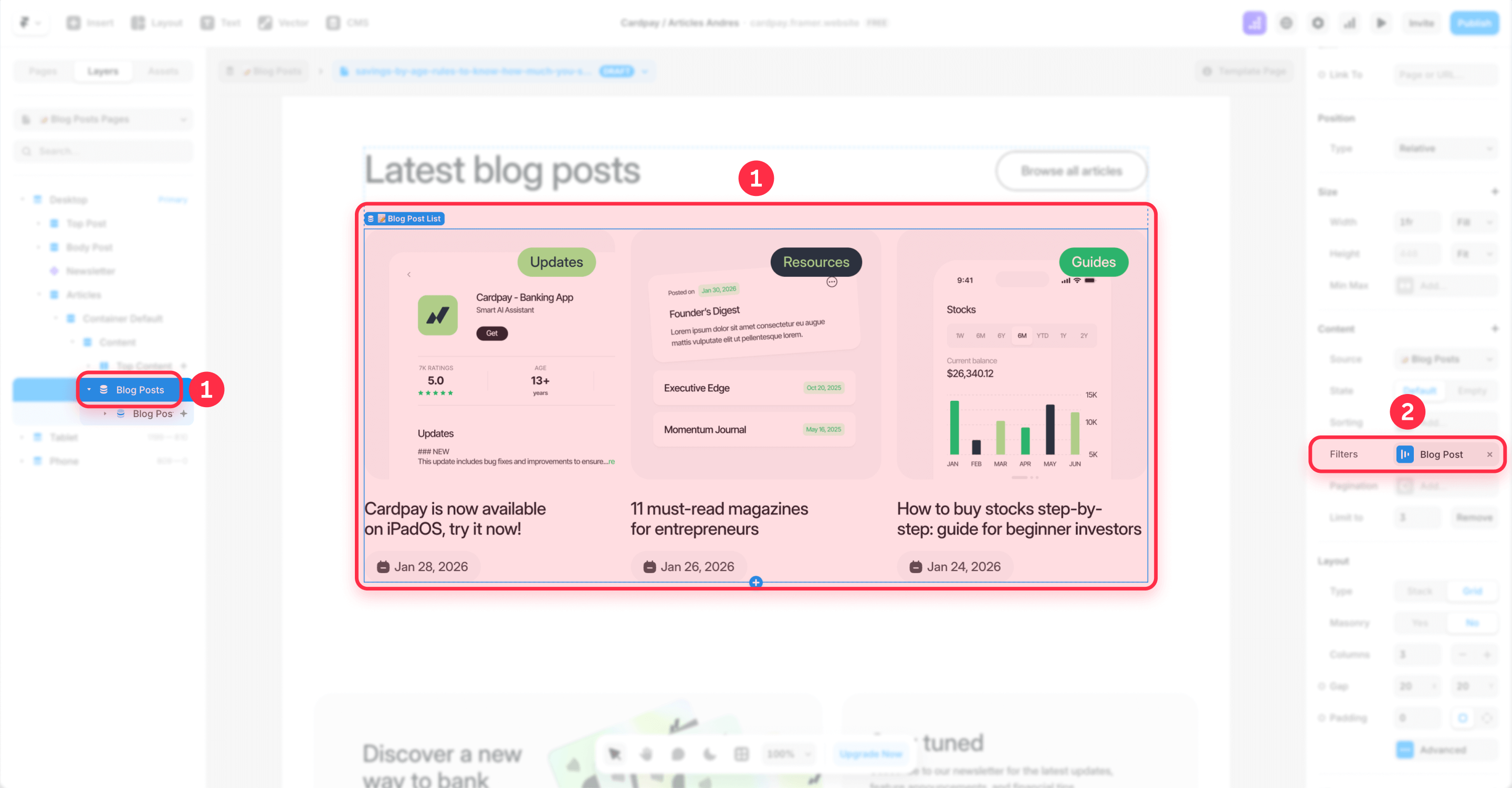
On your CMS detail page template, add a "Related items" section. Framer lets you place multiple CMS Collection Lists on a detail page:
- Open Insert in the editor.
- Find Collection Lists and drag the relevant Collection onto your detail page.
- Apply filters based on shared fields or references (for example, "show items where Category equals the current item's Category").
- Limit the list to 4 to 8 related pages — enough to build solid cross-links without overloading the page.
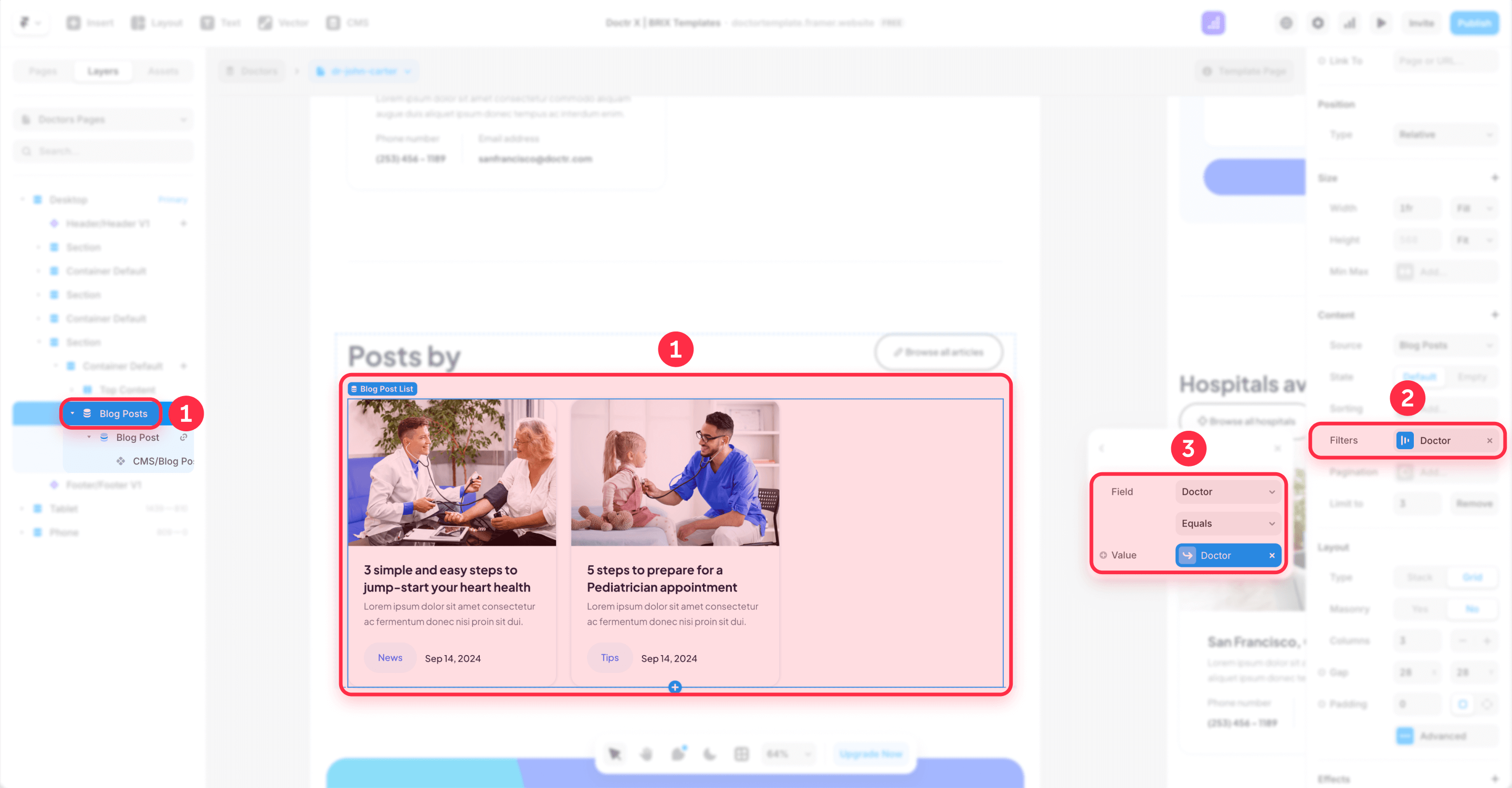
This creates navigation paths between your programmatic pages that search engines can follow efficiently.
Build an HTML sitemap page in Framer for programmatic SEO navigation
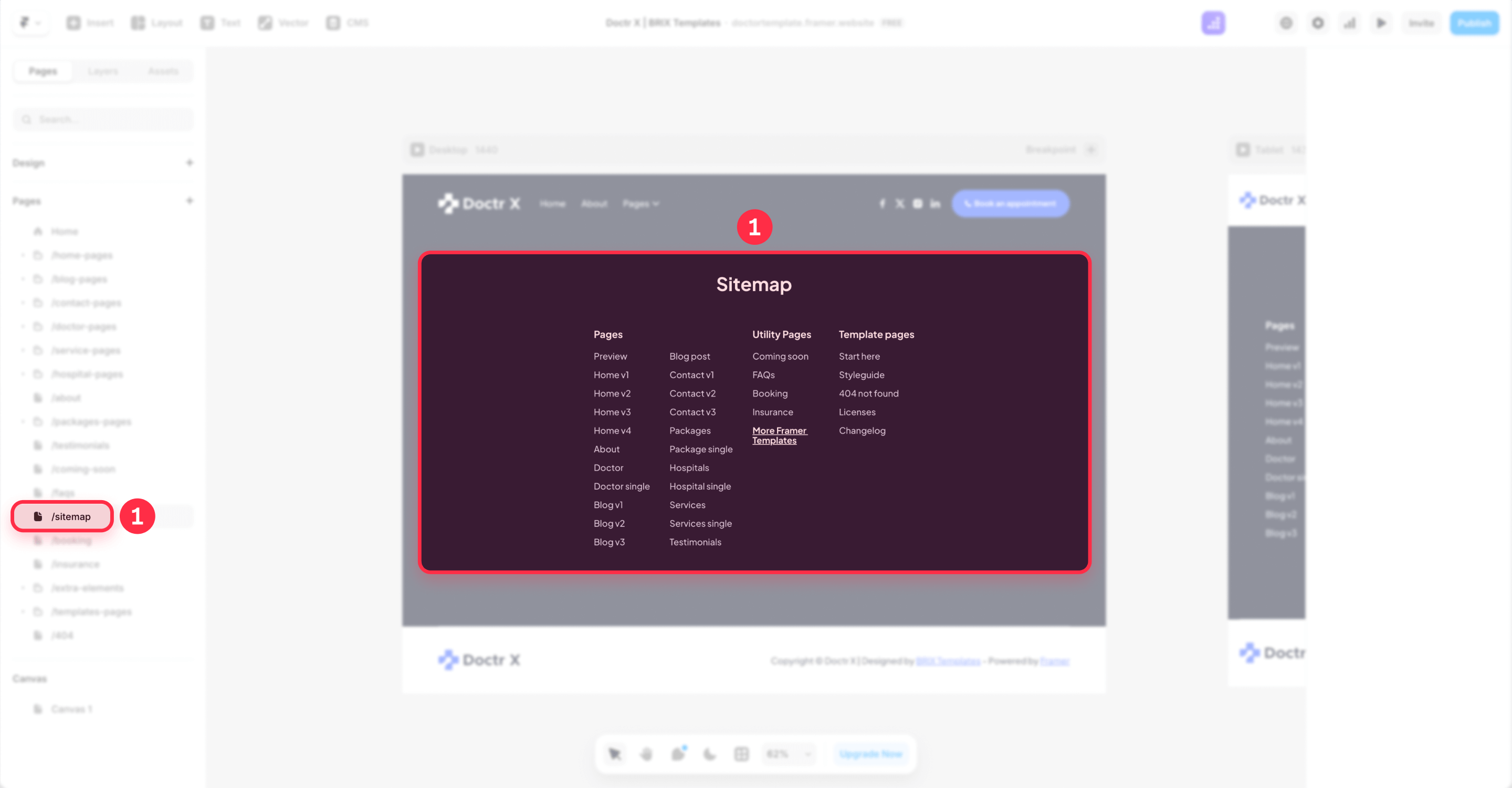
Beyond your auto-generated sitemap.xml, create an actual page (for example, /sitemap/) that links to your key hubs and top programmatic pages. Add a link labeled Sitemap in your site's footer so it's reachable from every page.
Divide the sitemap page into logical sections — by category, type, or letter — and use pagination if lists grow large. It's not the most exciting page on your site, but it guarantees that programmatic pages buried deep in your structure have at least one direct path for both users and crawlers to find them.
4 - Set canonical tags and manage localization in Framer for programmatic pages
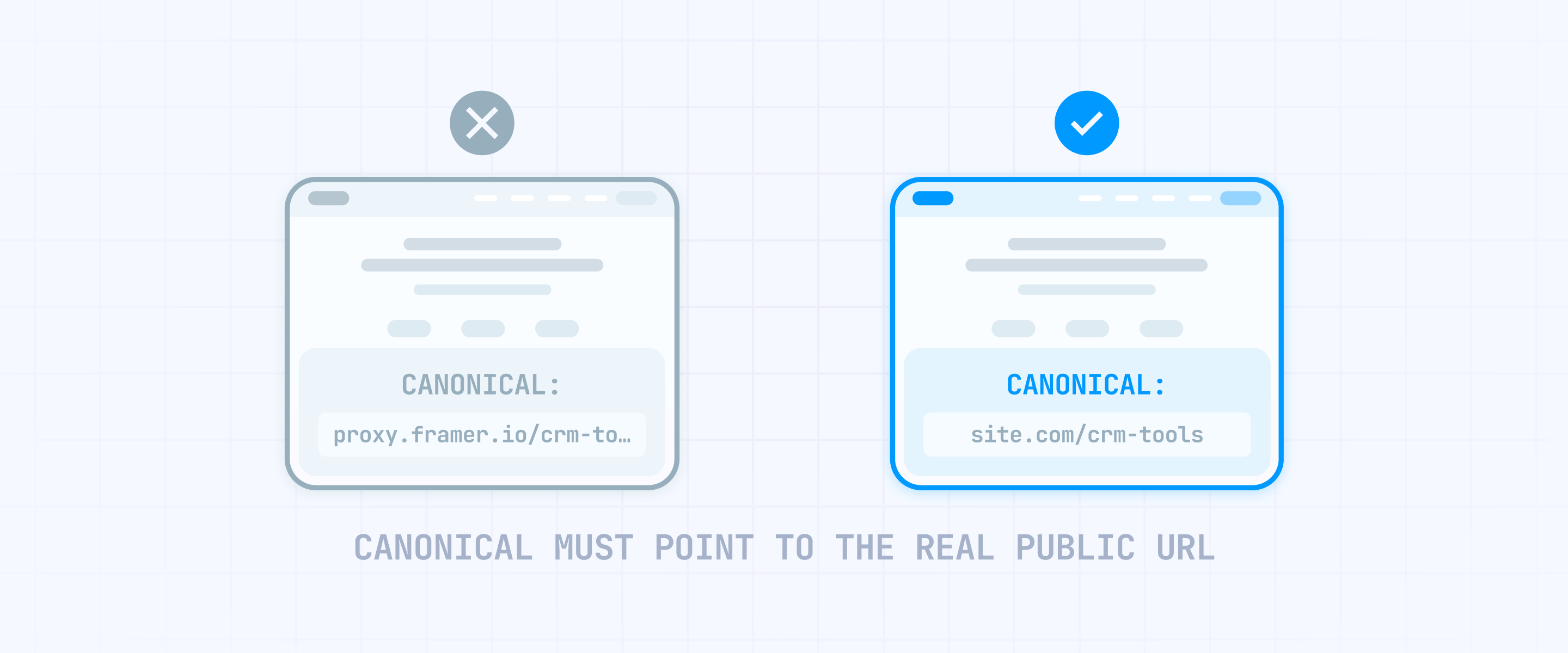
When you're generating hundreds of pages from templates, you need to make sure Google understands which version of each page is the original — and how translated versions connect to each other. If your content is genuinely unique (which it should be if you're following this guide), indexation mostly handles itself. The two things that need deliberate configuration are canonicals and localization.
Set canonical URLs in Framer correctly (especially with proxies and rewrites)
Canonical tags tell Google which URL is the "real" version of a page. In Framer, this becomes critical if you're using a reverse proxy, Multi Site rewrites, or serving your Framer project under a custom domain path — because Framer can default to the .framer.website domain as the canonical unless you explicitly override it.
To set your canonical correctly:
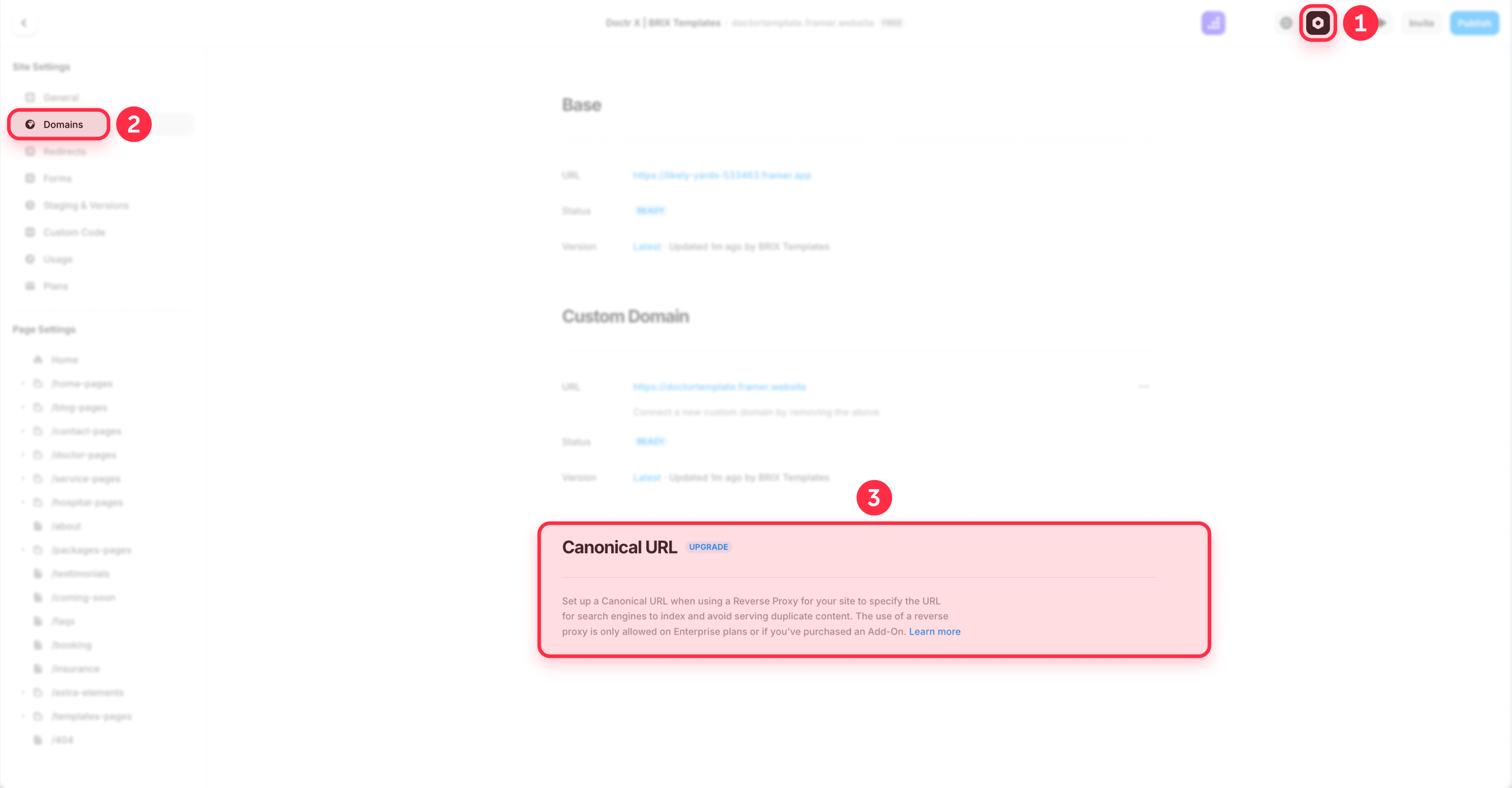
- Open Settings in your Framer project.
- Go to Domains.
- Find the Canonical URL field.
- Enter your actual domain (for example, https://yourdomain.com or https://yourdomain.com/blog if you're proxying a subpath).
- Publish your site.
- Verify by viewing the page source on your live site and confirming that the canonical URL points to the correct domain.
This is especially important if you're using Multi Site — Framer's feature for combining multiple projects under one domain using rewrite rules. Multi Site merges sitemaps from all sources, which is convenient, but if canonicals aren't set correctly on each project, Google may attribute your pages to the wrong domain entirely.
If you're not using proxies or rewrites and your domain is connected directly to Framer, canonicals should work correctly by default. But it's still worth checking after your first batch of programmatic pages goes live — open a few pages, inspect the source, and confirm the canonical matches the URL in the browser.
Use Framer localization to expand programmatic SEO to new markets
If your business serves multiple regions, translating your programmatic pages can unlock entirely new audiences with content that's already structured and validated. A glossary that ranks well in English can do just as well in Spanish, German, or Portuguese — particularly in B2B niches where localized content is still rare.
The return on effort is substantial: you've already built the data model, the template, and the linking structure. Translating 200 glossary terms into a new language creates 200 new pages aimed at a market where competitors likely haven't invested in this type of content.
Framer's localization features are well-suited for this:
- 500+ locales available, with automatic URL routing at yourdomain.com/[locale-slug]/page-path
- Hreflang tags generated automatically in the HTML of every page — so Google can properly discover and connect your translated versions
- AI-powered translation optimized for websites, which preserves links, images, and CMS variables across languages
- Fallback behavior: if a piece of content isn't translated yet, Framer shows the base language version for that specific element without breaking the page
Localization is available as an add-on on Pro plans and included natively on Scale. Custom locale regions (like Dutch for Belgium vs. Dutch for Netherlands) are available on Scale and Enterprise.
Two constraints worth noting:
- Slugs can't be translated yet — Framer is considering this for a future update, but for now, slug paths remain in the base language across all locales.
- Reverse proxy setups can override locale routing — if you have a page in your Framer project at /en/page and a proxy pointing /en/page to a non-Framer source, the Framer page takes priority.
After publishing localized programmatic content, check a few pages to verify that hreflang tags appear in the HTML source and that the locale URLs resolve correctly. Don't treat localization as a one-time setting — verify it across a sample of pages until you're confident the system works as intended.
5 - Publish, monitor, and scale Framer programmatic pages
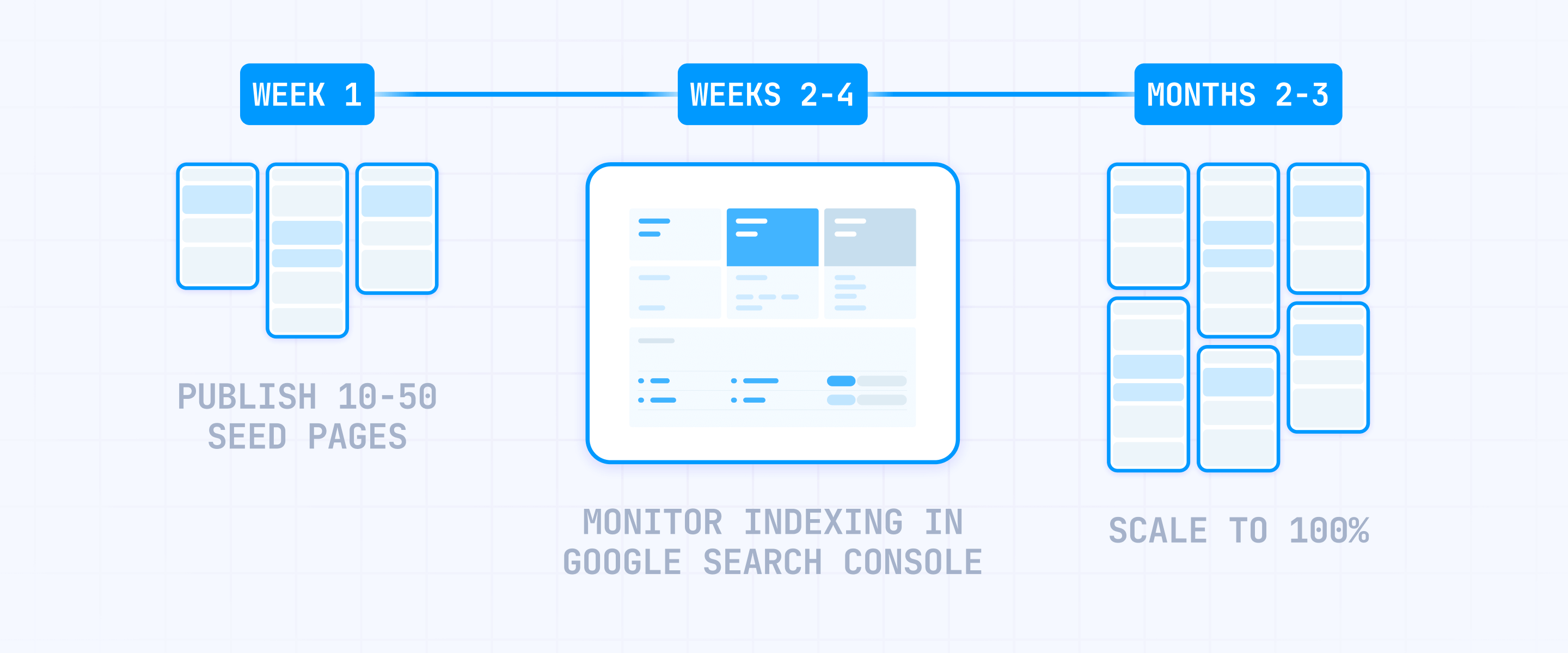
This is where your pSEO system goes from "built" to "live" — and where most people either move too fast or don't know what to watch for. The core principle: go slow, observe how Google responds, and only grow what's actually working.
Publish Framer programmatic pages gradually and track indexation
Don't push your entire dataset live at once. A more reliable approach:
- Publish roughly 10 pages per day during your first week. This lets Google crawl and evaluate each page individually instead of seeing a sudden wave of template-generated content.
- Check indexation in Google Search Console. After several days, go to URL Inspection and test a handful of your published pages. If they're showing up in the index, things are working.
- If pages aren't being indexed, use the Request Indexing button in GSC's URL Inspection tool to submit them manually. If they still aren't indexed after a couple of weeks, the issue is almost always content quality — pages may be too thin or too similar to each other.
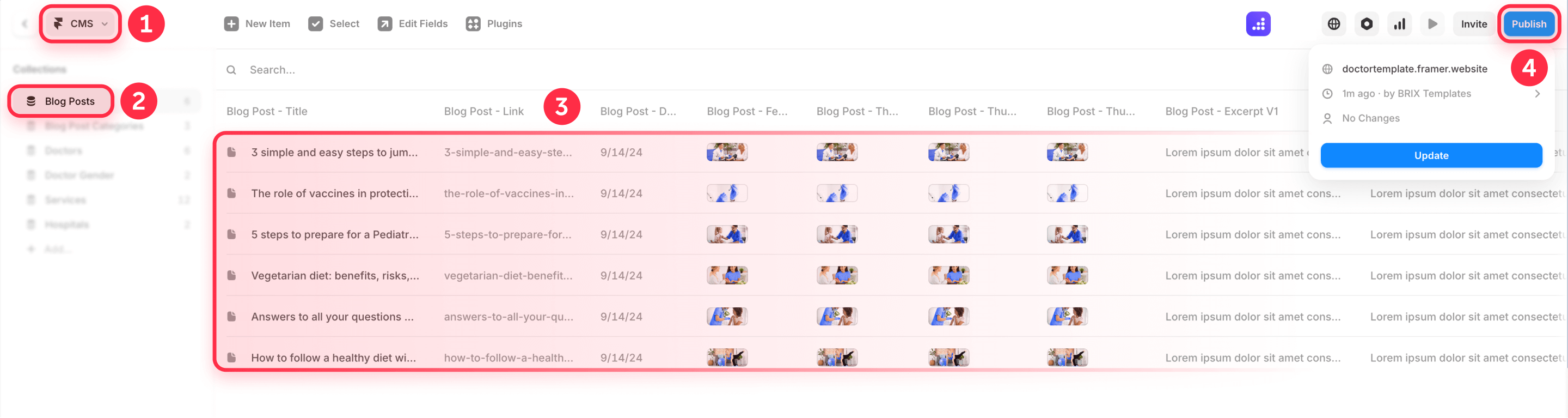
Unless you're working with thousands of items, we recommend keeping your pace at around 50 pages per day at most. This avoids your programmatic content eating up too much of Google's crawl budget for your site, leaving room for your other pages to get crawled and indexed normally.
If you haven't set up GSC yet, follow our step-by-step guide to submitting your Framer sitemap to Google Search Console. You can also submit your sitemap to Bing for broader search coverage.
Use Google Search Console to monitor your Framer programmatic pages
Google Search Console is your main tool for understanding how Google handles your programmatic pages. After your first batches go live, check the Indexing section regularly to see how many pages are making it into the index — and how many aren't.
Go to Pages (under Indexing) and look at the split between indexed and not-indexed URLs. Click into the "not indexed" categories to see which specific pages are being left out and the reasons Google provides. This data tells you whether the problem is content quality, crawl access, or something else.
Make it a habit to check GSC at least once a week during your first month. If a significant chunk of your pages aren't indexing, stop publishing and investigate before adding more. The answer is nearly always in the content — pages that are too alike, too thin, or not well-connected through hub pages.
Scale Framer programmatic publishing with plugins and Server API (if needed)
For most pSEO projects, syncing through the Google Sheets or Airtable plugin and publishing gradually is everything you need. But if you're managing continuous updates to hundreds of items — integration statuses that change, pricing that shifts weekly, content that needs regular refreshes — Framer offers tools for automation.
- CMS Plugins with managed collections: Framer's Plugin API can read and write CMS collections, including "managed collections" that the plugin controls entirely. This is useful for teams where the spreadsheet is the single source of truth and Framer is the rendering layer.
- Server API: Framer's Server API lets you update and publish projects from scripts without opening the Framer editor. For scheduled syncs or CI/CD-style publishing, this is the mature architecture.
These tools are worth exploring at serious scale, but most pSEO projects won't need them. Start with plugin-based sync, validate that your pages get indexed, and only introduce automation when the manual process becomes a genuine bottleneck.
Prune and consolidate underperforming Framer programmatic pages
After your pages have been live for 2-3 months, evaluate what's actually performing and cut what isn't. Here's the process:
- Export your GSC performance data. Go to Search Console → Performance → filter by the URL prefix of your programmatic pages (for example, /glossary/ or /integrations/). Export to a spreadsheet.
- Find pages with zero clicks and zero impressions. If a page has had no impressions for 60+ days, it's not contributing anything to your SEO.
- Decide: improve or redirect. For each underperforming page, either update the CMS item with stronger unique content, better FAQs, and a more specific summary — or redirect it to a stronger related page or hub.
- Set up redirects in Framer. Go to Site Settings → Redirects and add the old path with its redirect target. Framer supports folder wildcards and capture groups for bulk redirects — see our guide to wildcard redirects in Framer for the full syntax.
- Publish and verify. After adding redirects, publish your site and test that old URLs land where they should.
pSEO is a loop, not a launch. Publish, see what indexes, fix what underperforms, and keep trimming the weak spots.
Troubleshooting programmatic SEO in Framer
- My Framer programmatic pages are published but not getting indexed: Open Page Settings and confirm Show page in search engines is enabled. Re-Publish your site. In Google Search Console, use URL Inspection and request indexing. If pages still aren't indexed after two weeks, the content is likely too thin or too similar across pages. Verify: GSC shows "Indexing allowed" and the page has been crawled.
- My Framer canonical URL points to a .framer.website domain: Go to Settings → Domains and set the Canonical URL to your actual domain (with protocol, no trailing slash). Re-Publish and inspect the page source. Verify: the canonical URL matches your live domain, not a .framer.website URL.
- My Framer sitemap.xml is missing CMS pages: Confirm the page is published (not draft) and that Show page in search engines is enabled. Check /sitemap.xml again after publishing. Verify: The URL appears in the sitemap and GSC's sitemap report detects it.
- My Framer CMS template looks the same across all pages: Add conditional sections controlled by CMS fields using Is Set, Option, or Toggle conditions. Make at least 3 modules data-dependent (comparison table, FAQ block, pricing section). Verify: Open two random pages and confirm they differ in layout sections, not just swapped text.
- My FAQPage Schema isn't detected in Google's Rich Results Test: Check that your CMS field slugs in the JSON-LD match exactly what's in Framer (including hyphens and casing). Make sure the FAQ fields actually contain data for that specific item — empty fields produce blank Schema values that fail validation. Verify: Run the published URL through Google's Rich Results Test and confirm each Q&A pair appears.
- Framer won't let me create a redirect for a page that's still live: Unlike some platforms, Framer generally handles redirects through its Site Settings. If a redirect isn't working, check that the source path doesn't conflict with an existing published page. You may need to unpublish or remove the page first. Verify: After publishing, the old URL returns a redirect and lands on the correct target.
- My Framer Schema markup shows duplicates: Keep Schema in one place only — either in Page Custom Code or through another injection method, not both. Duplicate Schema blocks can confuse validation tools and search engines. Verify: Use Google's Rich Results Test and confirm only one Schema block per type is detected.
- Localized Framer pages show the wrong language or missing hreflang: Check that localization is properly configured in your project settings and that the locale has published content. Remember that untranslated content falls back to the base language automatically. Verify hreflang tags by viewing the HTML source of a localized page. Verify: Hreflang tags appear in the page source and locale URLs resolve to the correct language version.
Frequently asked questions about programmatic SEO in Framer
What is programmatic SEO in Framer and how does it work?
Programmatic SEO in Framer means building many search-targeted pages from structured data using Framer CMS Collections and a single CMS detail page template. Instead of designing each page by hand, you set up one template, sync data into a Collection (usually through a plugin), and Framer generates a unique page per CMS item.
The hard part isn't generating pages — it's making sure each one is genuinely useful. Every item should carry unique content across multiple sections: a specific summary, real data, and distinct FAQs. Sync a small batch of 50-200 items first to test your template before going further. The aim is pages worth indexing, not just pages that technically exist.
How do I set dynamic meta titles and descriptions for Framer CMS pages?
Framer supports CMS variables in Page Settings for dynamic metadata. Create Plain Text fields like seo-title and seo-description in your Collection, fill them per item, then open the CMS detail page's Page Settings and use {{seo-title}} and {{seo-description}} in the metadata fields. You can add branding too, like {{seo-title}} – Your Brand.
A practical tip: write each title under ~60 characters and treat descriptions like ad copy — specific, benefit-driven, and intent-matched rather than just summaries. This single step prevents duplicate SERP snippets across all your programmatic pages and is the highest-leverage SEO move for Framer CMS pages.
How do I structure Framer CMS Collections for programmatic SEO?
Start by modeling your CMS around actual entities — Glossary Terms, Integrations, Services — and only add combination Collections when each combo creates genuinely unique value. A typical B2B setup uses three Collections: two parent entities plus a "combo" Collection with Reference fields linking to both parents.
Design enough CMS fields to produce multiple unique sections per page. At minimum, each item needs a distinct summary, a primary content block, and unique FAQ pairs. Plan your spreadsheet first with all these columns, then mirror that structure as CMS fields in Framer. If an item can't pass a basic quality check, keep it as a draft until it can.
Can Framer handle thousands of CMS items for programmatic SEO?
Yes — Pro ($30/month) supports 2,500 items, Scale ($100/month) starts at 10,000 and expands to 40,000 with add-ons, and Enterprise goes beyond that with custom limits. For most B2B programmatic projects, 2,500 to 10,000 items is more than enough to build a meaningful content library.
The bigger question isn't whether Framer can publish them, but whether Google will want to index them. An important detail: CMS pages don't count against Framer's site page limit — only custom-designed pages do. Design lean templates with focused content and use hub pages for navigation rather than cramming everything onto one template.
How does Framer's plugin-based CMS sync work for programmatic SEO?
Framer's CMS workflow is plugin-first — instead of importing CSV files, you install a sync plugin from the Framer Marketplace (like the Google Sheets or Airtable plugin), map your spreadsheet columns to CMS fields, and sync. The plugin handles the data transfer and lets you re-sync whenever your source data changes.
Start by syncing 50-200 items to validate your template, then scale up once everything works on staging. For ongoing updates, the plugin approach keeps your spreadsheet as the single source of truth — edit there, sync to Framer, publish. If you outgrow plugins, Framer's Server API lets you automate updates from scripts without opening the editor.
How do I add FAQPage Schema to Framer programmatic pages?
Add FAQPage Schema by placing JSON-LD code in your CMS detail page's Custom Code section (head tag) and using Framer's {{field-slug}} variable syntax to pull FAQ content from each item. Create plain text CMS fields for each question and answer, then reference them in the Schema script.
After publishing, verify with Google's Rich Results Test to confirm each Q&A pair is detected. This is one of the most valuable Schema types for pSEO because it scales without any extra work per page — every CMS item with FAQ data automatically gets its own structured data. See the full code example in the Schema section of this guide.
How do I build internal linking for Framer programmatic SEO pages?
Build a hub-and-spoke structure: create regular hub pages (like /integrations/ or /glossary/) that use Collection Lists to link to all relevant CMS items. On each CMS detail page, add a "Related items" module using another Collection List filtered by shared fields or references.
Hubs linking down and detail pages linking across creates a crawl structure Google can navigate efficiently. Also build an HTML sitemap page and link it from your footer as Sitemap — this gives crawlers a backup discovery path. Keep related items to 4-8 per page for clean, focused cross-linking.
How do I handle Framer localization for programmatic SEO in multiple languages?
Framer offers built-in localization with 500+ locales, automatic URL routing at yourdomain.com/[locale-slug]/page, and hreflang tags generated in the HTML of every page. This means translating your programmatic content is straightforward — and the payoff is big, especially in B2B niches where localized content is scarce.
Configure localization before scaling translated content. After publishing, verify hreflang tags in the page source and check that locale URLs resolve correctly. Two things to keep in mind: slugs can't be translated yet (they stay in the base language), and reverse proxy setups can override locale routing if paths conflict.
What are the biggest mistakes to avoid with Framer programmatic SEO?
The top failure is publishing hundreds of pages where only the headline and meta description differ. Google identifies template-generated thin content and either refuses to index it or downgrades your site's quality signals. The second biggest mistake is scaling too quickly — syncing thousands of items before confirming that even a small batch gets indexed.
Other common pitfalls: syncing messy spreadsheet data without checking slugs and content completeness, skipping the staging validation step, ignoring internal linking from hub pages, and neglecting canonical configuration when using proxies or Multi Site rewrites. The fix is systematic: plan your data, test with a small batch on staging, publish gradually at ~50 pages per day, and review GSC weekly before expanding.
Should I use Framer or Webflow for programmatic SEO?
It depends on your workflow and technical setup. Framer is strong when you want a design-first workflow with plugin-based data syncing, modern server-side rendered hosting, and the option to scale across multiple projects with Multi Site rewrites. Webflow tends to be the choice when teams rely on its established CMS architecture and broader integration ecosystem.
In practice, the platform matters less than the system you build on it. Both can handle pSEO effectively if you follow the same fundamentals: unique content per page, conditional template design, strong internal linking, and controlled publishing. Pick the one that matches how your team works — then execute the pSEO playbook properly.
Conclusion
Programmatic SEO in Framer delivers results when you approach it as a system: well-organized data, a CMS model built around real entities, templates that earn their indexation through unique content, and careful publishing with ongoing monitoring. Begin with straightforward single-dimension pages — a glossary, an integrations directory, a comparison library — and only move to multi-dimension combos once you have the specific data to make each page worth Google's attention.
From here, the logical next moves are adding FAQPage Schema for rich results, expanding into localized versions of your top-performing pages, and running a regular pruning cycle guided by Google Search Console data.
If you need support building a scalable Framer pSEO system — from CMS architecture and template design to Schema setup and publishing workflows — our Framer agency team can help you get there.










Join readers commenting on this post!