
This is one of the most common sources of confusion in Webflow — whether you're a business launching your own site or an agency building for a client. The naming doesn't help, and the billing structure makes it easy to pay for the wrong thing.
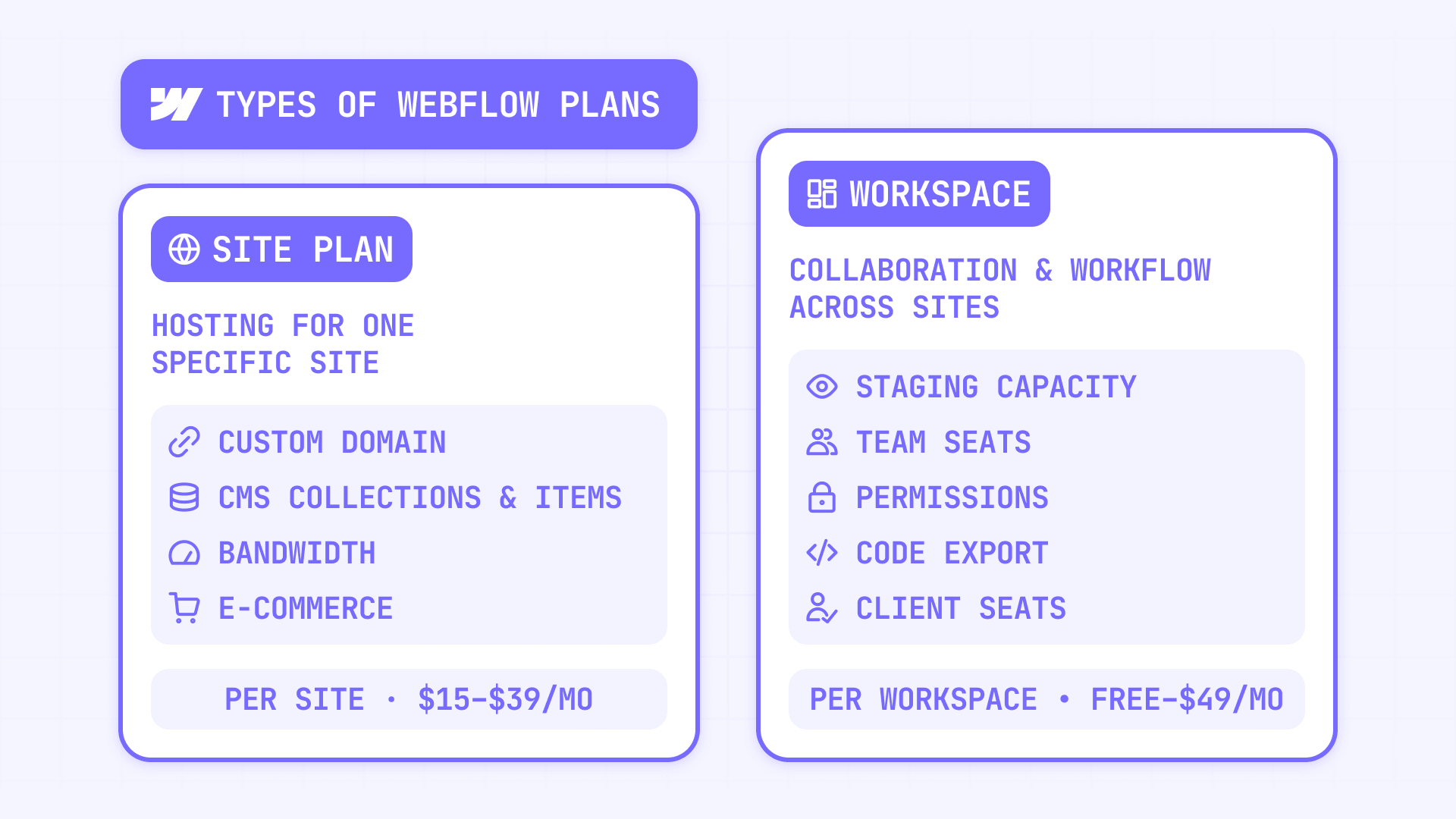
The direct answer: a Site plan is what makes one site live on a custom domain. A Workspace plan is for staging capacity, collaboration, permissions, and workflow features across sites. You always need a Site plan to go live. You don't always need a paid Workspace plan. Most confusion comes from mixing up hosting with collaboration — they're separate products with separate billing in Webflow.
This guide explains what each plan actually does, when you need one or both, and how ownership works — whether you're the one building the site or the one paying for it.
What a Webflow Site plan does vs what a Workspace plan does
These two plans solve completely different problems. Understanding the split is the entire key to making the right decision.
What a Webflow Site plan covers
A Site plan applies to one specific site. It's what lets that site publish on a custom domain — without it, the site only exists on a webflow.io staging URL. Every site you want live on its own domain needs its own Site plan, billed separately.
Current Site plan pricing for standard websites on annual billing:
- Starter: Free — for testing and publishing on a webflow.io staging domain only
- Basic: $15/month — for simple sites that don't need CMS
- Premium: $25/month — replaces the old CMS and Business split, adding CMS, higher content limits, and more advanced site features
- Team: $2,500/month — for growing teams that need Site and Workspace features bundled together, with an annual contract required
- Enterprise: Custom pricing
Webflow changed its Site plan structure in May 2026, including the introduction of the Premium Site plan. For a deeper breakdown of what changed and how the new pricing affects different sites, see our Webflow May 2026 pricing changes and calculator.
The key thing to remember: a Workspace plan does not provide hosting. If you bought a paid Workspace but not a Site plan, your site still can't go live on a custom domain.
What a Webflow Workspace plan covers
A Workspace plan applies across the entire Workspace — think of it as the account that holds your sites. It controls staging capacity, collaboration features, access controls, code export, and team workflow. On the free Starter Workspace, you get 2 unhosted staging sites, 2 static pages per staged site, 50 CMS items per staged site, and the ability to invite up to two Freelancer or Agency guest teams.
Here's the detail most people miss: all Workspaces — including the free Starter — can hold unlimited hosted sites. The Starter Workspace isn't useless. It's only restrictive for unhosted staging. Once a site has a paid Site plan, it becomes a hosted site and the Workspace stops being the limiting factor.
Workspace pricing splits into two tracks.
For businesses and in-house teams:
- Starter: Free
- Core: $19/month, billed yearly — for more staging needs
- Growth: $49/month, billed yearly — for unlimited staging and advanced collaboration tools
For freelancers and agencies:
- Starter: Free
- Freelancer: $16/month, billed yearly — for freelancers with a small client roster
- Agency: $35/month, billed yearly — for agencies with a larger client roster
Workspace plans are billed separately from Site plans. They pay for collaboration, staging capacity, seats, access controls, and workflow features — not hosting. For a full breakdown of current Workspace pricing and seat details, see our complete Webflow pricing guide.
The real question to ask about Webflow plans
The question isn't "which plan is better?" It's: do you need hosting only, or hosting plus more staging and collaboration? If the answer is hosting only, start with the Site plan. If the answer involves multiple projects, team permissions, or workflow features, the Workspace layer becomes relevant.
When you only need a Webflow Site plan
This is the setup many people overcomplicate. Whether you're a business launching your own site or a freelancer building for someone, a Site plan may be the only paid layer needed.
You only need a paid Site plan when all of these are true:
- The site needs to go live on a custom domain
- You don't need more than the free Workspace's staging limits
- You don't need Workspace-only features like code export or advanced access controls
- You're fine keeping the site inside a free Starter Workspace
The most common case: one site, one or two people working on it, no complex team workflow, and the site is ready to launch. In that scenario, a free Starter Workspace plus a paid Site plan is the correct — and cheapest — setup.
A Starter Workspace plus a paid Site plan is completely valid. The mistake is assuming you need a paid Workspace just because the site uses CMS or has many pages. CMS capability comes from the Site plan tier, not the Workspace plan.
When you need both a Webflow Workspace plan and Site plan
A paid Workspace plan becomes necessary when your problem is workflow, not hosting. This applies whether you're an in-house team managing your own site or an agency managing multiple projects.
You need a paid Workspace plan on top of the Site plan when you need:
- More than 2 unhosted staging sites (you're working on several projects at once)
- Code export to host elsewhere
- Tighter collaboration controls and publishing permissions
- More seats for team members with specific roles
- Agency-specific features like client seats, client payments, or direct site transfer with no downtime
The normal structure is a paid Workspace plus a paid Site plan for each site that needs to be live. The Workspace pays for collaboration and process. The Site plan pays for hosting. Don't confuse the two — one doesn't include the other. If code export is one of your reasons for upgrading, our guide to what Webflow code export includes and its limitations helps you decide whether it's worth the investment.
How Webflow site ownership actually works
This is the part that catches people off guard — especially when an agency or freelancer built the site.
Ownership follows the Workspace, not the billing
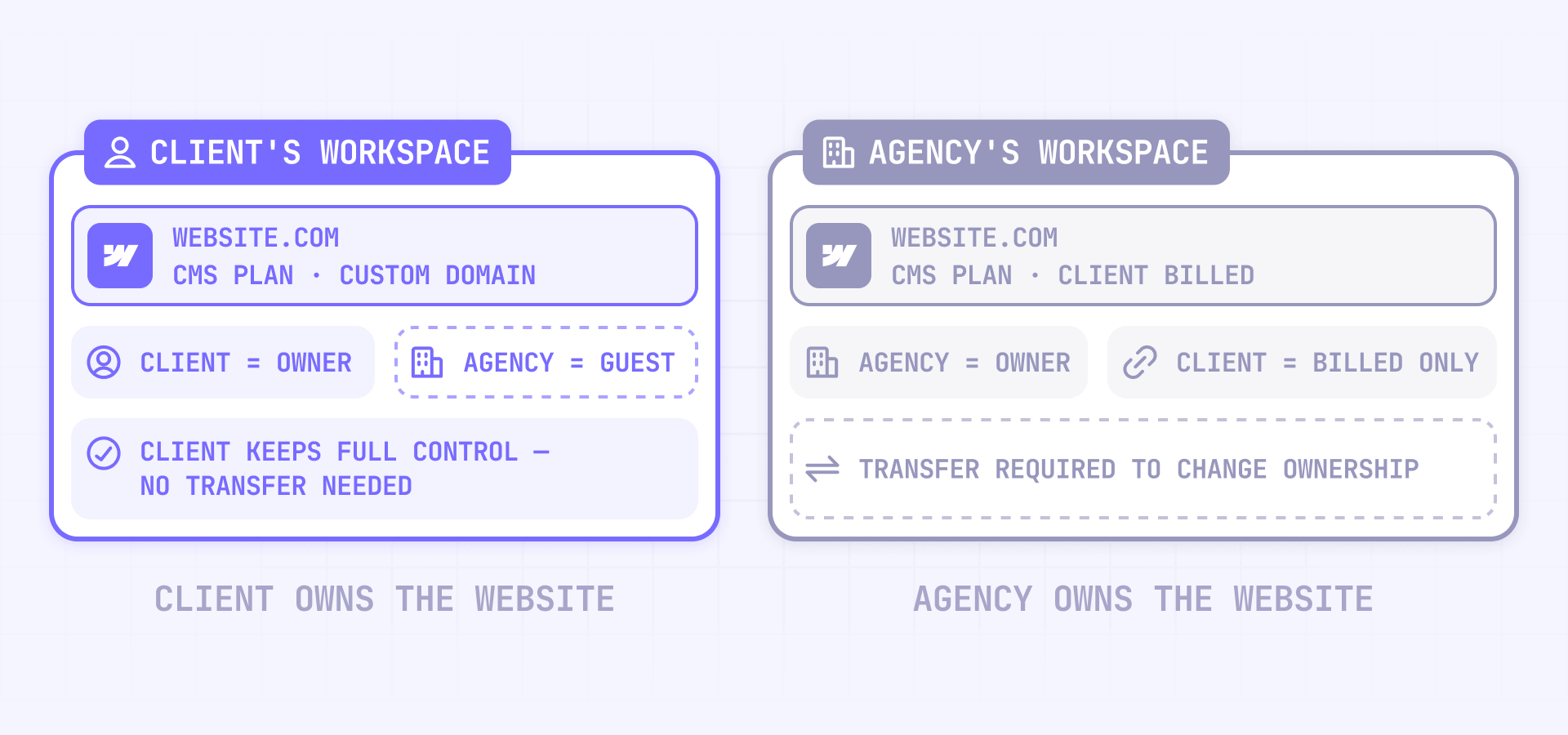
Webflow is clear about this: whoever's Workspace contains the site owns the site. If the site lives in an agency's Workspace, the agency owns it — even if the business pays the Site plan charges. Billing and ownership are separate things in Webflow.
This matters for two audiences:
If you're a business and an agency built your site: check which Workspace the site lives in. If it's in the agency's Workspace, they control the site — even if you pay the hosting bill. If you want full ownership, the site should be in your Workspace.
If you're an agency or freelancer: the cleanest long-term setup is usually putting the site in the client's Workspace from day one. It avoids transfer logistics, ownership ambiguity, and the awkward conversation that happens when the relationship ends.
Guest access: the recommended setup for agencies and clients
Webflow's guest access model is designed for exactly this situation. The business creates their own Workspace (even a free Starter works), owns the site from day one, and the agency joins as a guest to build and collaborate. No password sharing, no transfer drama, no ownership confusion.
From the business side: you invite the agency into your Workspace. Even the free Starter Workspace lets you invite up to two Agency or Freelancer guests or guest teams, depending on Webflow's current access model.
From the agency side: you need a Freelancer or Agency Workspace plan to join a client's Workspace as a guest. Once inside, you work on the site as if it were in your own Workspace, but ownership stays with the client.
If the agency relationship ends, the business keeps full control with zero transfer needed. That alone makes this the safest default for most projects.
Client payments: when the agency keeps the site
If the agency intentionally wants to keep the site in their Workspace — because they're retaining ongoing responsibility or the client prefers that arrangement — Webflow offers client payments on Freelancer and Agency Workspaces. This lets the business pay the Site plan charges while the site stays in the agency's Workspace.
This is useful for billing flexibility, but it's important to understand: client payments don't transfer ownership. The site is still in the agency's Workspace until explicitly transferred.
Legacy Editor is going away
One more thing that affects how teams set up access: Webflow's Legacy Editor will no longer be available starting August 4, 2026, and Webflow has already begun migrating eligible legacy Editor users to client seats or limited seats. Teams should avoid relying on the Legacy Editor as the default access model and use role-based access instead — including Content editor, Marketer, and Reviewer roles where appropriate.
Common misconceptions about Webflow plans
These keep circulating and they keep wasting people's money:
- "A paid Workspace plan includes hosting": False. Site plans and Workspace plans are billed separately. A paid Workspace does not put your site on a custom domain
- "Every site needs both plans": False. A site can live on a paid Site plan inside a free Starter Workspace. All Workspaces can hold unlimited hosted sites
- "The free Starter Workspace can't be used for a real site": False. It's limited for unhosted staging, not for hosted sites. If the staging limits are acceptable, it works fine
- "If I pay the Site plan, I own the site": False. Ownership follows the Workspace that contains the site, not who pays the bill. If an agency built it in their Workspace, they own it regardless of who pays
- "The Legacy Editor is the safe default for giving people access": False. It will no longer be available after August 4, 2026, and Webflow is already migrating users to client seats. Use current role-based access instead
Frequently asked questions about Webflow Workspace and Site plans
What is the difference between a Webflow Workspace plan and a Site plan?
A Workspace plan controls how you collaborate and work across sites — staging capacity, permissions, code export. A Site plan controls how one specific site is hosted on a custom domain. They're billed separately. A paid Workspace doesn't include hosting, and a paid Site plan doesn't require a paid Workspace. Ask whether your need is hosting or workflow — that's the decision rule.
Do I need a paid Workspace just to host my Webflow site?
No. To host a site on a custom domain, you need a paid Site plan for that site. All Workspaces — including the free Starter — can hold unlimited hosted sites. The paid Workspace only becomes necessary when you need more staging capacity, collaboration features, or tighter access controls.
Can I use a free Starter Workspace and only buy a Site plan?
Yes, if your project fits within the free staging limits while it's still unhosted: 2 staged sites, 2 static pages per staged site, and 50 CMS items per staged site. Once you add the Site plan, the site becomes hosted and those staging restrictions no longer apply to that site. For many single-site projects, this is the cheapest valid setup.
Who owns a Webflow site — the person who pays or the Workspace owner?
The Workspace owner. Webflow is clear that whoever's Workspace contains the site owns it. If an agency built the site in their Workspace and you pay the Site plan, the agency still controls the site. If you want full ownership, the site should be in your Workspace. This is the most important thing to clarify before any project starts.
Should I let my agency build the site in their Workspace or mine?
For most projects, yours. If the site lives in your Workspace, you own it from day one. The agency joins as a guest and works inside your Workspace. If the relationship ends, you keep full control with no transfer needed. The agency needs a Freelancer or Agency Workspace plan to join as a guest — but that's on their side, not yours.
Can an agency work inside my Workspace without me paying for a Workspace upgrade?
Yes. Even the free Starter Workspace lets you invite up to two Agency or Freelancer guests or guest teams, depending on Webflow's current access model. You don't need a paid Workspace just to give an agency access. The agency needs their own paid Workspace plan (Freelancer or Agency) to accept the guest invitation, but your Workspace can stay free.
Can the agency transfer the site to me after it's built?
Yes. However, the transfer path depends on the Workspace plan. Freelancer and Agency Workspaces can transfer sites with active paid Site plans directly to another Workspace with no downtime. If the site is in a Starter, Core, Growth, or Enterprise Workspace, Webflow may require downgrading the site before transfer, which can cause downtime or extra migration steps. If zero-downtime handoff matters, verify the transfer path before launch.
What are Webflow client seats and when should I use them?
Client seats let an agency give clients controlled, site-level access without full Workspace access. Available roles are Content editor, Marketer, and Reviewer. Use client seats when the site stays in the agency's Workspace but the business needs bounded access to update content or review changes.
What's the cheapest valid setup for a single Webflow site?
A free Starter Workspace plus a paid Site plan. If you're a business launching one site, this gets you live on a custom domain with no Workspace costs. If an agency is helping, they can join your free Workspace as a guest. This is the leanest setup that works. For current Site plan pricing and a calculator to compare plans, see our full breakdown of the May 2026 Webflow pricing changes.
Does the Legacy Editor deprecation affect how I give people access to my site?
Yes. The Legacy Editor will no longer be available starting August 4, 2026, and Webflow has already begun migrating eligible legacy Editor users to client seats or limited seats. If you're setting up access for team members or external collaborators, use current roles like Content editor, Marketer, or Reviewer instead of relying on the Legacy Editor.
Conclusion
The clean answer: you always need a Site plan for custom-domain hosting. You only need a paid Workspace plan when you also need more staging capacity, collaboration controls, or workflow features. The mistake is treating both as the same purchase.
For most projects, the strongest setup is straightforward: the business owns the Workspace, the business buys the Site plan, and any external builder joins as a guest. That gives you clear ownership, clean billing, and no handoff panic later.
Planning a Webflow build and want the plan structure, billing, and ownership sorted before anything else? Reach out to our Webflow team — we'll make sure the foundation is right.








Join readers commenting on this post!