

Webflow is one of the most capable visual site builders on the market. The Designer is powerful, hosting is solid, CMS-driven pages work well, and collaboration has improved significantly over the past two years. But choosing Webflow based on what you see in a demo is how teams end up locked into the wrong platform after launch.
The real question is whether Webflow fits your content scale, multilingual needs, team workflows, commerce requirements, and long-term ownership goals — or whether it becomes an expensive mismatch once the site grows past a simple marketing page. Real limitations exist around portability, ecommerce capabilities, CMS ceilings, localization routing, enterprise-level controls, and bandwidth economics that no amount of visual editing power eliminates.
This guide covers each limitation with enough detail for technical teams to evaluate accurately, while keeping the business impact clear for decision-makers. For each one, you'll learn whether there's a practical workaround or whether it's a hard blocker that should change your platform choice.
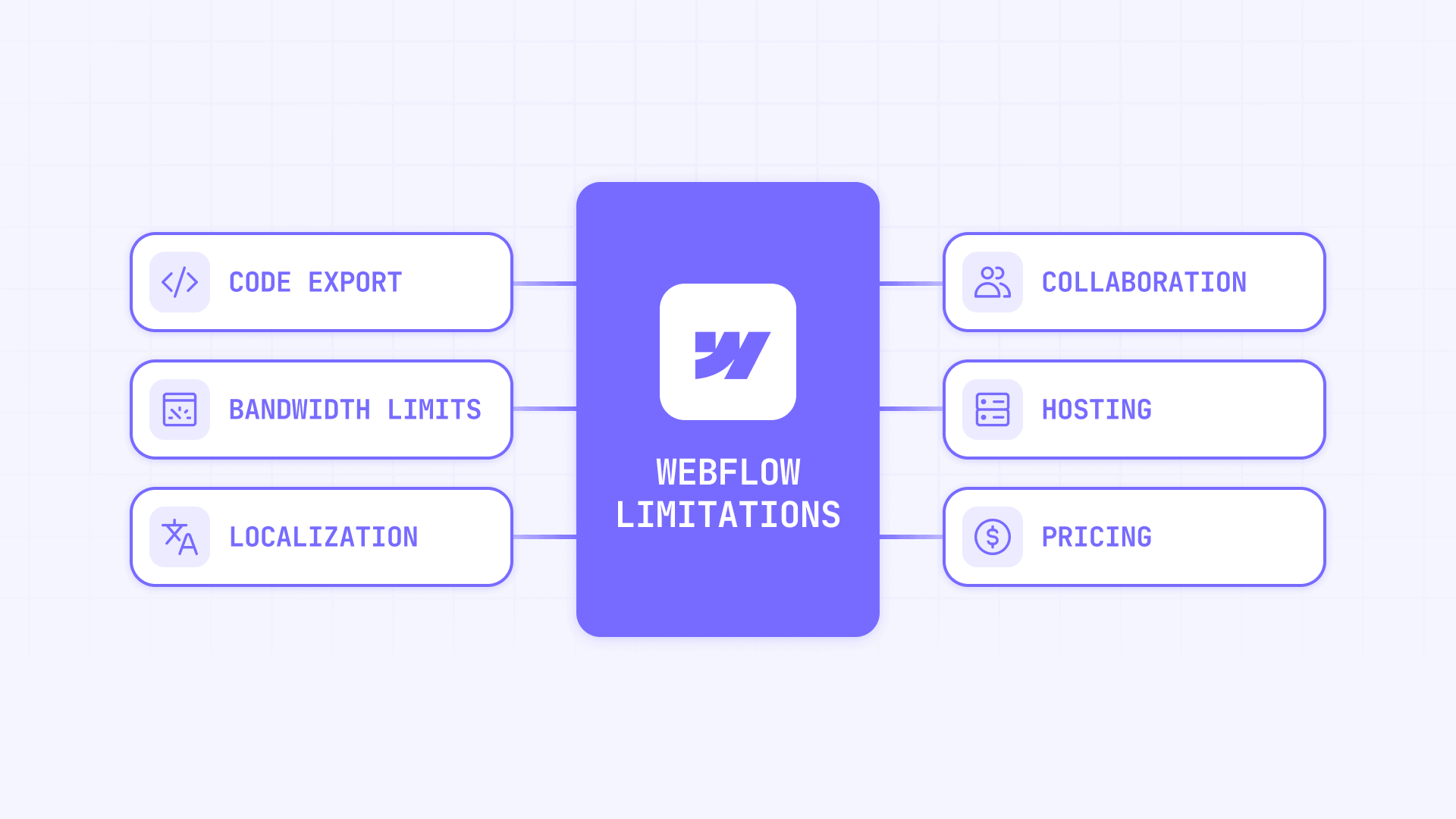
Why Webflow limitations matter before you commit
A serious Webflow evaluation isn't about finding flaws. It's about making sure the platform matches your operating model:
- Cost structure: Webflow pricing splits across Site plans, Workspace plans, seats, and add-ons — and the May 2026 plan changes made bandwidth a more significant cost variable. The total cost is easy to underestimate on first pass
- Content scale: CMS caps, Collection list rendering limits, CSV import restrictions, and search reindex delays matter fast once your site stops being simple brochureware
- Localization risk: Locale caps, 302 routing with no native override, separate per-locale redirects, and Ecommerce incompatibility can turn "multilingual" into fragile architecture
- Team controls: Collaboration improved a lot, but advanced governance — including custom roles, deeper auditability, page-specific access, and stronger security controls — is still concentrated in Enterprise
- Portability: Webflow code export exists but doesn't carry over the dynamic parts that usually matter most — CMS content, forms, search, and localization
- Bandwidth costs: Bots, redirects, 404s, and heavy assets all count toward bandwidth, and repeated overages can trigger automatic plan upgrades
Hard blockers in Webflow that no plan upgrade fixes
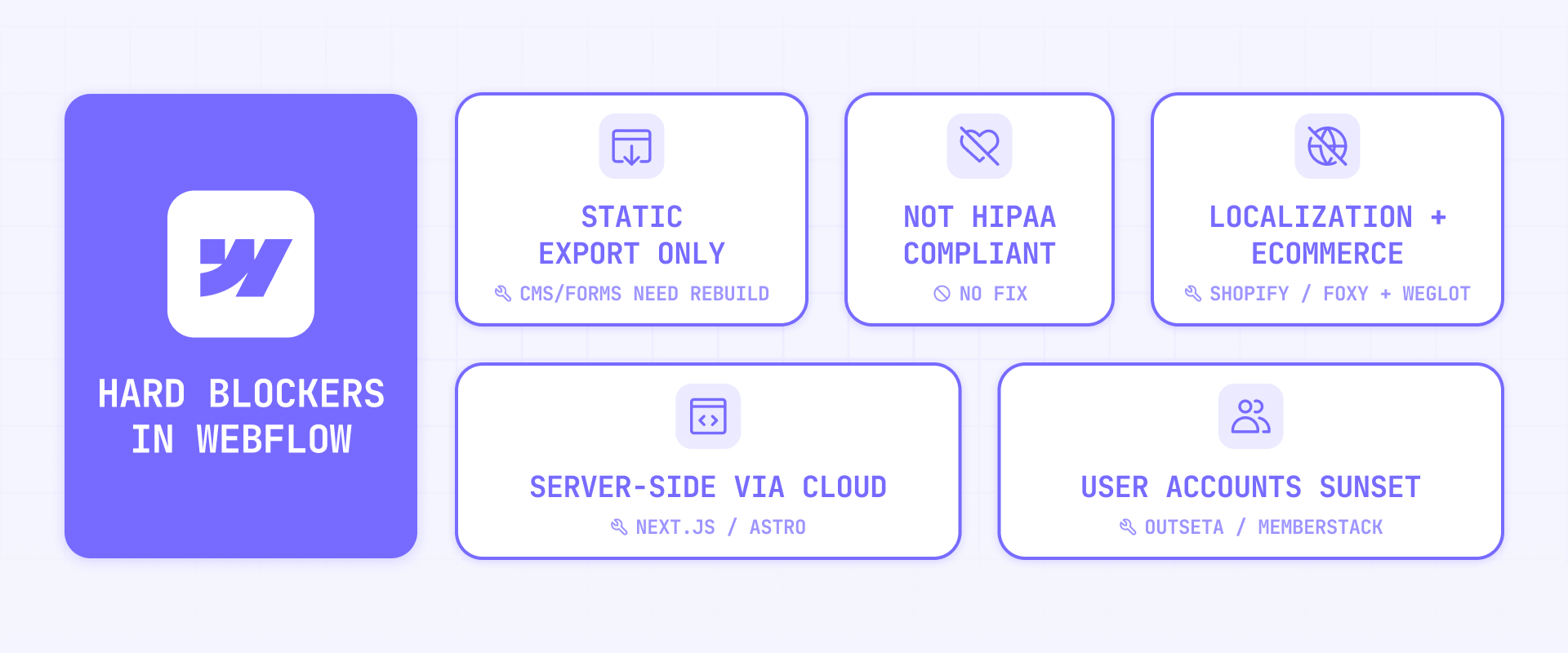
These are limitations where spending more doesn't solve the problem. If any of these apply to your project, they should change your platform decision entirely.
Webflow code export is not real portability
Webflow does let you export code — but it's not the escape hatch many teams assume. Export gives you static HTML, CSS, and JavaScript files. What it doesn't carry over is everything dynamic: CMS-driven pages, site search, password protection, form processing, reCAPTCHA, and localization behavior. For most serious marketing sites, the dynamic parts are exactly what matters most.
This means "we can always export later" is usually said by teams that haven't actually tested the export path. If your site depends on CMS content, search, or forms, exporting gives you a partial front-end snapshot, not an operational clone of your live site.
That said, there are ways to reduce lock-in. For content portability, tools like Whalesync, PowerImporter, and Airtable sync keep your source-of-truth outside Webflow so your content is always extractable. For architectural flexibility, reverse proxy patterns (using Cloudflare Workers) let you mount external apps or services under your Webflow domain without migrating everything away. And Webflow Cloud with Next.js or Astro is the modern path when you want to move dynamic parts into code while keeping Webflow as the design layer. But if you need a fully portable, self-hosted codebase, Webflow's export won't get you there.
Webflow does not support server-side code
Webflow supports HTML, CSS, and JavaScript in its custom code surfaces — but not server-side languages like PHP, Python, Ruby, or Perl. That means you can't run secure backend logic, database queries, API orchestration, or authenticated server processes natively inside Webflow.
Custom code also has a support boundary. Webflow explicitly says it can't guarantee compatibility and its support team won't troubleshoot custom code. Character limits apply too — 50,000 characters for the Code Embed element and major custom code fields.
For teams that need backend behavior, the cleanest path is Webflow Cloud with frameworks like Next.js or Astro — this keeps you on Webflow's hosting while adding server-rendered routes and server functions. For lighter middleware needs, Cloudflare Workers handle API proxies, auth checks, webhooks, and edge logic. And for full no-code backend stacks, Wized plus Xano or Wized plus Supabase give you database storage, API endpoints, and business logic that Webflow connects to. But if your site genuinely needs server-side application behavior throughout, Webflow is the frontend layer, not the full stack.
Webflow memberships and Logic are discontinued
Webflow's native User Accounts and Logic features have both been sunset. Logic was disabled on June 27, 2025. User Accounts became unavailable on January 29, 2026. Webflow has confirmed that memberships are moving to vetted app partners and that automation should be handled externally.
Do not build new projects around native Webflow memberships or Logic. Use third-party tools instead. For memberships, Memberstack is the default choice for authentication, gated content, and payment-based access. Outseta works better if you also need CRM, help desk, and B2B team memberships in one stack. For workflow automation, Make, Zapier, or n8n replace what Logic used to handle — form routing, CMS updates, order flows, and cross-app triggers.
Webflow Localization does not work with Ecommerce
This is a hard blocker with no native workaround. Webflow explicitly states that Localization is not compatible with Ecommerce. If both features are enabled, Ecommerce products, categories, and Ecommerce pages cannot be localized. For any team that needs multilingual commerce, this isn't a minor caveat — it's a platform-level disqualifier.
The workaround is moving commerce to a separate layer. Shopyflow syncs Shopify product data into Webflow CMS so you keep full design control in Webflow while Shopify runs the store logic. Pair it with Weglot to handle multilingual storefront translation across both layers. Foxy plus Weglot is another clean path where Webflow handles content and design while Foxy handles cart and checkout. For simpler setups, Shopify Buy Button or Stripe Payment Links plus Weglot work for lightweight product listings or digital sales.
Webflow is not HIPAA compliant
Webflow's terms explicitly warn against using the platform for PHI (Protected Health Information). This applies to all plan levels including Enterprise.
The workaround is the same as with any non-compliant platform: don't use Webflow forms for health-related data collection, don't publish PHI anywhere on the site, and route all regulated workflows through compliant tools. Jotform HIPAA, Formstack, or Paubox Forms handle compliant form collection and can be embedded or linked from your Webflow pages. Webflow handles the marketing experience; everything involving patient data lives somewhere else. But if the Webflow site itself must handle protected health information, there is no workaround.
CMS and content limitations in Webflow
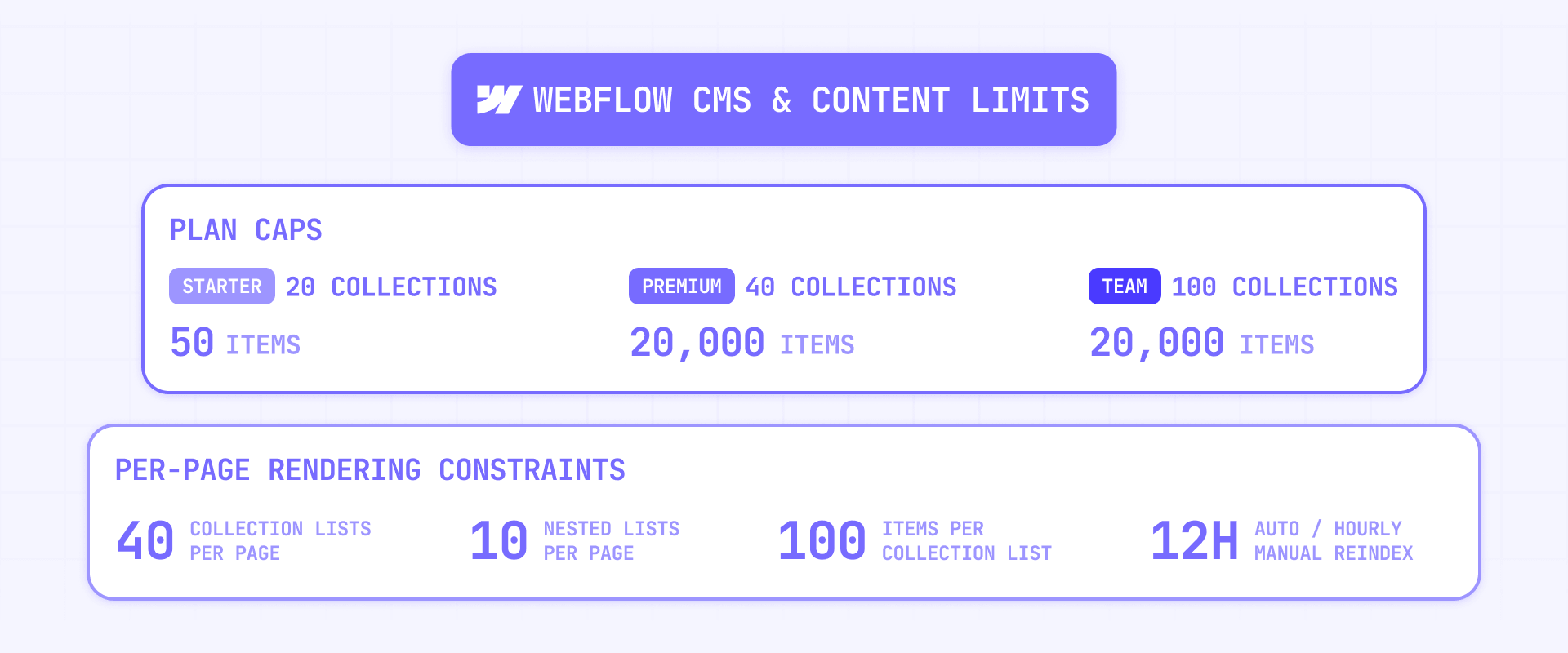
Webflow's CMS is one of the main reasons teams choose the platform. But it's also one of the clearest ways to outgrow it — not just because of item caps, but because of rendering constraints, import limits, and search behavior that don't show up in a sales demo.
Where Webflow CMS limits become real
After Webflow's May 2026 plan changes, the CMS landscape looks different:
- Starter (Free): Very limited CMS capacity — not suitable for serious content websites
- Basic: No CMS access — this plan is for static sites only
- Premium: 40 Collections, 20,000 CMS items (included by default, no add-ons needed)
- Enterprise: Custom limits
On top of the raw item count, Webflow has rendering constraints that shape what you can actually display: 40 Collection lists per page, 10 nested Collection lists per page, 100 items per Collection list, and 100 items per nested Collection list.
These limits are enough for many marketing sites. The risk, as with any CMS platform, is roadmap drift — a team that starts with a blog often evolves into a site with resource hubs, case studies, directories, documentation, and landing page programs that compound against both the item cap and the rendering constraints.
For rendering constraints, Finsweet CMS Load adds load-more, infinite scroll, and pagination beyond the 100-item display limit. Finsweet CMS Nest bypasses native nested Collection restrictions for related-content layouts.
For larger operations, keep the source-of-truth outside Webflow. Whalesync two-way syncs from Airtable, Notion, or Google Sheets into Webflow CMS. PowerImporter handles one-way syncs from Airtable, CSV, or WordPress including references, files, and locales. And Jetboost adds instant search, filtering, and sorting on top of existing collections so large directories stay usable.
Where Webflow content operations get tricky
Content operations have traps that aren't visible in a demo. Scheduled publishing only works for Collection items that have never been published before — and it's unavailable on Starter and Basic plans. Publishing one Collection item can also publish referenced and multi-referenced items tied to it, which is a real workflow risk for teams that expect isolated publishing.
CSV import has practical limits: files cap at 4 MB, File fields can't be mapped during import, and Option fields are capped at 100 options. Ecommerce CSV import is even more restricted — it happens inside the Designer, mapping to custom fields isn't supported, and exported asset URLs remain tied to the original site.
For large content migrations, PowerImporter or Whalesync handle the heavy lifting outside Webflow's native import flow. The key practice is testing a realistic batch first — including references, options, localized content, and publish behavior — before committing to a full migration.
Where Webflow search falls behind
Webflow site search has limits that matter for content-heavy sites. It's available on Premium and legacy CMS-or-higher plans, returns results from the currently selected locale only, supports only one search engine per site, doesn't support pagination, and caps at 60 results per page.
The bigger issue is freshness. On legacy CMS plans, automatic reindexing happens 72 hours after a full-site publish. On Premium and legacy Business plans, it drops to 12 hours. Publishing a single CMS item does not trigger automatic reindexing. If your content operation assumes near-real-time search updates, native search will frustrate you.
Jetboost solves instant on-page search and filtering over rendered CMS collections — it works client-side, so it sidesteps reindex delays entirely. For true sitewide search with autocomplete and faceting, Algolia is the standard external search integration for Webflow. Use Make or Pipedream with Webflow webhooks to push CMS changes into Algolia immediately on publish instead of waiting for Webflow's native schedule.
Localization limitations in Webflow
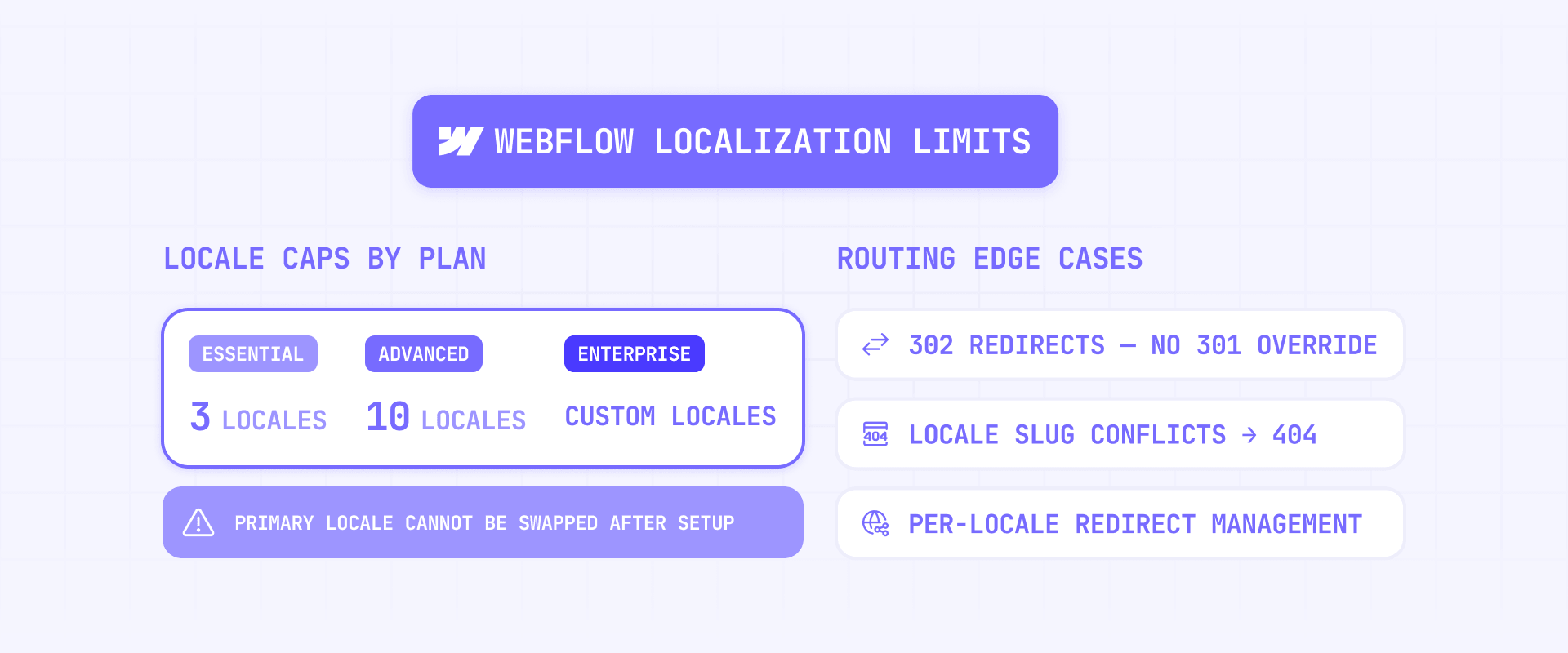
Webflow Localization works, but teams often overestimate how automatic it is. The right question isn't "can Webflow do multilingual?" It's whether Webflow can handle your specific multilingual routing and publishing model without turning into expensive manual work.
What Webflow Localization does well
Webflow can localize static content, CMS content, page settings, and visibility per locale. Hidden localized elements are removed server-side from the HTML output, and Webflow supports automatic RTL handling for Arabic, Persian, Hebrew, Urdu, and Yiddish with directional overrides when needed. For straightforward multilingual marketing sites, it's a capable setup.
Where Webflow Localization gets expensive or breaks
Publishing a secondary locale requires a Localization add-on. Current caps are up to 3 locales on Essential and 10 locales on Advanced, with Enterprise plans having custom limits based on your agreement. Localization is billed per locale, which matters fast for country-specific programs.
The routing model has edge cases that affect SEO and implementation:
- Locale routing uses 302 redirects with no native way to override to 301
- Root-level 301 redirects don't automatically apply to locale subdirectories — /old-url and /es/old-url must be handled separately
- Locale slugs can conflict with page, folder, or Collection slugs and generate 404s because the locale path wins
- Automatic locale-aware routing works for Page and Collection page links, not raw manual URL strings
- Webflow AI metadata generation only works for the primary locale, not secondary locales
There's also an architectural risk around the primary locale. Webflow warns that you cannot simply swap a secondary locale into the primary position later. Choose your initial primary locale carefully and assume changing it will be painful.
For translation workflows, Weglot is the fastest path to multilingual with automatic translation and SEO-friendly pages. Lokalise offers team-based translation management with direct Webflow sync. PowerImporter handles syncing translated CMS fields from external sources into Webflow locales.
Collaboration and permissions limitations in Webflow
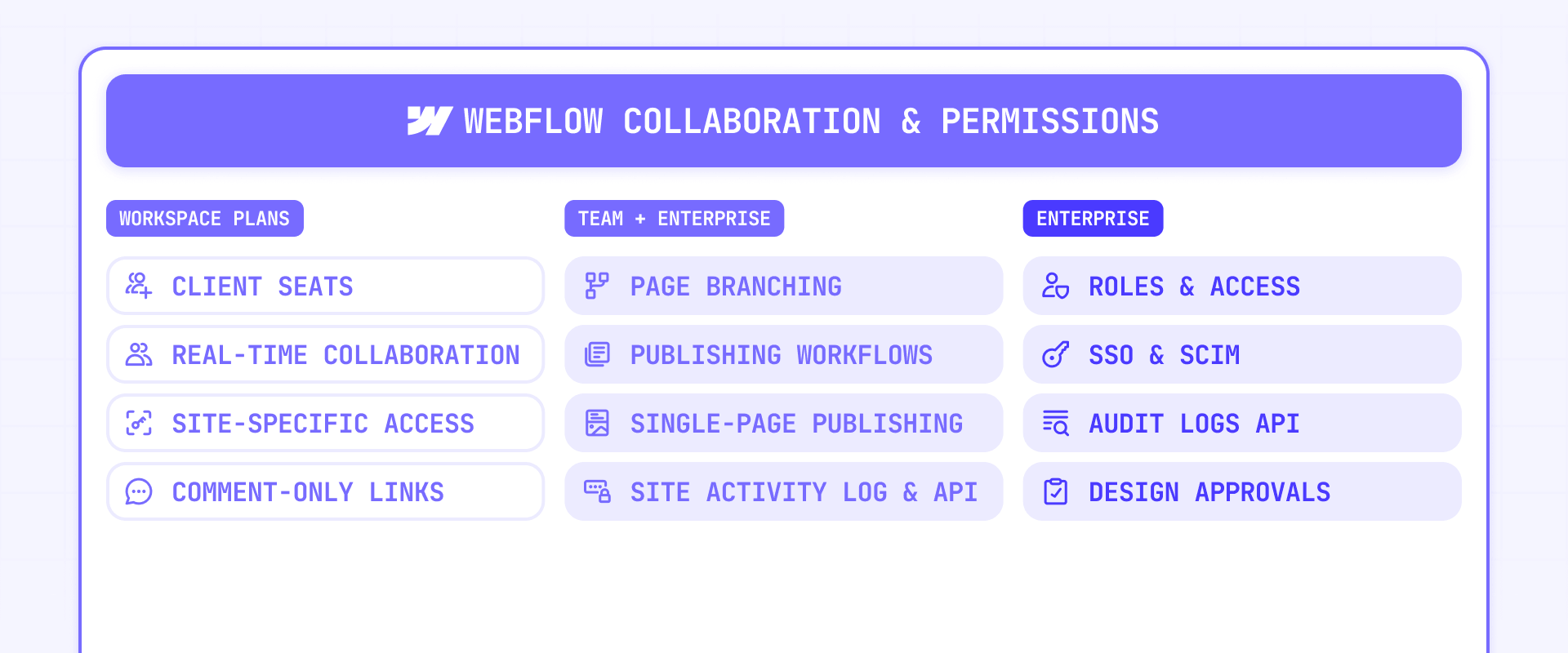
Webflow's collaboration is meaningfully better than it was a few years ago. The real question now isn't whether teams can collaborate — it's whether the permission model is strong enough for your organization without Enterprise.
What improved in Webflow collaboration
Client seats are now available for freelancer and agency Workspaces, replacing the old one-size-fits-all Editor model. Real-time collaboration is enabled across all sites by default. Guests can share comment-only links, and free Reviewer access is broader than before. Non-Enterprise plans now include better role and site-level access options than older Webflow criticism suggests — site-specific access controls, site-level roles, and publishing permissions are available on Growth and Agency Workspace plans.
One important timeline: the Legacy Editor will no longer be available starting August 4, 2026, with automatic migration beginning May 2026. Any evaluation based on "our client will just use the old Editor" is outdated.
Where Webflow permissions still need Enterprise
The strongest governance controls still sit at the Enterprise layer: custom roles, page-specific access, SSO, SCIM/JIT provisioning, Audit logs API, security headers, custom SSL, and design approvals. For organizations with compliance requirements or security reviews that require any of these, Enterprise is the only path.
Even within standard plans, permissions have gaps. Page-specific access is only available on certain Enterprise plans. Reviewers can't comment on components, CMS panel items, or elements only visible through custom code or animations. Collection-level CMS restrictions don't apply to Ecommerce Collections and don't prevent editing static content on related Collection pages.
For review workflows, Superflow adds live-site comments, annotations, and approvals. Relay.app adds human approval checkpoints around CMS updates and form processing. For editorial governance, moving content workflow to Airtable plus Whalesync or Notion plus SyncFlow lets you manage approval states upstream and sync only approved records into Webflow.
The strategic message: Webflow collaboration is good enough for many marketing teams, but not equivalent to enterprise-grade governance unless you are on the right Enterprise setup.
Why Webflow branching is not full version control
Page branching is useful but limited. Webflow allows one branch per page and one designer per branch at a time. Comments on a branch are permanently deleted on merge. Branches don't transfer with site transfers and don't duplicate with the site. Merge operations can overwrite changes made to the original page while the branch was open.
Custom staging domains are Enterprise-only, limited to one per site, and replacing them removes the default webflow.io staging subdomain. The pre-publish summary also doesn't include all Site settings changes except custom code.
For most marketing teams, branching and staging are useful QA tools — but if you need parallel feature branches and automated release pipelines, you're looking at a code framework, not a visual builder.
Hosting and infrastructure limitations in Webflow
Webflow hosting is convenient and fast, but the bandwidth model and asset handling have real operational implications that teams discover too late.
How Webflow bandwidth becomes a real cost
Bandwidth in Webflow isn't a vague limit — it's a billing mechanic. Webflow counts traffic regardless of status code and includes bots as well as human visitors in the dashboard without separating them. Redirects, 404s, aggressive crawlers, and heavy assets all count financially.
The overage policy is strict. The first month you exceed bandwidth triggers a notification and surge protection. If you exceed again the second consecutive month, Webflow automatically upgrades the site to the required plan or add-on.
With Webflow's May 2026 plan changes rolling out across new and existing sites, bandwidth became a more important cost variable. The Premium Site plan includes 50 GB base bandwidth — down from the legacy Business plan's 100 GB. Sites that use more than 50 GB need bandwidth add-ons, and costs scale quickly for high-traffic or asset-heavy sites. For detailed cost modeling, see our Webflow May 2026 pricing changes guide.
The practical defenses: put Cloudflare in front for bot mitigation, WAF, and caching. Move images to Cloudinary for device-optimized delivery outside Webflow's asset path. Move video to Vimeo or Vidzflow so streaming doesn't drag through Webflow bandwidth. And reduce oversized assets and heavy background video on every page.
Why Webflow assets are less private than expected
Files uploaded to the Assets panel or CMS file/image fields are publicly accessible and discoverable by default. If a sensitive file is uploaded by mistake, deleting it from the Assets panel isn't enough — Webflow instructs users to remove all references, delete the asset, and contact support with the file URLs so the CDN copy can be removed.
Upload limits are also tighter than many teams expect: 4 MB for images, 10 MB for documents and audio, and 25 MB for ZIP files. If your team handles sensitive documents or large media files, plan your asset workflow around these constraints from the start.
Pricing complexity is still a planning risk
Webflow pricing changed significantly in May 2026, so exact numbers should not be buried inside a limitations article that may be read months later. The important limitation is structural: Webflow costs still compound across Site plans, Workspace plans, seats, bandwidth, Localization, Analyze, Optimize, and Enterprise-only controls. For current numbers and a calculator, read our Webflow May 2026 pricing changes guide. For a broader plan-by-plan breakdown, see our full Webflow pricing guide.
Where Webflow Ecommerce changes the pricing picture
If you're considering Webflow Ecommerce, know that it introduces its own constraints. Add-ons are not available on Ecommerce Site plans. Localization is not compatible with Ecommerce pages, products, or categories. And each product is capped at 50 variants. Serious multilingual commerce or complex catalog logic pushes you out of Webflow's comfortable zone quickly.
Outdated Webflow complaints that no longer apply
Some criticism you'll find online about Webflow is genuinely stale. If you're researching the platform, here's what has changed:
- "Webflow forms are too limited": Paid Site plans now include unlimited form submissions
- "There's no client access": Client seats exist for freelancer and agency Workspaces with role-based access
- "Collaboration is single-user": Real-time collaboration is now enabled on every site by default
- "Conditional visibility doesn't exist": Webflow conditionals are broader than simple show/hide and work across CMS and static content
- "Staged sites are too restricted": Paid Workspaces now allow 300 pages per staged site
- "You can't give clients limited access": The new role model includes Limited seats and client billing options
The real question now isn't "is Webflow collaboration terrible?" It's whether Webflow's controls are strong enough for your team without Enterprise.
When Webflow is the wrong platform for your project
This is the direct version. Webflow is the wrong choice when:
- You need native memberships or user portals: User Accounts were discontinued in January 2026 and are no longer available
- You need native workflow automation inside the platform: Logic was disabled in June 2025 — automation now requires external tools
- You need server-side application behavior: Webflow's code surfaces don't run server-side languages
- You need multilingual Ecommerce: Localization and Ecommerce are incompatible in Webflow
- You need HIPAA or PHI workflows: Webflow's terms explicitly warn against using the platform for PHI
- You need 50,000+ CMS items without custom architecture: Public plan caps and rendering limits will push you into Enterprise or headless patterns
- You need engineering-grade version control: Branching and staging help, but they're not software release workflows
- You need private asset storage: Webflow assets are public by default with no native privacy controls
If none of these apply, Webflow is likely a strong fit — genuinely excellent for brand sites, marketing sites, and mid-sized content programs that want a visual operating model with strong hosting.
Frequently asked questions about Webflow limitations
What are Webflow's biggest limitations for a marketing website?
The biggest limitations aren't in the Designer — they're in portability, ecommerce capabilities, CMS scale, localization routing, team permissions, and bandwidth economics. Webflow is strong when the site is a marketing frontend with manageable content scale. It gets weaker when you need native app logic, multilingual Ecommerce, or engineering-grade release control. Check the hard blockers first, then evaluate plan-gated limits against your actual roadmap.
Can you export a Webflow site with CMS content intact?
No. Webflow code export gives you static HTML, CSS, and JavaScript, but dynamic CMS content, forms, search, and localization behavior don't carry over in a usable way. Export is partial frontend portability, not platform independence. Keep content portable using Whalesync or PowerImporter syncing to external sources — so if you ever migrate, your content comes with you even if the site doesn't.
What are Webflow's CMS limits on each plan?
Starter has very limited CMS capacity and is not suitable for serious content sites. Basic has no CMS at all. Premium includes 40 Collections and 20,000 CMS items by default. Rendering limits apply separately: 40 Collection lists per page, 10 nested Collection lists, 100 items per standard list, and 100 items per nested list. For large content operations, use Finsweet CMS Load for display limits and external CMS sync to keep the source-of-truth outside Webflow.
Does Webflow Localization work with Ecommerce?
No. Webflow explicitly states Localization is not compatible with Ecommerce. Products, categories, and Ecommerce pages cannot be localized. For multilingual commerce, move the store layer to Shopify via Shopyflow or Foxy, and use Weglot for translation. This is a hard blocker with no native workaround.
Is Webflow collaboration good enough for teams in 2026?
For most teams, yes — basic collaboration has improved significantly. Client seats, real-time editing, and reviewer links all work. Growth and Agency plans now include site-level roles, publishing permissions, and site-specific access controls. The limitation is the strongest governance controls: custom roles, SSO, SCIM, audit logs, and page-specific access all require Enterprise. If your organization needs compliance-level permissions, Enterprise is the only path. For standard marketing teams, the collaboration is solid.
What happens when a Webflow site exceeds its bandwidth?
First month triggers a notification and surge protection. Second consecutive month triggers an automatic plan upgrade. Webflow counts bots and all status codes without separating them in the dashboard, so crawlers, redirects, and 404s all count financially. After the May 2026 plan changes, Premium includes 50 GB base bandwidth — sites that need more must purchase add-ons, which increase costs progressively. Use Cloudflare for bot mitigation and Cloudinary/Vimeo to offload heavy assets. For detailed bandwidth cost modeling, see our Webflow May 2026 pricing changes guide.
Are Webflow User Accounts still available?
No — User Accounts were discontinued on January 29, 2026. Logic was disabled on June 27, 2025. Memberstack is the standard replacement for authentication, gated content, and payment-based access. Outseta is the alternative if you also need CRM and help desk. Do not build new projects around native Webflow memberships or Logic.
How much does a serious Webflow site actually cost?
Total cost splits across Site plan, Workspace plan, seats, and add-ons — and the May 2026 plan changes made bandwidth a more significant variable. A site with Premium, a Growth Workspace, a few seats, Localization, and Analyze can reach several thousand dollars per year. Don't approve Webflow based on the Site plan price alone — model every editor, locale, bandwidth estimate, and add-on to get the real annual number. For exact pricing, see our full Webflow pricing guide.
Can Webflow handle enterprise security requirements?
On standard plans, not fully. SSO, SCIM/JIT provisioning, custom roles, audit logs API, security headers, custom SSL, and design approvals are all Enterprise features. If your security review requires any of these, Enterprise is the conversation. Webflow is also explicitly not HIPAA compliant on any plan.
Should I choose Webflow or a code framework like Next.js?
Choose Webflow when the priority is visual design speed, fast iteration, and managed hosting for a marketing site that doesn't need full backend ownership. Choose a code framework when you need server-side logic, self-hosted output, engineering-grade release management, or application-level functionality. Webflow Cloud with Next.js or Astro offers a middle path — Webflow as the design system with code handling the dynamic parts.
Conclusion
Webflow's limitations cluster around five areas: ecommerce capabilities, content scale, localization routing, team permissions, and hosting economics. If you separate hard blockers from plan-gated limits, the platform becomes much easier to evaluate honestly. Webflow is genuinely strong for brand sites, marketing sites, and mid-sized content programs — it gets risky when the site evolves into something the platform wasn't designed for.
The smartest next step is testing with your real content model, real permissions model, amount of website locales, and real budget model before committing. That's where Webflow will either prove itself or reveal a mismatch.
If you're evaluating Webflow for your site and want help figuring out whether it fits — or need the workarounds implemented properly — our Webflow agency can help you scope the right approach.









Join readers commenting on this post!