

If you're running Reddit Ads to a Webflow landing page, you need to know whether your tracking is actually working before you spend a dollar. The problem is that Webflow has a few quirks around custom code, and Reddit's reporting can lag by hours—which means you can't rely on dashboards alone to confirm your pixel is firing.
In this guide, you'll create a Reddit Pixel in Reddit Ads, install it on Webflow using Google Tag Manager (primary method) or Webflow custom code (alternative), and verify events immediately using Reddit Pixel Helper and browser checks—so you can launch campaigns with confidence.
Why Reddit Pixel matters for Webflow sites
- Retarget Webflow visitors on Reddit: Build audiences like "visited pricing page but didn't convert" and run retargeting ads to bring them back.
- Optimize Reddit campaigns for Webflow conversions: Track a Lead event on your Webflow thank-you page so Reddit can optimize beyond clicks and find users who actually convert.
- Validate tracking before you spend: Use Reddit Pixel Helper to confirm events are firing instead of waiting hours for delayed campaign reporting.
- Keep tracking clean across Webflow pages: Install the base pixel once site-wide, then trigger conversion events only on the pages that matter.
- Troubleshoot faster when dashboards lag: When Ads Manager shows nothing, browser DevTools and helper extensions tell you what's really happening in real-time.
Prerequisites for adding Reddit Pixel in Webflow
Before you touch any code, confirm you can actually deploy and test it on your Webflow site. Most "pixel not detected" issues come from missing these basics.
Webflow requirements for custom code
- Confirm your Webflow project supports custom code. You'll need either a qualifying Workspace plan or an active Site plan—check Webflow's Help Center if you're unsure.
- Understand where Webflow injects custom code:
- Head code goes before </head> on every page site-wide
- Footer code goes before </body> on every page site-wide
- Page-level custom code runs after site-wide code
- Remember: custom code won't go live until you Publish your site. This is the most common reason tracking "doesn't work."
- Never paste HTML wrapper tags like <html>, <head>, or <body> into Webflow's custom code fields—it can break your layout.
Testing on the right domain
- Webflow preview or comment mode can render your site on a canvas.webflow.com domain, but that's not where your ads will send traffic.
- Always verify tracking on the same domain you'll use in Reddit Ads—your custom domain or Webflow staging domain.
Step 1: Create and install the Reddit Pixel in Webflow
The Reddit Pixel is created and installed directly through Reddit Ads. You have two paths: Google Tag Manager (recommended) or manual Webflow custom code (alternative). Choose one method only—never install through both or you'll create duplicate events.
Navigate to Reddit Pixel setup in Reddit Ads
- Log into Reddit Ads Manager.
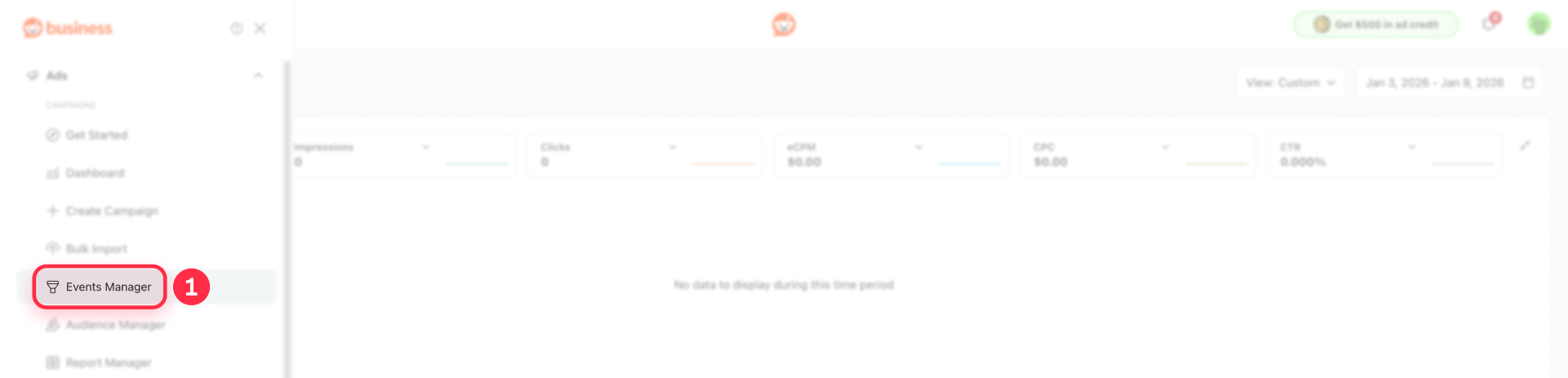
- Open Events Manager (may also appear as Configure events tracking or Configure data source, depending on UI version).
- Look for options to set up a new pixel or configure tracking.
Path A: Install Reddit Pixel using Google Tag Manager (recommended)
This is the cleanest approach for most teams. Reddit's GTM partner flow automatically creates the pixel tag inside your GTM container—no manual code pasting required.
Prerequisites for GTM path
GTM must already be installed on your Webflow site before starting this flow. If you haven't installed GTM yet, install GTM in Webflow first, then return here.
Set up Reddit Pixel via GTM partner flow
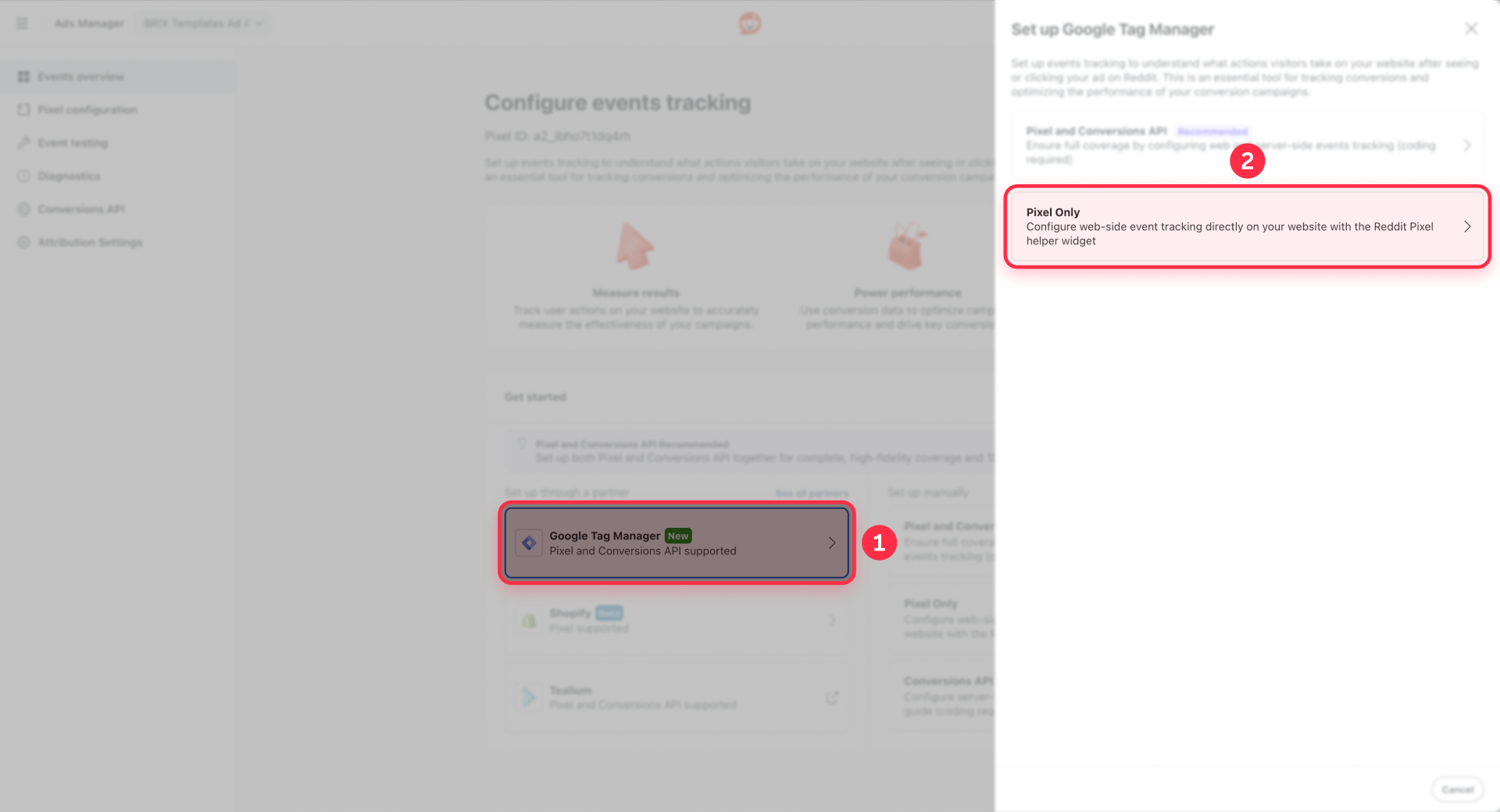
- In Reddit Ads Events Manager, select the Google Tag Manager option.
- When prompted to choose your tracking method, select Pixel Only (skip Conversions API for now).
- Click Connect Google and authenticate with your Google account.
- Select your GTM Account, Container, and Workspace from the dropdowns.
- Reddit will automatically create the Reddit Pixel base tag inside your selected GTM container.
- Click Publish or Confirm inside Reddit's setup flow to activate the pixel.
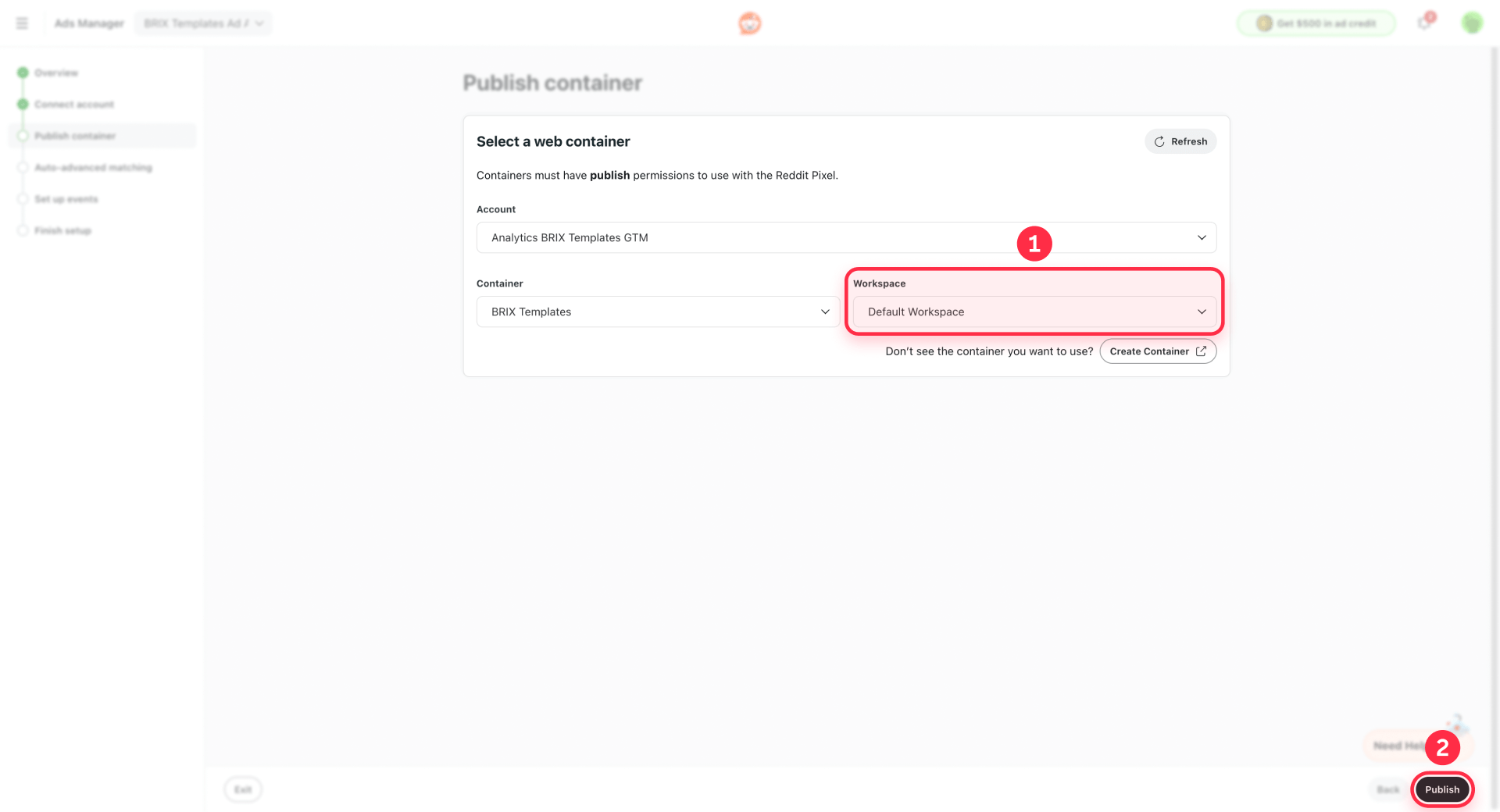
Note: If Reddit cannot publish due to container permissions, open Google Tag Manager separately and click Submit to publish your container manually. The Reddit Pixel tag will already be there—you just need to make it live.
Path B: Install Reddit Pixel using Webflow custom code (alternative)
Use this when you don't want GTM on your project. This manual method covers the base pixel only. The conversion example in Step 3 uses GTM.
Set up Reddit Pixel manually in Webflow
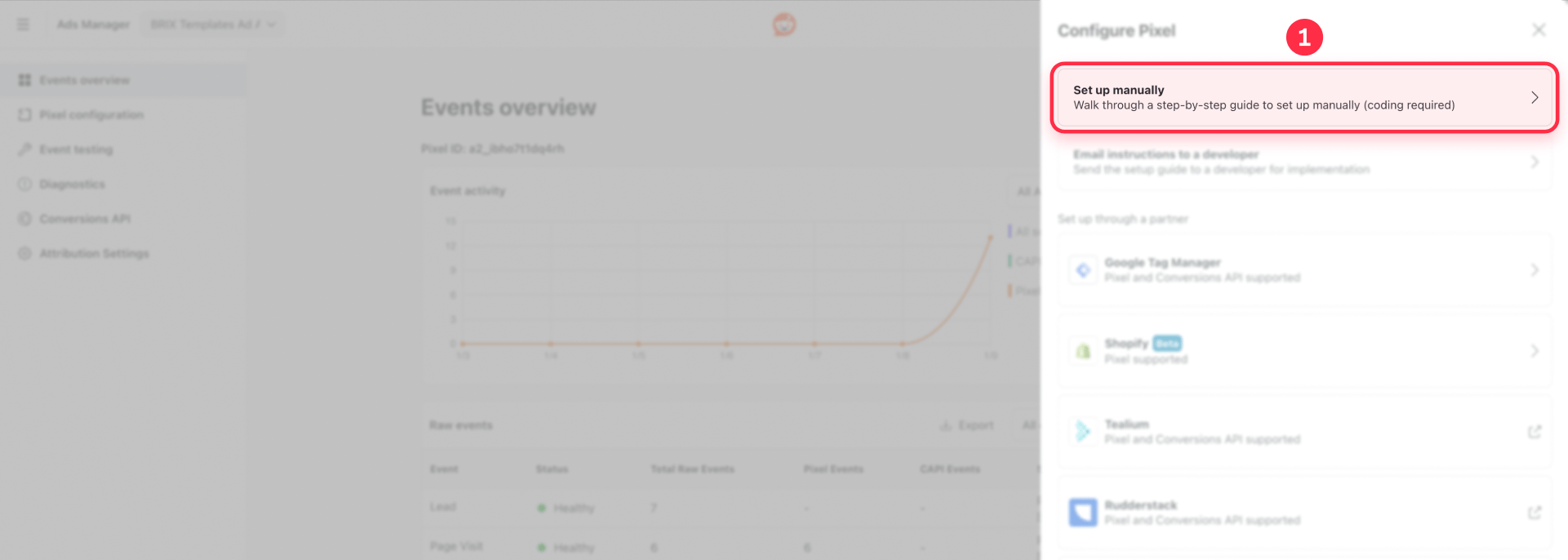
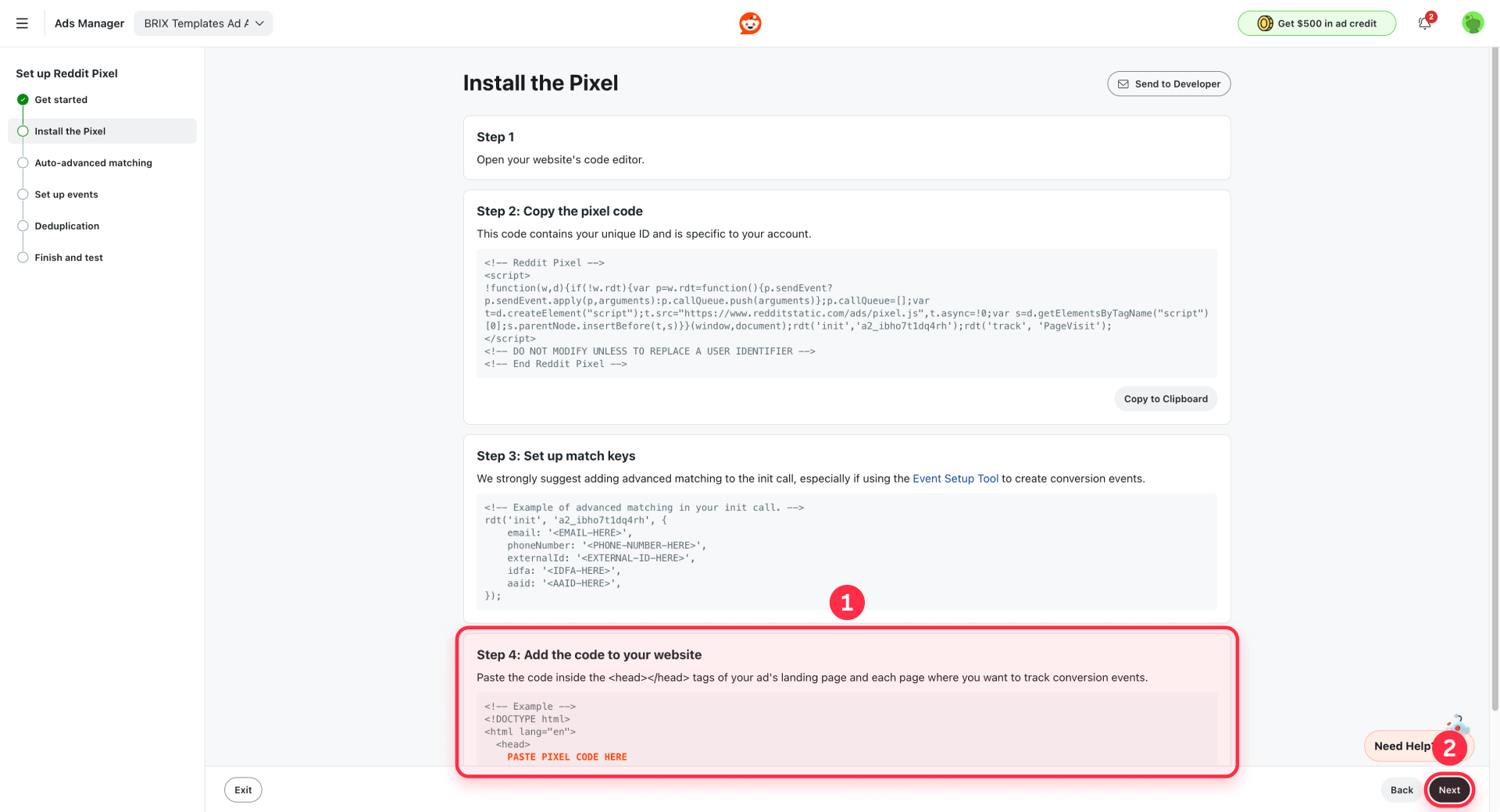
- In Reddit Ads Events Manager, select Set up manually.
- Choose Pixel Only when prompted.
- Copy your Pixel ID and the base pixel code snippet shown on screen.
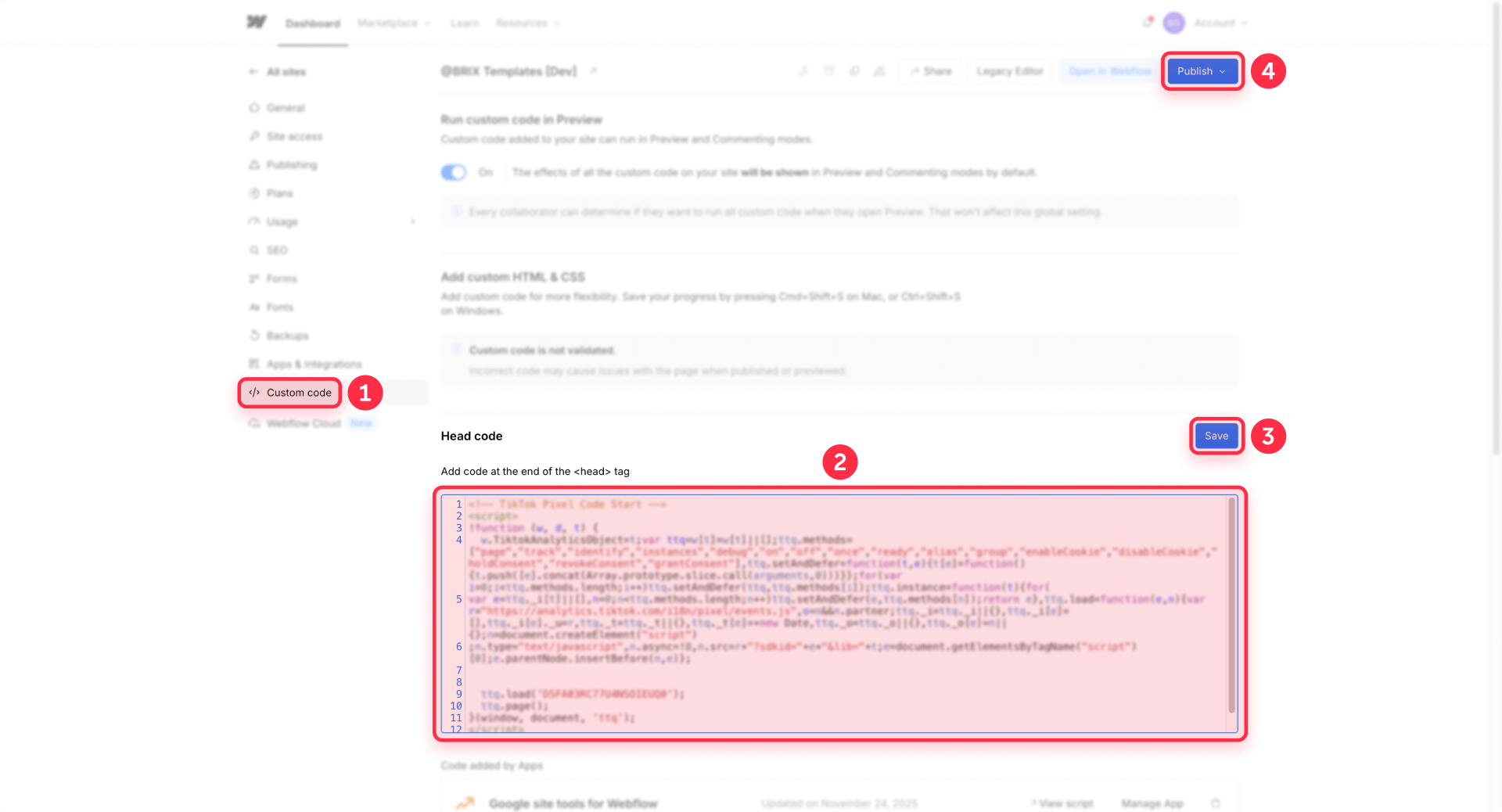
- In Webflow, go to your Webflow Dashboard → open your project → Project Settings → Custom Code.
- Paste the base pixel code into Head Code (site-wide).
- Click Save Changes.
- Publish your Webflow site (custom code won't go live without publishing).
Here's what Reddit's base code typically looks like (for reference only—copy your actual code from Reddit Ads):
<script>
!function(w,d){
  if(!w.rdt){
    var p=w.rdt=function(){
      p.sendEvent ? p.sendEvent.apply(p,arguments) : p.callQueue.push(arguments)
    };
    p.callQueue=[];
    var t=d.createElement("script");
    t.src="https://www.redditstatic.com/ads/pixel.js";
    t.async=!0;
    var s=d.getElementsByTagName("script")[0];
    s.parentNode.insertBefore(t,s);
  }
}(window,document);

rdt('init','YOUR_PIXEL_ID');
rdt('track','PageVisit');
</script>
Warning: Choose one install method (GTM or manual custom code). Don't install the Reddit Pixel through both paths—you'll create duplicate tracking and inflated conversion counts.
Step 2: Verify the Reddit Pixel is firing in Webflow
Don't wait for Reddit Ads Manager reporting—it can lag by hours. Use these immediate checks to confirm your pixel is working right now.
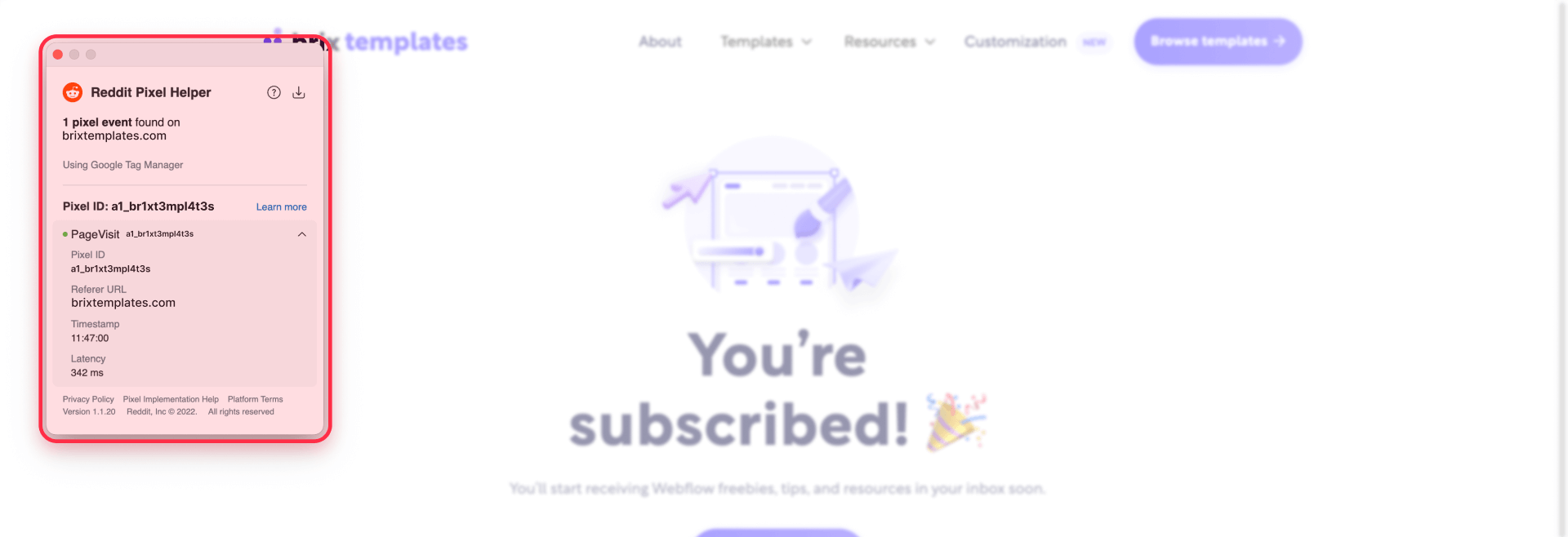
Verify with Reddit Pixel Helper
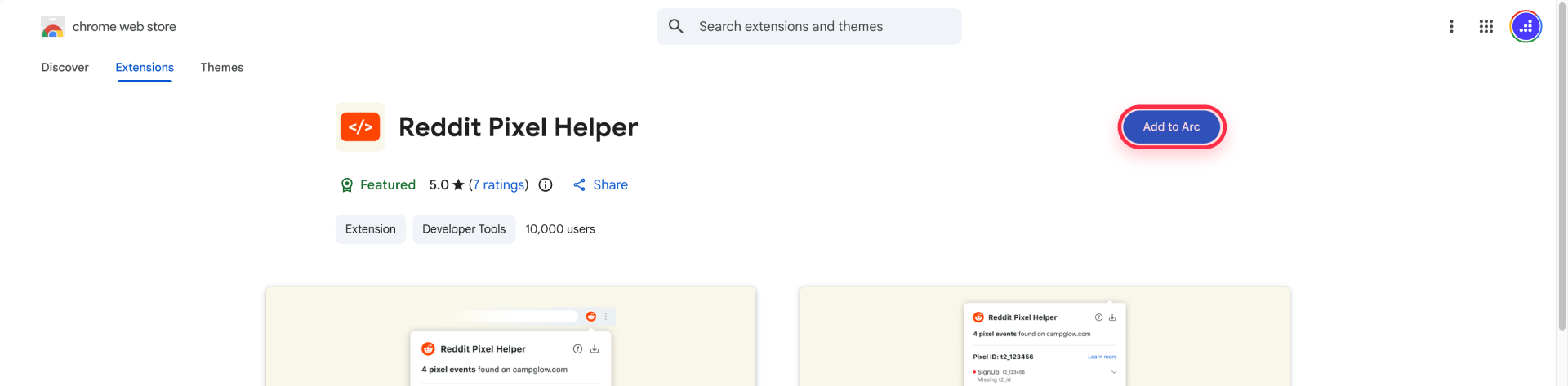
- Install Reddit Pixel Helper (Chrome extension).
- Visit your published Webflow site (use your custom domain or Webflow staging domain—not preview or canvas domains).
- Check the extension badge—it shows how many Reddit Pixel events fired.
- Click the extension to see:
- Which events fired (PageVisit should appear on every page)
- Any errors or warnings
- Configuration recommendations
The extension is built specifically for QA and shows event firing and errors directly in your browser.
Verify with browser DevTools
If tools disagree, the Network tab is your ground truth:
- Open Chrome DevTools → Network tab.
- Reload your Webflow page.
- Filter or search for redditstatic to confirm the pixel script loads (look for redditstatic.com/ads/pixel.js).
- If the script loads but events don't show in Pixel Helper, check for double installs, wrong Pixel ID, or trigger logic issues.
Note: Reddit Ads Manager reporting can take several hours to update. Browser-based verification tells you what's happening immediately.
Step 3: Track a Lead conversion on a Webflow thank-you page
A thank-you page conversion is the most reliable setup for Webflow lead-gen without backend access. You're simply firing a conversion event when the thank-you URL loads after a form submission.
Set up the thank-you page flow in Webflow
- Create (or identify) a thank-you page in Webflow, like /thank-you.
- In your Webflow form settings, set the success action to redirect users to your thank-you page.
- Publish your site and test the full form submission flow to confirm the thank-you URL only loads after a real completion.
Warning: URL-based conversions can be "faked" by visiting the thank-you URL directly. For most teams, it's still worth it for simplicity—but always test by completing the real form flow, not by typing the URL.
Fire the Reddit Lead event using GTM
This assumes you installed the base pixel via GTM
Create the thank-you page trigger in GTM
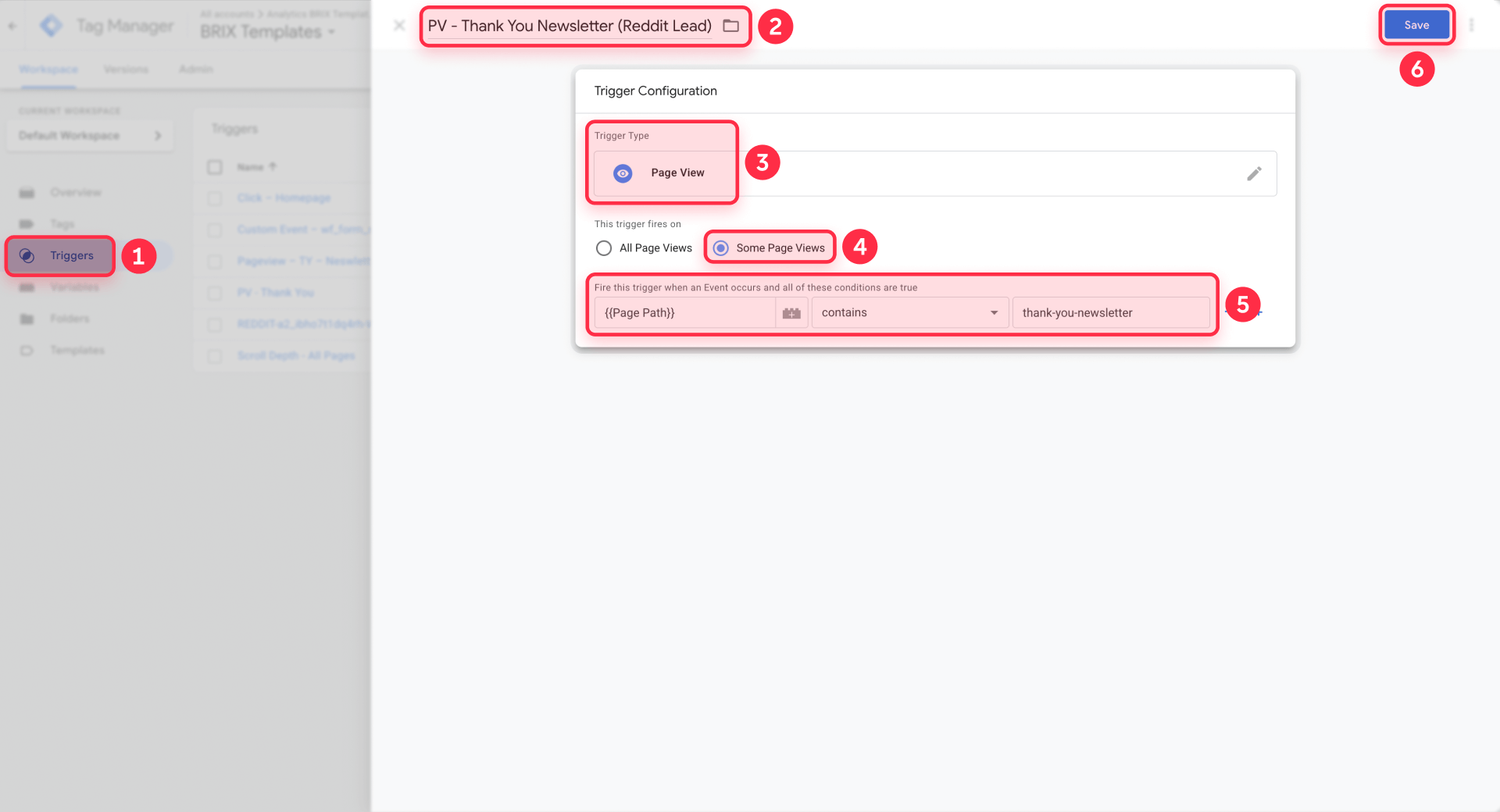
- In GTM, go to Triggers → New.
- Choose trigger type Page View.
- Configure it as Some Page Views where Page Path equals /thank-you (or Page URL contains your thank-you slug).
- Save the trigger.
Create the conversion tag in GTM
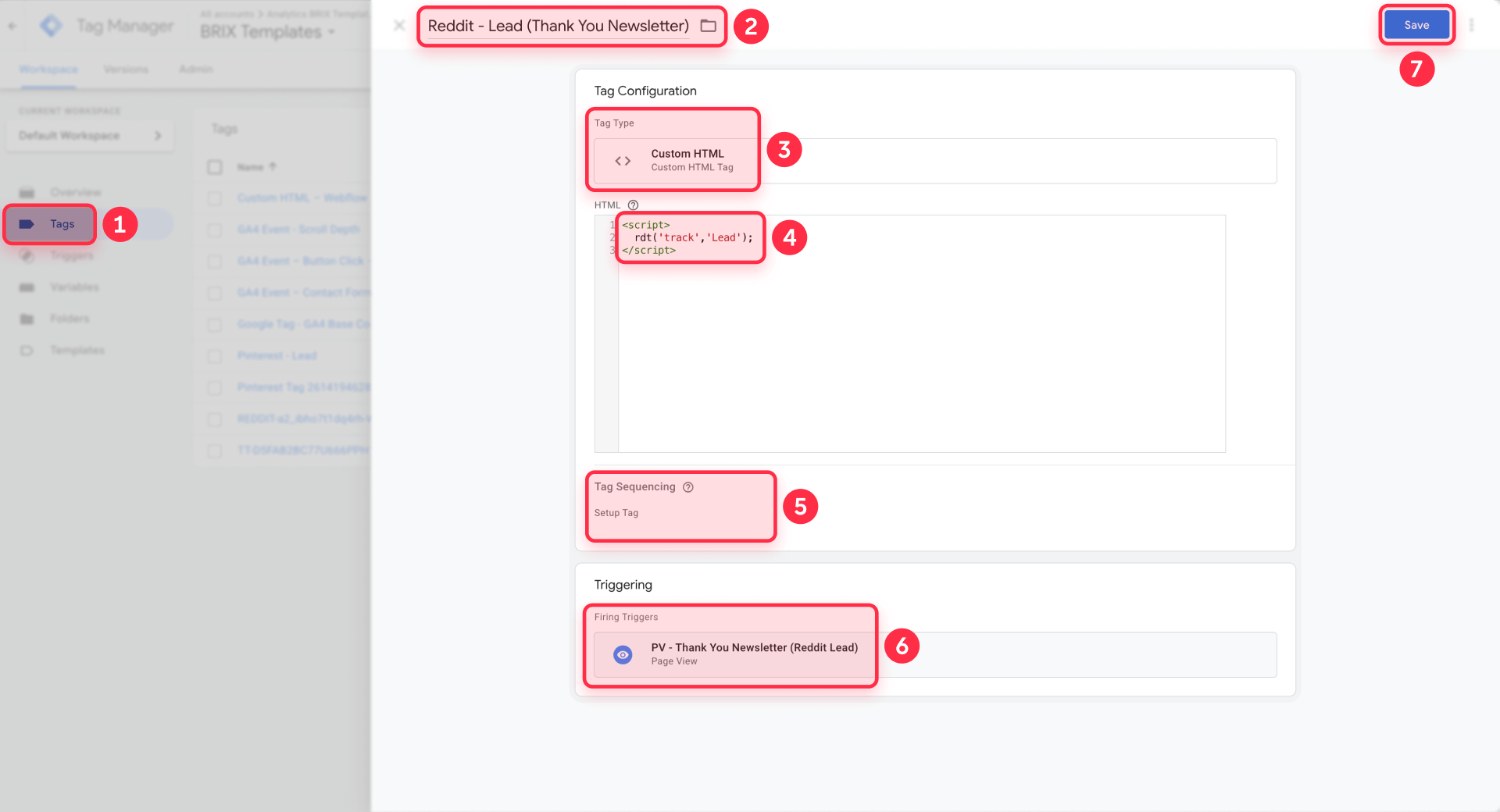
- Go to Tags → New → Custom HTML.
- Paste this conversion call:
<script>
  rdt('track','Lead');
</script>- Attach the thank-you trigger you just created.
- Enable Tag Sequencing so the Reddit base pixel fires before this Lead tag.
- Save the tag.
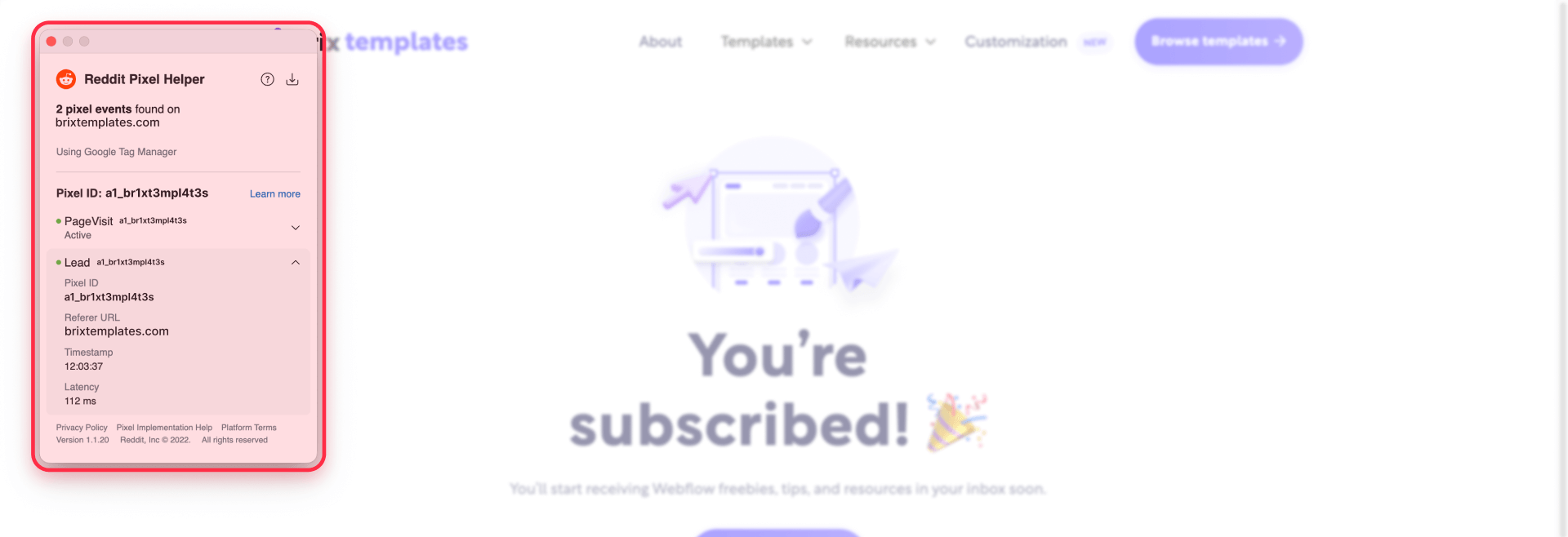
- Use GTM Preview mode to test: navigate through your form submission flow and confirm the conversion tag fires only on the thank-you page.
- When it looks correct, click Submit in GTM to publish the container.
Tip: Keep the base pixel tag on All Pages, and keep the conversion tag only on the thank-you URL. This separation makes debugging much easier.
Other common Reddit Pixel events
Reddit supports additional standard events you can implement using the same GTM pattern:
- SignUp: User completes a registration
- AddToCart: User adds a product to cart
- Purchase: User completes a transaction
- ViewContent: User views a specific page or content piece
- Custom events: You can define your own event names
For any of these, the setup is identical to the Lead example above—just swap the event name in the rdt('track','EventName') call.
Troubleshooting Reddit Pixel issues in Webflow
"No pixel found" in Reddit Pixel Helper. Confirm you published your Webflow site after adding pixel code. If using GTM, click Submit in GTM to publish the container. Test on your live domain (not preview or canvas), and disable ad blockers.
Duplicated events (double PageVisit, double Lead). You likely installed the pixel twice—check if you used both GTM and Webflow Head code. Use GTM Preview to see if multiple Reddit tags fire, then remove the duplicate.
Wrong domain showing in verification. Test on the actual domain you'll use in Reddit Ads (custom domain or Webflow staging), not in Webflow editor or preview mode.
Published but pixel still isn't firing. For GTM: verify GTM snippets are in Project Settings and the Reddit Pixel tag trigger is set to All Pages. For manual: confirm you didn't paste wrapper tags like <html> or <head>. Clear cache and test again.
GTM published in Reddit but pixel not firing. Open GTM and verify the Reddit Pixel tag exists and is set to All Pages. Use GTM Preview to confirm it fires. If the tag is missing, disconnect and reconnect your GTM account in Reddit Ads.
Which method should you choose for installing Reddit Pixel in Webflow?
Use Google Tag Manager if:
- You're managing multiple tracking pixels (Reddit, Facebook, TikTok, etc.) and want them in one place
- You need governance—GTM lets marketing teams update tags without touching Webflow custom code
- You're implementing consent management or need to control when tags fire
- You want easier debugging with GTM Preview mode
- You need to roll back changes quickly if something breaks
Use manual Webflow Head code if:
- You only need one simple pixel and rarely change tracking
- You prefer fewer moving parts in your stack
- You don't have time to set up GTM right now
Recommendation: GTM is the better long-term choice for most Webflow teams. It scales as your tracking needs grow and makes troubleshooting much faster.
Need help setting up advanced tracking, multiple conversion events, or a complete event map for your Webflow site? Our Webflow agency team can implement and audit tracking end-to-end.
Frequently asked questions about Reddit Pixel in Webflow
What is the Reddit Pixel and how does it work with Webflow?
The Reddit Pixel is a JavaScript snippet you add to your Webflow site to track visitor behavior from Reddit Ads. It records page views and conversions so you can build retargeting audiences and measure campaign performance. The most practical Webflow setup is installing the base pixel site-wide (via GTM or Head code), then firing conversion events on specific pages like thank-you pages after form submissions. Always verify the pixel is firing with Reddit Pixel Helper before launching campaigns—don't rely on delayed reporting.
How do I create a Reddit Pixel in Reddit Ads Manager?
Log into Reddit Ads, open Events Manager, select Configure data source, and choose Reddit Pixel → Set up manually. Copy your Pixel ID and base code snippet. Then deploy the code on Webflow using either Google Tag Manager (recommended) or Webflow custom code. Never reuse random pixel snippets from blogs—always copy directly from your Reddit Ads account to get the current implementation.
Should I install Reddit Pixel via GTM or Webflow custom code?
GTM is better for most teams because it centralizes tracking, makes testing easier with Preview mode, and lets you update tags without editing Webflow repeatedly. Manual Webflow Head code is simpler if you only need one pixel and rarely make changes. The critical rule: pick one method and stick to it—never install the same pixel through both GTM and Webflow or you'll create duplicate events.
Where do I paste the Reddit Pixel code in Webflow?
For a manual install, paste the base pixel code into Webflow Dashboard → Project Settings → Custom Code → Head Code (site-wide). This loads the pixel before </head> on every page. If you're using GTM, you don't paste Reddit code into Webflow at all—you paste it into a GTM Custom HTML tag instead. Never paste HTML wrapper tags like <head> or <body> into Webflow's custom code fields.
How do I track form submissions with Reddit Pixel in Webflow?
The simplest method is redirecting your Webflow form to a thank-you page (like /thank-you), then firing a Lead event only when that page loads. In GTM, create a Page View trigger for the thank-you URL and attach it to a Custom HTML tag running rdt('track','Lead'). Always test by completing the real form flow, not by visiting the thank-you URL directly—URL-based conversions can be faked but are still the most reliable no-code option for Webflow.
How do I verify the Reddit Pixel is working on my Webflow site?
Install the Reddit Pixel Helper Chrome extension, then visit your live Webflow site. The extension badge shows how many events fired, and clicking it reveals event details, errors, and recommendations. For a second check, open Chrome DevTools → Network, reload your page, and search for redditstatic to confirm the pixel script loads. Don't wait for Reddit Ads Manager reporting—it can lag by hours, while browser checks are immediate.
Can I install Reddit Pixel in Webflow without Google Tag Manager?
Yes. Copy the base pixel code from Reddit Ads and paste it into Webflow Dashboard → Project Settings → Custom Code → Head Code, then Publish your site. This is faster for simple setups but harder to maintain long-term. If you need conversion tracking on thank-you pages, you'll either need to add page-specific code manually or switch to GTM for cleaner trigger logic.
Why does Reddit Pixel Helper show "no pixel found" on my Webflow site?
First, confirm you Published your Webflow site after adding the pixel code—custom code doesn't go live without publishing. If using GTM, confirm you clicked Submit to publish the container, not just Save. Also verify you're testing on your real domain, not a Webflow preview or canvas domain. Finally, disable ad blockers and test in an incognito window—privacy extensions often block tracking scripts.
How do I avoid double-counting events with Reddit Pixel in Webflow?
Pick one install method: either deploy the pixel through GTM or paste it into Webflow Head code—never both. Double installs are the most common cause of inflated conversion counts. Use GTM Preview and Reddit Pixel Helper to confirm only one base pixel load happens per page. If you're migrating from manual to GTM, remove the old Webflow Head code snippet before publishing the GTM version.
What's the difference between Lead and SignUp events in Reddit Pixel?
Both are standard Reddit conversion events, but Lead typically tracks contact form submissions while SignUp tracks account registrations. For Webflow lead-gen funnels with a thank-you page after form submission, Lead is usually the right choice. The setup is identical—just swap the event name in your GTM conversion tag from rdt('track','Lead') to rdt('track','SignUp'). Choose the event name that matches your business goal.
Conclusion
Adding the Reddit Pixel to Webflow is straightforward once you treat it as a two-part job: install the base pixel site-wide, then verify it immediately with Pixel Helper and browser DevTools before launching ads. If you add a thank-you page conversion tracking Lead events, you'll have clean data for campaign optimization and retargeting.
The next step is implementing additional events like button clicks or exploring server-side tracking to reduce data loss from ad blockers—but those are separate builds. If you need help implementing or auditing tracking on a Webflow project, our agency team can step in and get it working end-to-end.










Join readers commenting on this post!