
Framer Enterprise is hard to evaluate for one specific reason: the line between Scale plus add-ons and Enterprise is blurry. Unlike platforms where Enterprise is a clear step above everything else, Framer's Scale plan already offers flexible limits, overage pricing, and even a Custom Proxy add-on — which means many teams can't tell if they actually need Enterprise or just a better Scale configuration.
The confusion gets worse around hosting. Framer uses the word "proxy" in at least four different contexts, and each one has different plan requirements. Add SSO, compliance artifacts, and organization-level governance to the mix, and you have a buying decision that's genuinely difficult to make without a clear breakdown.
This guide gives you a feature-by-feature delta between Framer Enterprise and standard plans, pricing context based on public references and self-serve cost modeling, and a trigger-based decision framework so you know exactly when Enterprise is justified — and when Scale is the smarter move.
Why Framer Enterprise matters for Framer sites
Understanding the strategic value of Enterprise helps you separate real blockers from problems that Scale plus add-ons can solve:
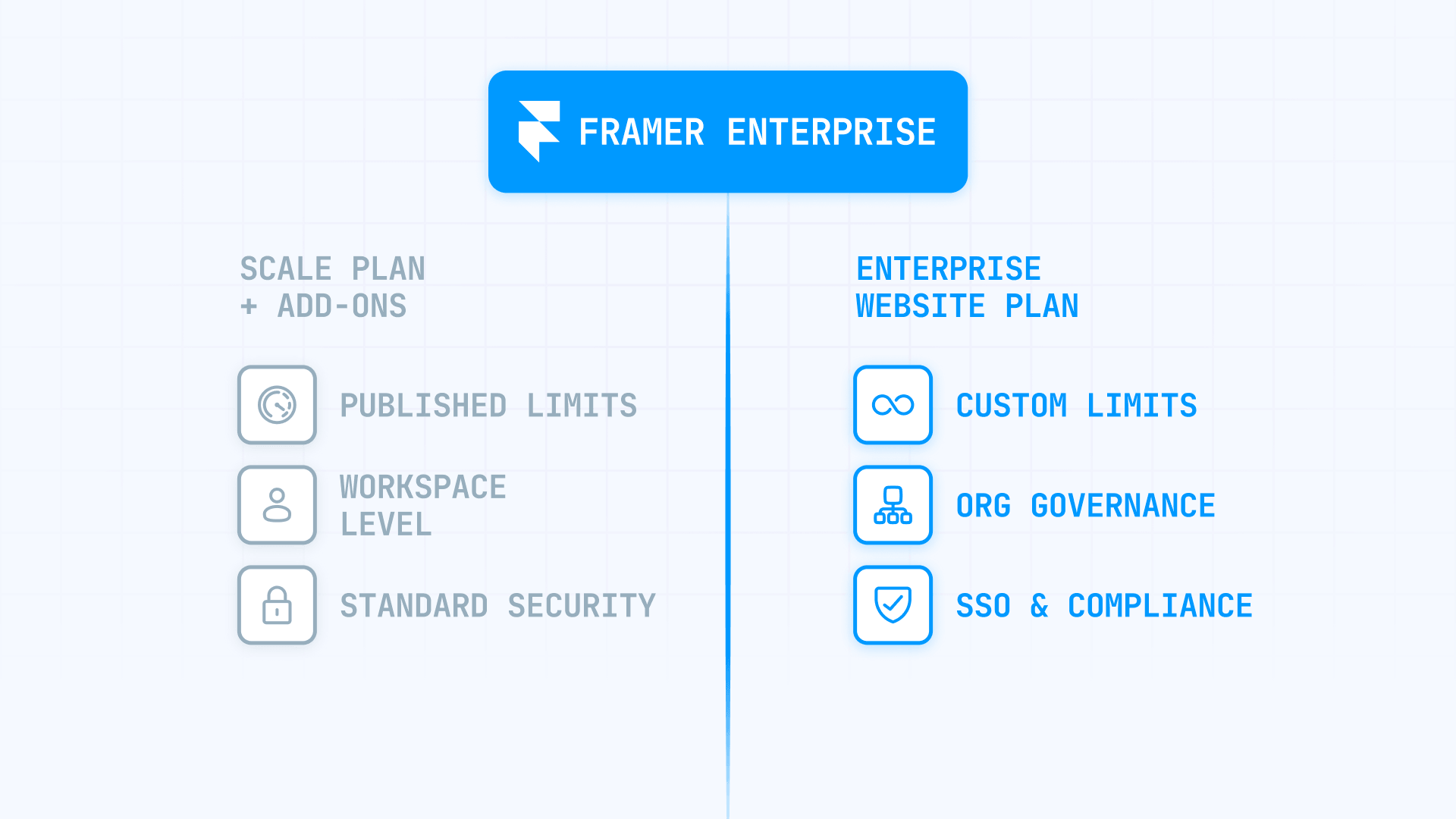
- Passing corporate security reviews: If your organization requires SSO (SAML or OIDC) or compliance documents like SOC 2 and ISO 27001, Enterprise is the only path to access those artifacts
- Centralized governance across many teams: Enterprise adds organizations as a top-level container above workspaces, enabling org-wide user management and billing — something no self-serve plan offers
- Reverse proxy and advanced hosting requirements: If your infrastructure team mandates path-based hosting (like /blog under your main domain) or you need Framer's built-in Advanced Hosting, Enterprise is required depending on the setup
- Higher reliability and incident response: Enterprise infrastructure includes 200+ hosting regions, custom DDoS mitigations, and a commitment to actively fight attacks with your team instead of potentially taking sites offline
- Procurement and predictable invoicing: Enterprise billing uses annual contracts with bi-monthly true-ups, designed for finance teams that need predictable vendor spending
- Scale beyond published caps: When your usage exceeds Scale's maximum overages (700 pages, 40,000 CMS items, 2 TB bandwidth), Enterprise is the contract path to custom limits without published ceilings
How Framer Enterprise differs from Basic, Pro, and Scale in Framer
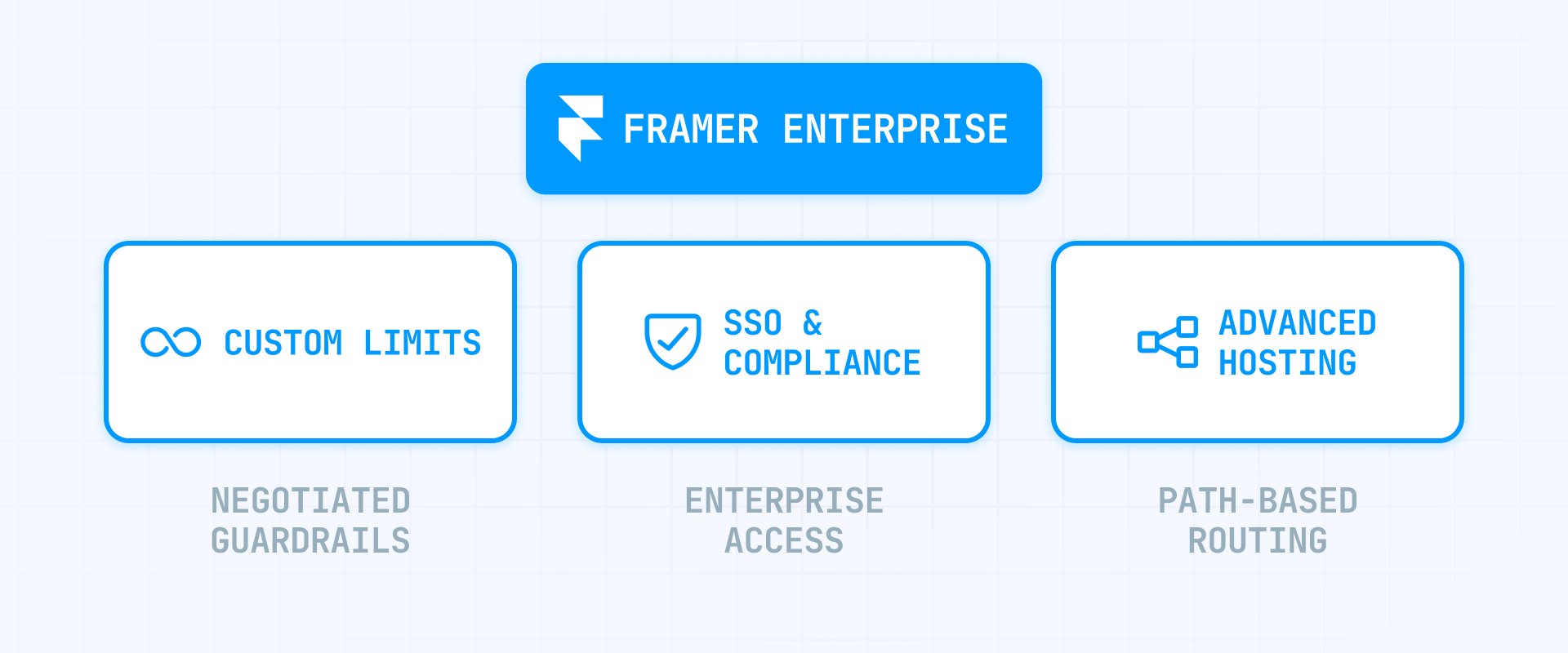
The simplest way to think about it: Scale is "pay-as-you-grow within published guardrails" and Enterprise is "you negotiate the guardrails." Before evaluating Enterprise, you need to know exactly where those guardrails are.
How Framer plan limits compare across all Framer tiers
Here's what each plan allows, presented as the key dimensions that drive upgrade decisions:
- Site pages: Basic allows 30, Pro allows 150, Scale allows 300 with paid increments up to a maximum of 700. Enterprise is custom
- CMS collections: Basic allows 1, Pro allows 10, Scale allows 20 with paid increments up to 40. Enterprise is custom
- CMS items: Basic allows 1,000, Pro allows 2,500, Scale allows 10,000 with paid increments up to 40,000. Enterprise supports up to 100,000 CMS items
- Bandwidth: Basic allows 10 GB, Pro allows 100 GB, Scale allows 200 GB with paid increments up to 2 TB. Enterprise is custom
- Editor seats: Basic allows 2, Pro allows 10, Scale allows 10. Enterprise is custom. Viewers are free across all plans
Scale's overage pricing gives you room to grow: +$20 per 100 additional pages, +$40 per 10 additional collections, +$20 per 10,000 additional CMS items, and +$40 per 100 GB additional bandwidth. These overages are meaningful — a maxed-out Scale plan can handle quite a lot before Enterprise becomes necessary.
How Framer add-ons blur the Scale vs Enterprise line in Framer
Several add-ons let Scale handle use cases that feel "enterprise" without an Enterprise contract:
- Translation locales: Up to 20 locales on Scale at $20 per locale per month — enough for most multilingual sites
- A/B testing: Available on Scale at $50 per 500,000 events — no Enterprise required for experimentation
- Custom Proxy: Listed at $300 per month on Scale, described as allowing multiple sites under one domain
The Custom Proxy is the most important one to understand. At $300 per month on top of Scale's $100 per month, you're looking at $4,800 per year for a setup that handles many enterprise-style routing needs. This is the clearest price anchor when comparing against an Enterprise quote.
What Framer Enterprise unlocks vs standard Framer plans
This section breaks down Enterprise's actual deltas by category. For each area, you'll see what changes and why it matters.
Governance and organization differences in Framer Enterprise
- Enterprise: Organizations as a top-level container above workspaces, with centralized billing and user management
- Non-Enterprise: Workspaces are the highest level, with no org-wide structure
Enterprise introduces organizations — a governance layer that sits above workspaces and enables centralized control. This means a single view of all members and roles across workspaces, centralized billing that avoids duplicate charges for users in multiple workspaces, and standardized permissions and access controls across the organization.
Enterprise workspaces also unlock additional features: access to custom code, canonical URLs, custom fonts uploaded at the workspace level, and a team library for sharing components across projects. These are practical workflow improvements, but the real Enterprise value here is the organizational structure — if you have multiple teams or workspaces, this is the governance layer that makes Framer manageable at scale.
Publishing and staging differences in Framer Enterprise
- Enterprise: Full staging workflow with Deploy permissions and enterprise-grade controls
- Non-Enterprise: Staging available on Pro and Scale (requires a connected custom domain)
Framer's publishing control works through a permission model with three granular capabilities: Design, Content, and Deploy. The key distinction is that when staging is enabled, everyone can publish to staging — but only users with Deploy permission can promote changes from staging to the live site.
Staging itself is available on Pro and Scale, not just Enterprise. But Enterprise makes staging enforceable at org scale with contract support and custom limits. If your team needs to run QA, stakeholder review, or compliance checks before production, the combination of staging plus Deploy permissions is the control mechanism.
One important detail: staging is only available when a custom domain is connected to the project. Without a custom domain, staging doesn't appear as an option.
Security and compliance differences in Framer Enterprise
- Enterprise: SSO, SOC 2 and ISO 27001 artifacts, custom HTTP security headers, custom SSL certificates
- Non-Enterprise: Standard platform security with no access to compliance documentation
SSO supports common identity providers including Google Workspace, Azure AD (Entra), OneLogin, and Okta, and works with both SAML and OAuth-based OpenID Connect. If centralized identity management is a requirement from IT, Enterprise is non-negotiable — there is no SSO on any self-serve plan.
For compliance, Framer states it has completed SOC 2 Type 1 and Type 2 audits and achieved ISO 27001 compliance. The reports, certificates, and statements of applicability are available to Enterprise customers upon request. Enterprise customers also get access to the Framer Trust Center for compliance artifacts and GDPR documentation (DPA/TIA).
Custom HTTP security headers and custom SSL certificates are Enterprise-only controls. If your security team requires specific headers for compliance (like CSP configured at the HTTP layer rather than via meta tags), Enterprise is the path.
One important unknown: Framer's official materials confirm SSO but do not confirm SCIM provisioning. If automated user provisioning and deprovisioning from your IdP is a hard requirement, verify this directly with Framer Sales during evaluation.
Hosting and infrastructure differences in Framer Enterprise
- Enterprise: 200+ hosting regions, AWS Global Accelerator, enterprise DDoS response, custom SSL, custom headers
- Non-Enterprise: 20 hosting regions on Basic and Pro, 300+ locations on Scale
The infrastructure delta between Enterprise and self-serve is significant:
Hosting reach: Standard hosting uses 13 regions (the infrastructure page number), while Enterprise guarantees 200+ regions with AWS Global Accelerator and CloudFront edge locations.
DDoS handling: This is where the delta becomes sharp. Framer's infrastructure documentation states that on self-serve plans, they may take sites down under extreme attacks. On Enterprise, they commit to "actively fight attacks, working directly with you" — with rate limiting, bot filtering, Cloudflare integration, and direct team engagement during severe incidents.
Uptime: Enterprise infrastructure claims 99.99% uptime with 24/7 monitoring. As with any SLA claim, the only definition that matters is what's written into your contract — ask for the SLA document during evaluation.
Proxy and advanced hosting differences in Framer Enterprise
This is Framer's biggest source of confusion, because "proxy" means different things in different contexts. Here's the clear breakdown:
Reverse proxy via Cloudflare, NGINX, or CloudFront — Available on Scale and Enterprise. This means you manage the proxy infrastructure yourself (Cloudflare Workers, NGINX config, CloudFront distribution) and route traffic to your Framer site. Framer provides documentation for each setup. This is for teams with specific infrastructure or policy needs like logging, routing, compliance, or traffic management.
Advanced Hosting inside Framer — Enterprise-only. This is reverse proxy functionality built directly into Framer, with no third-party infrastructure required. It allows multi-site routing and rewrites under one domain. Currently in closed beta for Pro/Scale with a signup option.
Path-based micro frontends — Enterprise-only. If your requirement is hosting Framer under a specific path like example.com/blog while the rest of the domain serves a different application, Framer explicitly requires an Enterprise plan plus a host that supports proxy rewrite rules.
Custom Proxy add-on — Available on Scale for $300 per month. Described as allowing "multiple sites under one domain." This is a self-serve add-on that covers many multi-site routing needs without requiring Enterprise.
The decision tree is simple: if you need self-managed reverse proxying, Scale works. If you need Framer-managed advanced hosting or path-based micro frontends, Enterprise is required. If you need multi-site routing under one domain, the $300 Custom Proxy on Scale might be enough.
Support and SLA differences in Framer Enterprise
- Enterprise: Direct access to Product Specialist team via Slack, Microsoft Teams, or email, plus onboarding, training, and contract-defined response SLAs
- Non-Enterprise: Standard support channels with no contractual response times
Framer's support page draws a hard line between standard and Enterprise support. Enterprise includes a dedicated support relationship with a cited median first response time of under 10 minutes over the past 90 days. When necessary, the support path escalates directly to Engineering.
If contract-level support behavior matters for your team — not just "faster replies" but defined response SLAs and onboarding support — Enterprise is the route.
Billing and procurement differences in Framer Enterprise
- Enterprise: Annual contracts with bi-monthly true-ups and invoice-based billing
- Non-Enterprise: Self-serve billing, monthly or annual (Scale is annual-only)
Enterprise billing follows a specific cadence: you sign an annual contract, and every two months Framer reviews your usage against the contract. You get notified via email or Slack, have a two-week review window to adjust, and then charges are finalized.
Billable items under Enterprise include editors and admins (viewers are free and unlimited), and projects with a custom domain or reverse proxy setup. One important gotcha: if you're downgrading a site at true-up or renewal, remove the custom domain from the project — DNS redirects alone can still count it as an active billable site.
A practical cost control move: set new users to Viewer by default. On Enterprise, new users are added as viewers automatically, which you can configure. Upgrade to editor status only when someone genuinely needs edit rights.
How much Framer Enterprise costs in Framer
Framer does not publish fixed Enterprise pricing — it's custom-quoted and sold through Sales. The pricing page shows "Custom" for Enterprise with no self-serve checkout.
What Framer Enterprise typically costs based on public references in Framer
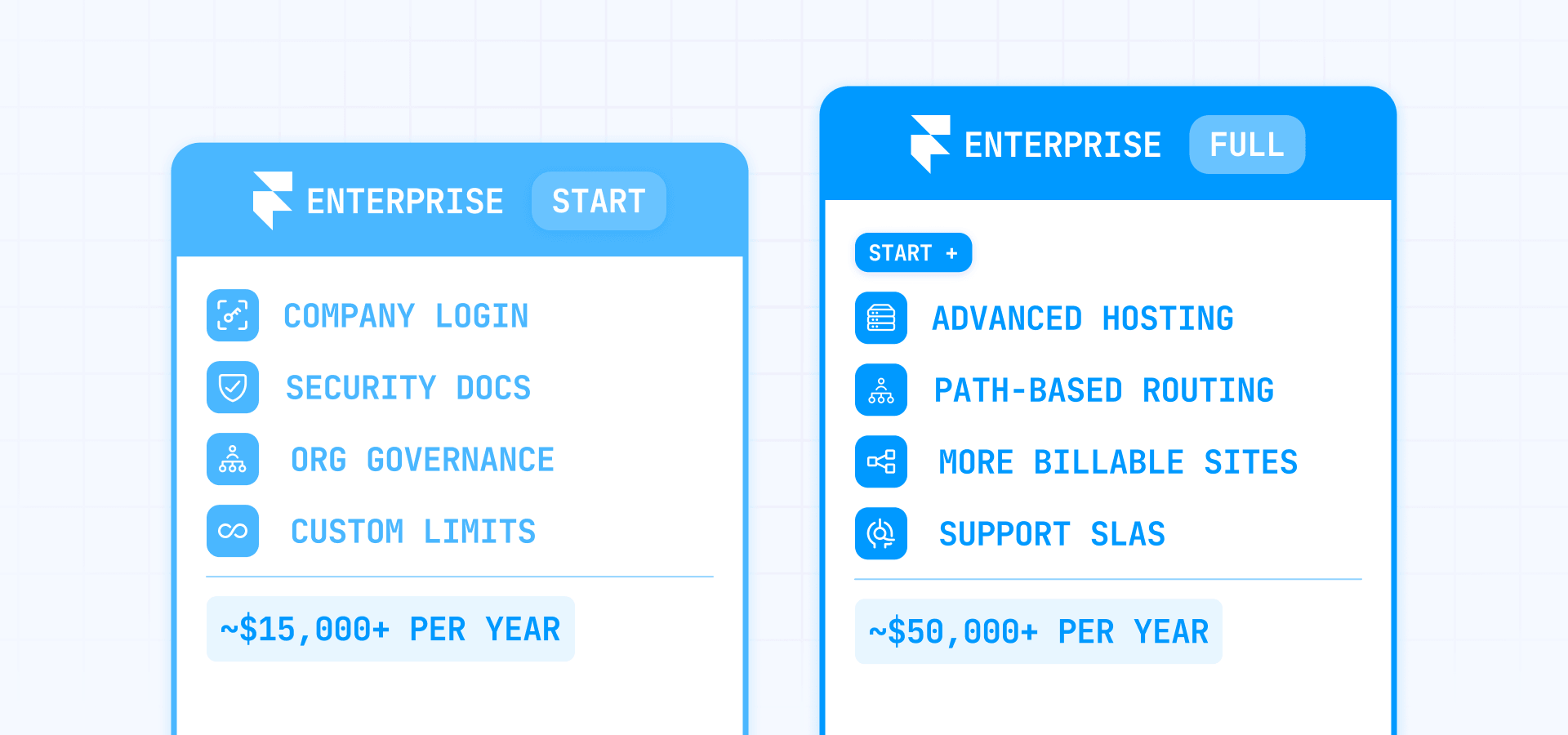
Based on public references from community discussions and agency sources, Framer Enterprise pricing starts at approximately $15,000 per year for basic Enterprise access — typically covering custom limits, enterprise security, and dedicated support for straightforward setups.
For larger organizations with more complex requirements — multiple billable sites, higher seat counts, advanced hosting, and comprehensive support SLAs — pricing can range from $20,000 to $100,000 per year depending on scope. As with any custom-quoted plan, the final number depends entirely on what you need and how you negotiate.
How much Framer Scale plus add-ons costs as a baseline in Framer
To judge an Enterprise quote, you need to know what the self-serve alternative costs:
- Scale base plan: $100 per month (annual-only) = $1,200 per year
- Scale plus Custom Proxy: $100 + $300 per month = $4,800 per year
- Scale plus max overages (700 pages, 40 collections, 40,000 CMS items, 2 TB bandwidth): approximately $3,120 per year on top of the base
- Scale fully maxed with Custom Proxy and locales: Can reach $8,000–$10,000 per year depending on locale count and overage usage
This means the self-serve ceiling is roughly $8,000–$10,000 per year before you're truly out of options. If an Enterprise quote comes in at $15,000 per year, the delta is $5,000–$7,000 — which buys you SSO, compliance artifacts, org governance, premium hosting, and enterprise support. That's a meaningful upgrade for the price if you actually need those features.
What drives Framer Enterprise pricing up or down in Framer
Based on Framer's billing documentation and the true-up model, these factors likely influence Enterprise pricing:
- Number of billable sites (projects with custom domains or reverse proxy setups)
- Editor and admin seat count (viewers are free)
- Proxy and hosting requirements (Advanced Hosting, path-based micro frontends, or custom routing complexity)
- Compliance and security needs (SSO, custom headers, custom SSL, access to audit artifacts)
- Support SLA expectations (response time commitments, dedicated Product Specialist access, engineering escalation)
The narrower your scope, the lower the price. If you only need SSO and compliance docs, that's a very different conversation than SSO plus Advanced Hosting plus 50 billable sites plus 20 editor seats.
How to decide if Framer Enterprise is worth it in Framer
Use hard triggers first, then ROI triggers.
Framer Enterprise hard-requirement triggers in Framer
If any of these are true, Enterprise is not optional — it's a requirement:
- You need SSO (SAML or OIDC): Enterprise is the only plan with SSO support — there is no alternative
- You need SOC 2 or ISO 27001 documentation: Compliance artifacts are only available to Enterprise customers upon request
- You need path-based hosting (micro frontends): Hosting Framer under a specific path like /blog explicitly requires Enterprise
- You need custom HTTP security headers: Enterprise-only control for compliance-driven header configuration
- You need enterprise incident response: The commitment to actively fight DDoS attacks with your team is Enterprise-only
- You need organization-level governance: Centralized billing and user management across multiple workspaces requires Enterprise organizations
Framer Enterprise scale and ROI triggers in Framer
Enterprise becomes financially rational when these stack up:
- You're pushing beyond Scale's published maximums (700 pages, 40,000 CMS items, 2 TB bandwidth) and need custom limits
- You need premium hosting with 200+ regions and AWS Global Accelerator for latency-sensitive workloads
- You need contract-level support with defined response SLAs and direct engineering escalation
- You need procurement mechanics (annual agreements, true-ups, invoice billing) instead of self-serve credit card payments
When Framer Enterprise is usually unnecessary in Framer
Enterprise is usually overhead if this describes your situation:
- You're building a marketing site — even a high-end one — without SSO or compliance requirements
- Your team is small enough that workspace-level roles and permissions on Pro or Scale cover governance
- You don't need path-based hosting, custom headers, or enterprise incident response
- Your biggest pain is pricing frustration, not an operational requirement — a common pattern in community discussions
How to run a Framer Enterprise evaluation in Framer
Use this process to make the decision concrete:
- List your non-negotiables — Write down requirements across security, compliance, hosting, governance, scale, and support SLAs
- Check if Scale plus add-ons solves it — Many "enterprise" needs (reverse proxy, A/B testing, localization, flexible limits) are available on Scale. Compute the total annual cost of Scale plus every add-on you'd need
- Identify the Enterprise-only blockers — If anything on your list requires SSO, compliance artifacts, org governance, path-based hosting, or custom security headers, those are Enterprise-only
- Demand contract-level precision — Ask Framer for the exact SLA terms, billable item definitions, true-up mechanics, which features are included vs billed separately, and the exact support model including response time commitments
- Decide with a single sentence — If Enterprise removes a blocker that Scale plus add-ons cannot solve, buy it. If your needs fit within Scale's published guardrails, stay on Scale and save the budget
Frequently asked questions about Framer Enterprise in Framer
What is Framer Enterprise and how does it differ from Framer Scale?
Framer Enterprise is a contract-based plan designed for teams that need custom limits, enterprise security, and dedicated support. The core difference from Scale is operational: Scale is self-serve with published limits and overage pricing, while Enterprise lets you negotiate custom limits, adds organization-level governance, and unlocks security features like SSO and compliance artifact access. If your needs fit within Scale's maximums (700 pages, 40,000 CMS items, 2 TB bandwidth) and you don't need SSO or org governance, Scale is usually the better fit.
Does Framer Enterprise include SSO and which identity providers are supported?
Yes, Framer Enterprise supports SSO with providers including Google Workspace, Azure AD (Entra), OneLogin, and Okta. It supports both SAML and OAuth-based OpenID Connect protocols. SSO is exclusively Enterprise — there is no way to get it on Basic, Pro, or Scale. One thing to verify during evaluation: Framer's public documentation confirms SSO but does not explicitly confirm SCIM provisioning. If automated user lifecycle management from your IdP is required, ask Framer Sales directly.
Can Framer Enterprise provide SOC 2 and ISO 27001 compliance documents?
Framer states it has completed SOC 2 Type 1 and Type 2 audits and achieved ISO 27001 compliance. The reports, certificates, and statements of applicability are available to Enterprise customers upon request. Enterprise customers also get access to the Framer Trust Center for additional compliance artifacts and GDPR documentation. If compliance is your trigger for Enterprise, ask for the exact documents during evaluation and confirm delivery timelines as part of procurement.
How much does Framer Enterprise cost per year?
Framer does not publish fixed Enterprise pricing — it's custom-quoted. Based on public references, pricing starts at approximately $15,000 per year for basic Enterprise access, and can range from $20,000 to $100,000 per year for larger organizations with complex requirements. For context, a fully maxed Scale plan with Custom Proxy and add-ons can reach $8,000–$10,000 per year, which means the delta to Enterprise starts around $5,000–$7,000 for the additional features. The final price depends on billable sites, seat count, hosting requirements, and support SLA expectations.
What is the difference between Framer reverse proxy, Advanced Hosting, and Custom Proxy?
This is Framer's most confusing area. Reverse proxy (Cloudflare, NGINX, CloudFront) means you manage the proxy infrastructure yourself and is available on Scale and Enterprise. Advanced Hosting is reverse proxy functionality built into Framer with no third-party infrastructure — it's Enterprise-only. Custom Proxy is a Scale add-on at $300 per month that allows multiple sites under one domain. And path-based micro frontends (hosting Framer under a path like /blog) explicitly requires Enterprise. Choose based on who manages the infrastructure and how the routing works.
How do Framer Enterprise true-ups and billing work?
Framer Enterprise uses annual contracts with bi-monthly true-ups. Every two months, Framer reviews your usage and sends notifications via email or Slack. You get a two-week review window to adjust before charges are finalized. Billable items include editors and admins (viewers are free), and projects with a custom domain or reverse proxy setup. To control costs, set new users to Viewer by default and remove custom domains from projects you intend to downgrade before the true-up window closes.
Does Framer Enterprise offer a 99.99% uptime SLA?
Framer's Enterprise infrastructure page claims 99.99% uptime with 24/7 monitoring. However, the marketing page does not define the SLA terms in detail. In a real procurement context, the only definition that matters is what's written into your Enterprise agreement — including what counts as downtime, exclusions, credit mechanisms, and response times during incidents. Ask for the written SLA terms during evaluation and confirm scope before signing.
What hosting improvements does Framer Enterprise provide over Scale?
Enterprise infrastructure includes 200+ hosting regions with AWS Global Accelerator and CloudFront edge locations, compared to standard hosting's 13 regions. The DDoS response also changes significantly: on self-serve plans, Framer may take sites down under extreme attacks, while on Enterprise they commit to actively fighting attacks alongside your team. Enterprise also adds custom SSL certificates and custom HTTP security headers. If your workload is latency-sensitive or your site faces regular attacks, the infrastructure upgrade is substantial.
Is Framer Enterprise worth it for agencies managing multiple client sites?
For most agencies, no — unless client contracts specifically require SSO, compliance artifacts, or enterprise incident response. Scale plus the Custom Proxy add-on handles multi-site routing at $4,800 per year, and Scale's overage pricing accommodates growth without a contract commitment. Enterprise becomes worth it for agencies when clients demand security documentation, when you need org-level governance across many workspaces, or when your total billable site count and seat volume make the contract pricing more predictable than à la carte Scale billing.
How do I evaluate whether Framer Scale plus add-ons is enough vs Enterprise?
Start by listing every requirement your team has across security, compliance, hosting, governance, and support. Then check each one against Scale's capabilities: reverse proxy support, A/B testing, localization, flexible limits with overages, and the Custom Proxy add-on. If everything on your list can be solved by Scale plus add-ons, compute the total annual cost and compare it to an Enterprise quote. Enterprise is only justified when it removes a blocker that Scale cannot address — typically SSO, compliance artifacts, path-based hosting, org governance, or enterprise incident response.
Conclusion
Framer Enterprise is worth it when you need contract-grade operations: SSO, compliance artifacts, organization-level governance, enterprise hosting controls, path-based micro frontends, and dedicated incident response — things that Pro and Scale are not designed to guarantee. If your needs are "normal growth" (more pages, CMS items, bandwidth) or basic governance (roles plus staging), you'll usually get better ROI from Scale plus only the add-ons you truly need.
The sharpest evaluation approach is to list your non-negotiables, check if Scale plus add-ons solves them, identify any Enterprise-only blockers, and demand contract-level precision from Sales before signing. Framer Enterprise is a contract product — treat the buying process accordingly.
If you're evaluating Enterprise for your site and want a second opinion on the security, proxy, and governance requirements — our Framer Enterprise agency can help you scope the right plan and implement the setup end-to-end.







Join readers commenting on this post!