
Framer's pricing structure can feel overwhelming at first glance. With site plans, editor seats, and add-ons all priced separately, it's easy to get confused about which combination makes the most sense for your project. Choosing the wrong plan can lead to overpaying for features you don't need or worse, hitting unexpected limitations just as your site starts gaining traction.
The main challenge when evaluating Framer is understanding how its different pricing components work together. This guide will help you navigate Framer's pricing structure, explaining not just what each option costs, but why you might need it. You'll learn how site plans work, what limitations to consider, and how to make the smartest decision for your specific needs in 2026.
Why understanding Framer pricing matters
Before diving into the plans, it's crucial to understand the philosophy behind their structure. Framer has separated its pricing into modular components to serve different user profiles, from freelancers to agencies. Understanding this separation is key to accurate and scalable budgeting.
Avoid hidden costs: Knowing that Editors and Add-ons are billed separately from Site Plans lets you calculate the true total cost of your project without surprises. For a complete picture of how platform fees, agency costs, and add-ons combine into a total budget, check our breakdown of Framer website costs.
Plan for growth: Understanding each plan's limits (like bandwidth and CMS items) helps you choose a plan that not only works today but can scale with your success tomorrow.
Optimize your investment: By knowing exactly what each tier includes, you can avoid paying for enterprise features you don't need, or conversely, ensure you have the right tools for your goals.
Framer site plans in 2026
Framer offers five site plan tiers: Free, Basic, Pro, Scale, and Enterprise. Each tier unlocks more pages, CMS capacity, bandwidth, and professional features. Basic and Pro plans are available with annual billing, with significant discounts compared to monthly. Scale is billed annually only, and Enterprise requires contacting sales. Additionally, Framer offers a generous free plan for Students.
Free plan
Perfect for learning Framer or testing ideas. You can build and test as many projects as you want for free.
- CMS: 10 collections
- Pages: 1,000
- Storage: 5 MB for file uploads
- Domain: framer.website subdomain
- Branding: Includes "Made in Framer" badge
- Editors: Up to 3 in workspaces without a subscription
- Localization: One free locale to try
Basic plan
The ideal starting point for students, freelancers, and small studios looking to publish a creative personal site.
- Price: $10/month billed annually
- Pages: Up to 30
- Bandwidth: 50 GB
- CMS: 2 collections, 1,000 items
- Custom domain: Yes, with a free .com included on yearly billing
- Analytics: 30-day history
- Key features: Password protection, site search, AI-powered design tools, fast and secure hosting, built-in SEO, 20 hosting locations
Pro plan
The go-to plan for growing professional sites that need staging environments, redirects, and more CMS capacity.
- Price: $30/month billed annually
- Pages: Up to 150
- Bandwidth: 100 GB
- CMS: 10 collections, 2,500 items
- Analytics: 90-day history
- Key features: Staging and instant rollback, roles and permissions, relational CMS, site redirects, add-ons for Convert and multiple locales, 20 hosting locations
Scale plan
The most powerful plan for agencies, startups, and companies that run their full marketing stack on Framer. Scale is billed annually only and includes flexible expansion add-ons to grow beyond the base limits.
- Price: $100/month, annual only, plus usage
- Pages: 300 included (expandable up to 700 max)
- Bandwidth: 200 GB (expandable to 2 TB)
- CMS: 20 collections (expandable to 40), 10,000 items (expandable to 40,000)
- Hosting: 300+ global locations
- Analytics: 90-day history
- Key features: Custom locale regions, events and funnels, priority support, premium CDN, flexible limits, Advanced Hosting (add-on)
Scale's flexible expansion model means you only pay for what you use beyond the base limits. Expansion pricing:
- Pages: +$20 per 100 additional pages (up to 700 total)
- CMS collections: +$40 per 10 additional collections (up to 40 total)
- CMS items: +$20 per 10,000 additional items (up to 40,000 total)
- Bandwidth: +$40 per 100 GB additional (up to 2 TB total)
Enterprise plan
A custom solution for large organizations requiring compliance, dedicated support, and custom limits.
- Price: Custom (contact sales)
- CMS: Up to 100,000 items
- Uptime: 99.99% with fixed SLAs
- Key features: Custom limits, enterprise security, dedicated support, custom contracts
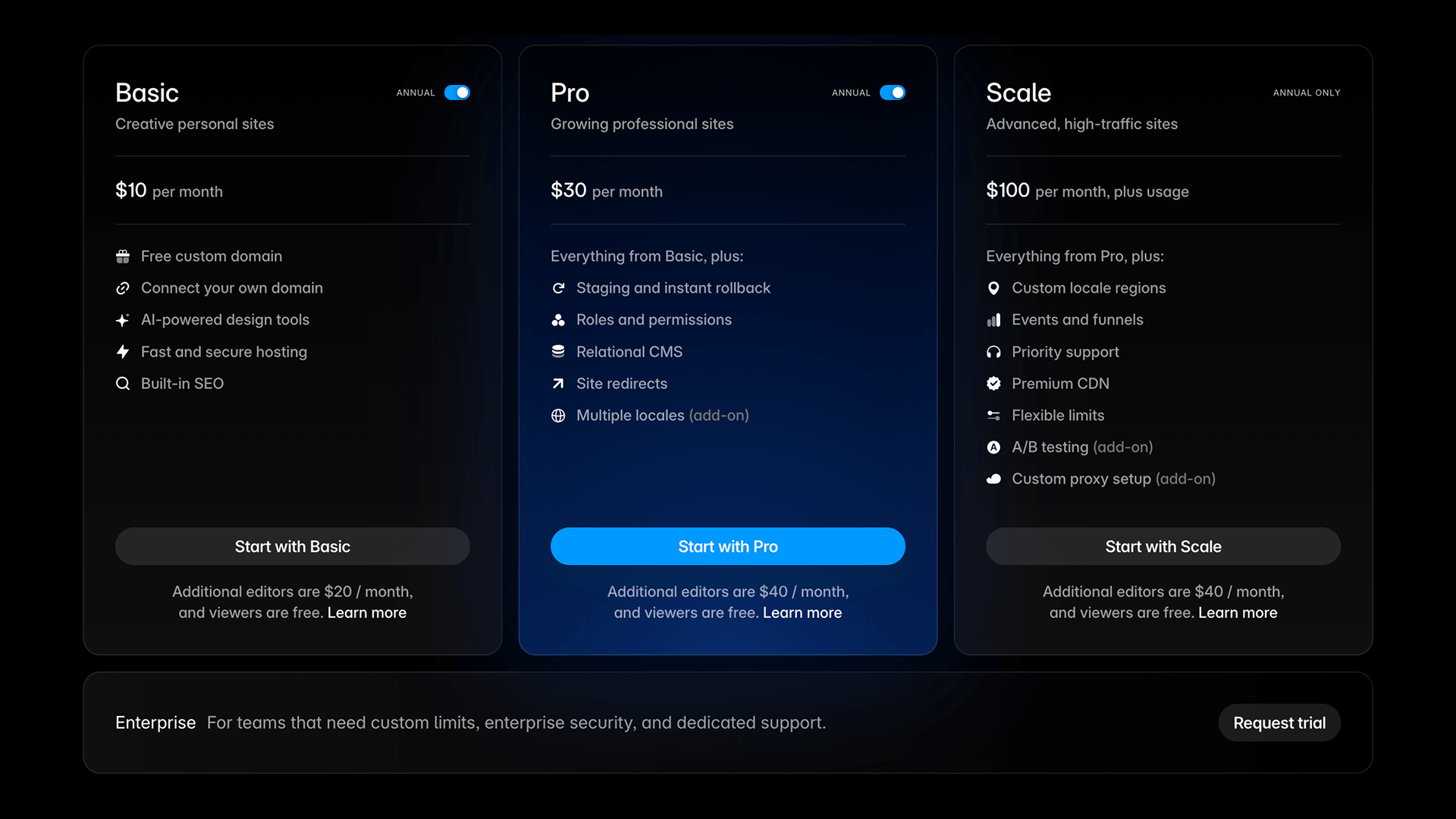
For more details about Framer plans, visit the official Framer pricing page.
Student plan (Free)
Framer offers a generous program for students that removes the economic barrier to learning and building.
- Price: Free (worth $120/year)
- Includes: All Basic plan features, plus AI tools like Wireframer and Workshop, allowing you to host your portfolio or personal site on a custom domain at no cost
- Eligibility: You must be enrolled in a certified program (high school, college, or university). You can reapply for the discount every 11 months
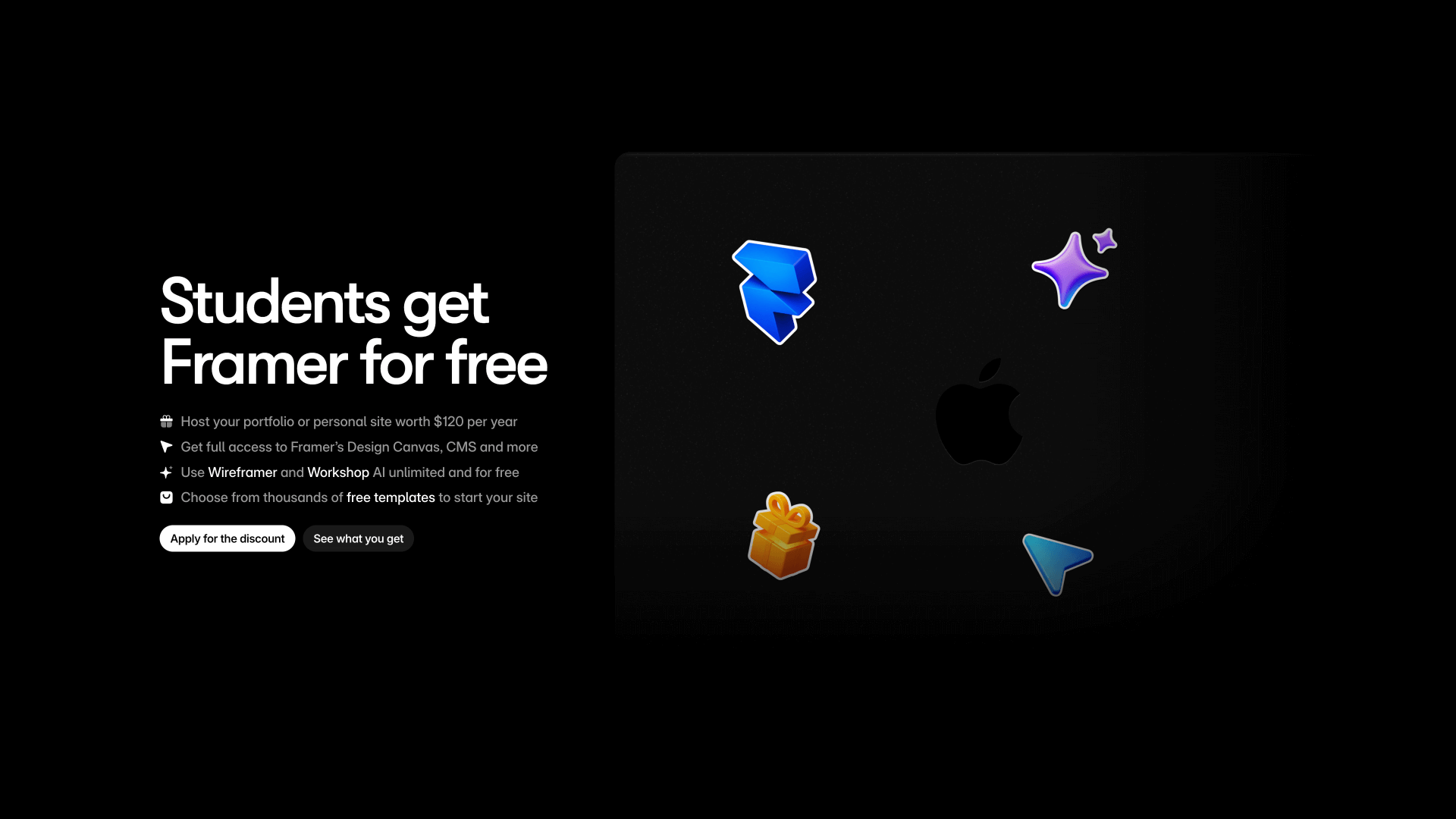
More information: To apply and see all details, visit the official Framer for Students page.
Editors in Framer: How collaboration works
This is where Framer's pricing structure becomes clearer: site plans are for hosting, and Editor seats are for collaborating. The workspace owner is always included for free, and viewers can view and add comments at no cost.
Editor pricing and limits depend on your plan:
Basic plan:
- Maximum of 2 editors
- Each editor costs $20/month billed annually
Pro plan:
- Maximum of 10 editors
- Each editor costs $40/month billed annually
Scale plan:
- Maximum of 10 editors
- Each editor costs $40/month billed annually
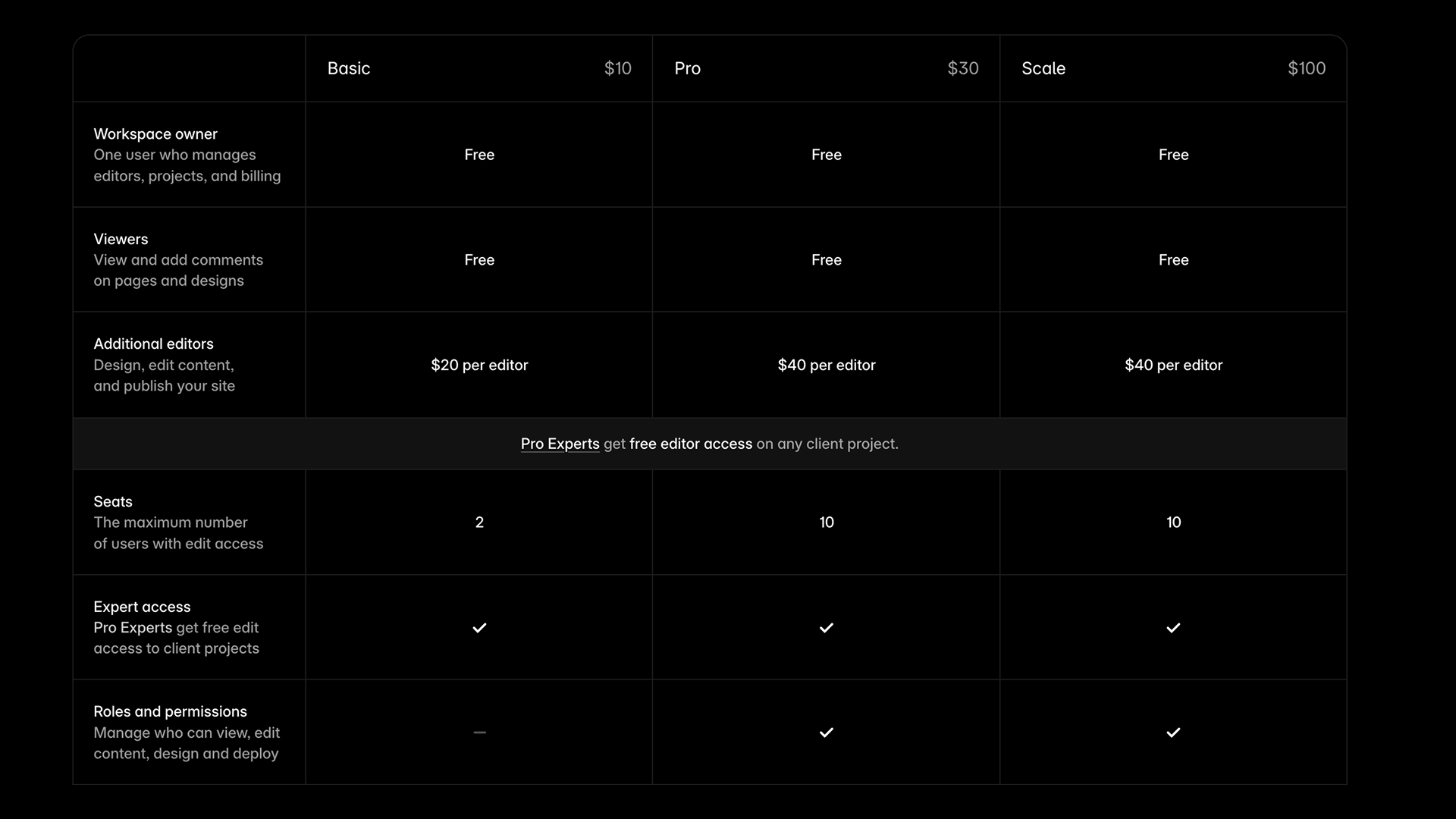
If your workspace includes a mix of plans, editors are charged and limited according to the highest tier plan.
Framer add-ons: How to extend your plan
As your site grows, you might need additional features offered as paid add-ons.
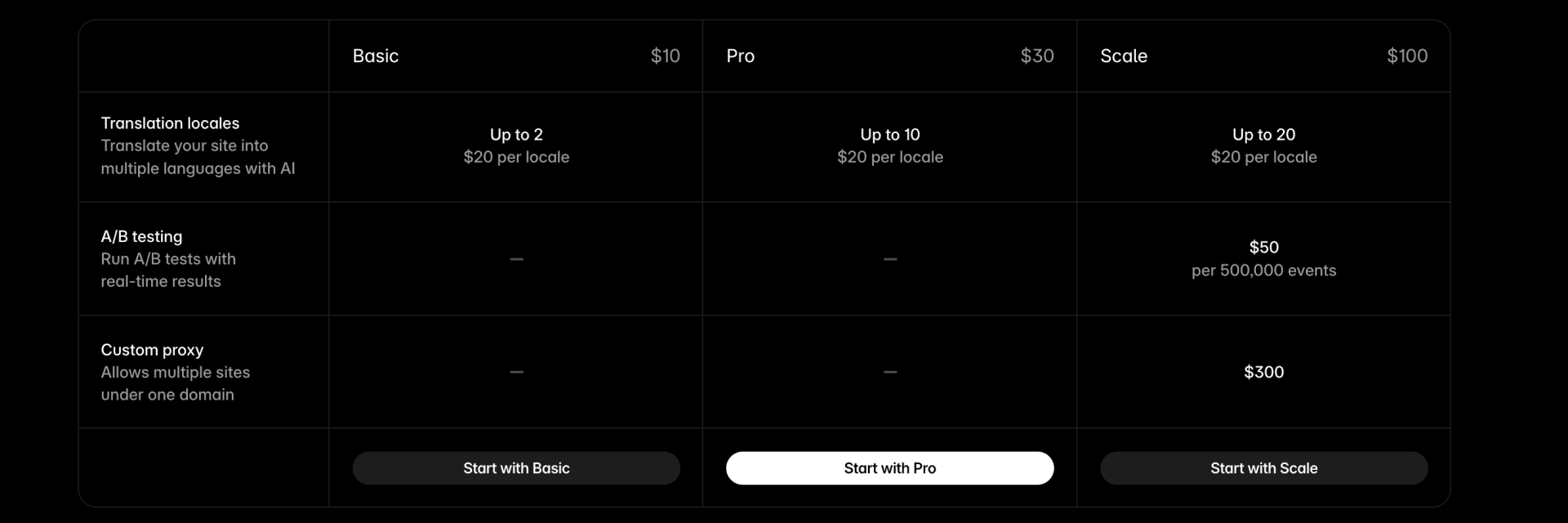
Localization: Translate your site into multiple languages with AI. Pricing is per additional locale (language or region), and the maximum number of locales depends on your plan.
Basic plan: Up to 2 locales — $20/month billed annually per locale
Pro plan: Up to 10 locales — $20/month billed annually per locale
Scale plan: Up to 20 locales — $20/month billed annually per locale
Convert (A/B testing): Run A/B tests and optimize your site's performance.
- Convert: $50 per 500,000 events
Advanced Hosting: Multiple sites and custom headers under one domain.
- Available on the Scale plan: $200/month
- Includes: Up to 6 rewrites, custom values for Permissions-Policy, Referrer-Policy, and X-Frame-Options headers, and up to 50 static files
How to choose the right Framer plan for you
Choosing the right plan requires an honest assessment of your needs. Before deciding, consider these two major factors:
1. Hosting and content limits
- Pages and CMS: How many static and dynamic pages (CMS items) do you need? Remember that each CMS item counts as a page.
- Bandwidth and storage: Will your site have many images or videos? Calculate your estimated bandwidth usage to avoid surprises. If you're concerned about exceeding your plan's allocation, our guide to reducing Framer bandwidth consumption covers practical strategies from quick wins to advanced implementations.
- Form submissions and version history: How many interactions do you expect and how important is being able to restore old versions?
2. Key functionality
- Do you need a custom domain? If yes, the Free plan is out.
- Do you need to password-protect your site? This feature starts with the Basic plan. If you also need redirects or staging, you'll need Pro.
- Do you need events, funnels, or A/B testing? If so, you'll need Scale for events and funnels, or the Convert add-on for A/B testing.
Troubleshooting common issues
- I've exceeded my bandwidth or visitor limit: Framer sends you an email warning when you reach your limits and allows you to exceed them for one month. This gives you time to decide if you need to upgrade your plan.
- I need more editors: The Basic plan allows a maximum of 2 editors. If your team needs more collaborators, upgrade to the Pro or Scale plan, which allow up to 10 editors.
- I chose the wrong plan, can I change it?: Yes, you can upgrade or downgrade your plan at any time. When upgrading, you're automatically credited for the unused portion of your current subscription.
Frequently asked questions about Framer pricing
What's the main difference between Framer's plan tiers?
The key difference across tiers isn't just higher limits, but exclusive features. The Basic plan covers essentials like a custom domain, password protection, and AI-powered design tools. Pro adds staging and instant rollback, roles and permissions, relational CMS, and more CMS capacity. Scale unlocks custom locale regions, events and funnels, priority support, premium CDN, and flexible expansion for pages, bandwidth, and CMS items.
Do I need a separate site plan for each website in Framer?
Yes, in Framer, pricing is per site. Each project you publish to a custom domain requires its own site plan. However, unlike other platforms that might limit the number of projects you can have, Framer lets you manage unlimited sites from a single account.
Is A/B testing included in any Framer plan?
A/B testing isn't included by default. It's available as the Convert add-on, priced at $50 per 500,000 events. Scale includes events and funnels, plus 90-day analytics history.
If I have multiple site plans, how are editors charged?
Editor seats are billed according to the highest-tier site plan in your workspace. For example, if you have one site on the Basic plan and another on the Pro plan, all your editors will be billed at the Pro rate ($40 per editor billed annually).
Can I transfer a site to a client after building it in Framer?
Yes, you can build the site in your own account and then transfer complete ownership to the client. Alternatively, you can create a dedicated "Team" for each client and invite them to it so they can set up their own billing.
What's Framer's refund policy?
If you live in the EU or Turkey, you're legally eligible for a refund if your subscription was purchased within the last 14 days. To request it, you must contact Framer's support team.
What happens if I exceed my bandwidth or visitor limit in Framer?
Framer sends you an email warning when you reach your limits and allows you to exceed them for one month. This gives you time to decide if you need to upgrade your plan before service is affected.
What do I do if my team needs more than 2 editors on the Basic plan?
The Basic plan allows a maximum of 2 editors. If your team needs more collaborators, you'll need to upgrade to the Pro or Scale plan, both of which allow up to 10 editors.
Can I change my Framer plan if I chose the wrong one?
Yes, you can upgrade or downgrade your plan at any time. When upgrading, you're automatically credited for the unused portion of your current subscription. If downgrading, the unused balance is added as credit to your account for future bills.
Is Framer cheaper than Webflow?
The pricing comparison is complex. For small sites, Framer's Basic plan ($10/month billed annually) is often more affordable than Webflow's equivalent tier. However, as sites grow and require more CMS features or team capabilities, pricing can become very similar. The best choice depends on your specific feature needs and which platform makes you more productive. For a side-by-side look at Webflow's plan structure and add-on costs, see our Webflow pricing explained guide.
Conclusion
Framer's pricing structure in 2026, while modular, is designed to offer clear value at every level. The Free plan is perfect for getting started, Basic and Pro cover individuals and growing teams, and Scale unlocks the advanced tools companies need to grow. By understanding the distinction between site plans, editors, and add-ons, you can make an informed decision that fits both your budget and ambitions.
If after reading this guide you still have questions about which combination of plans is ideal for your project, our team of Framer experts can help you design a custom solution that maximizes your investment and drives your growth.







Join readers commenting on this post!