

Framer is one of the strongest visual site builders available today. The design experience is fast, hosting is solid, collaboration works well, and the CMS is more capable than many teams expect. But choosing Framer based on how good it feels during a demo is how teams end up surprised six months after launch.
The real question is whether Framer fits your content needs, multilingual plans, team workflows, hosting requirements, and long-term ownership goals — or whether it becomes the wrong platform once the site grows past a brochure. Real limitations exist around portability, custom code, CMS ceilings, localization routing, and enterprise-level controls that no amount of visual polish eliminates.
This guide covers each limitation with enough detail for technical teams to evaluate accurately, while keeping the business impact clear for decision-makers. For each one, you'll learn whether there's a practical workaround or whether it's a hard blocker that should change your platform choice.
Why Framer limitations matter before you commit
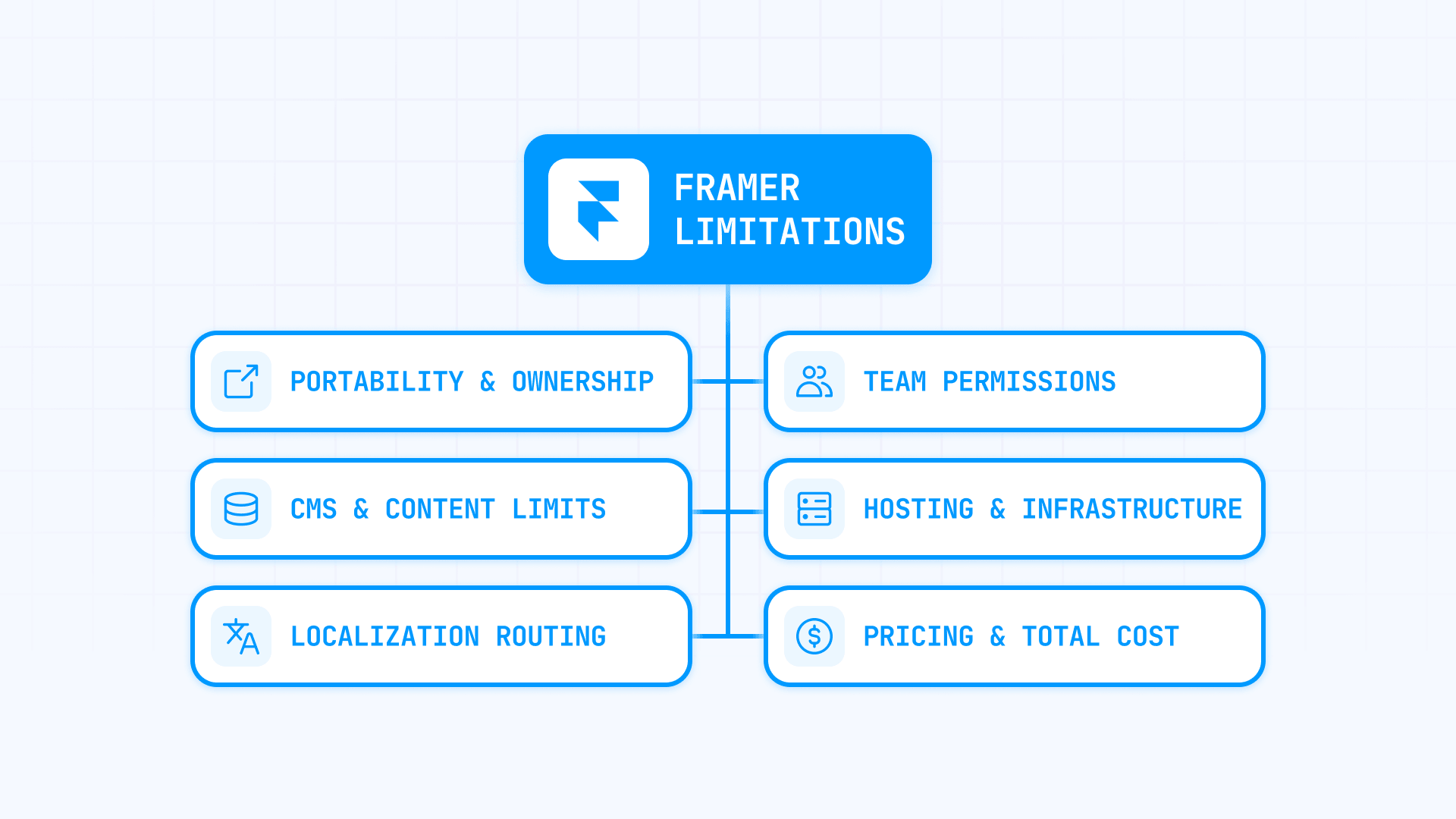
A serious Framer evaluation isn't about finding flaws. It's about making sure the platform matches your operating model:
- Portability: Framer does not export to HTML. Even reverse-proxy setups keep Framer as the content origin. If owning your codebase matters long-term, this is the first thing to evaluate
- Content scale: Self-serve caps on pages, CMS items, and bandwidth are real. Scale add-ons extend those limits, but there's a ceiling before Enterprise becomes the only option
- Multilingual routing: Framer localization works well for simple setups, but Automatic Locale has specific routing constraints that break assumptions for complex multilingual sites
- Team controls: Framer has solid Design, Content, and Deploy permissions, but enterprise-level access controls, SSO, and org-wide management require Enterprise
- Hosting and delivery: Vanilla Framer hosting is straightforward. But once you need multiple systems under one domain, custom routing, or security headers, you're in proxy, Multi Site, or Enterprise Advanced Hosting territory
- Total cost: Framer pricing combines a site plan, paid editor seats, and add-ons for locales, A/B testing, and proxy hosting. The base number and the real number are often very different
Hard blockers in Framer that no plan upgrade fixes
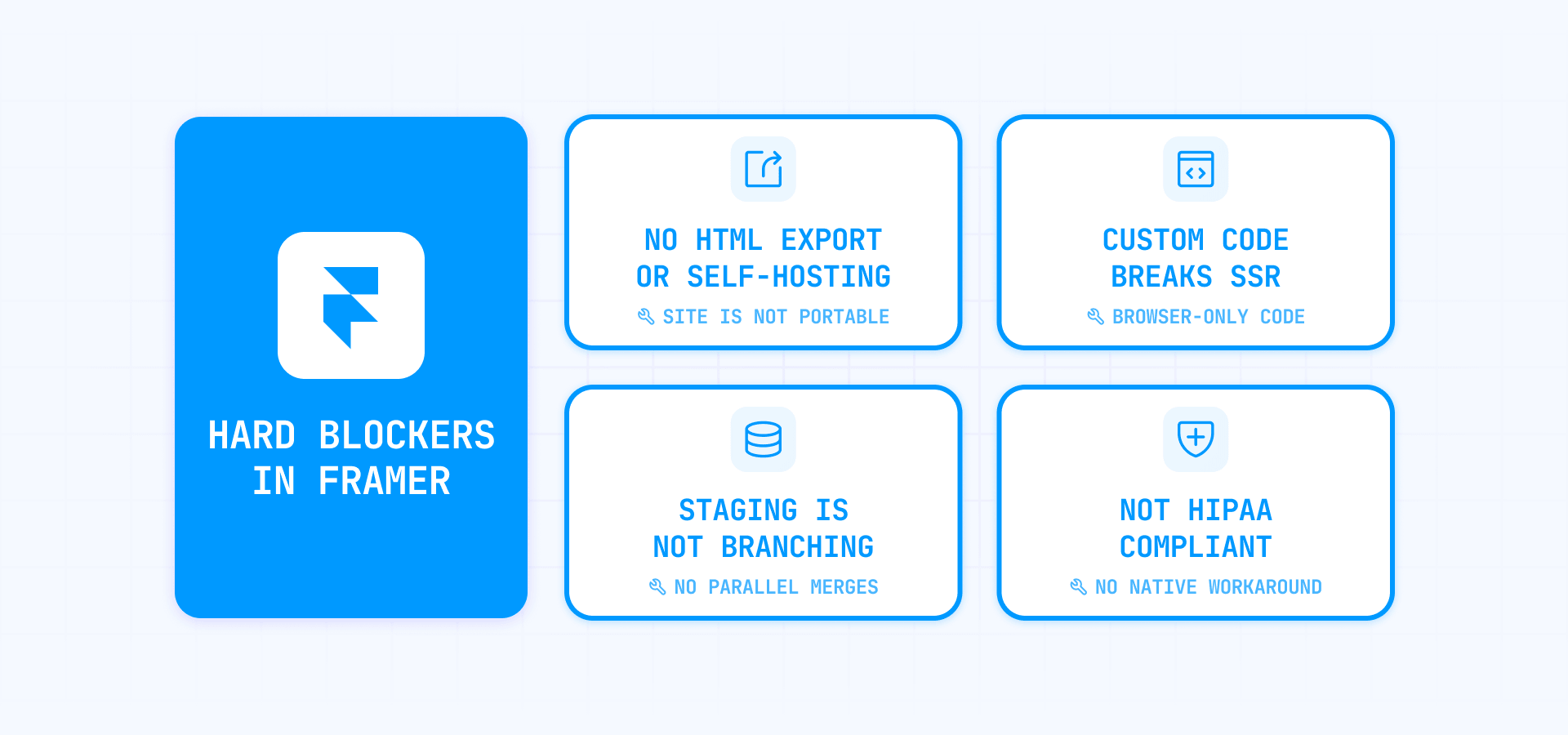
These are limitations where spending more doesn't help. If any of these apply to your project, they should change your platform decision entirely.
Framer does not let you export or self-host your site
Framer explicitly states it does not offer HTML export for self-hosting. Published sites depend on backend services like pre-rendering, image resizing, and font subsetting — so "we can always export later" is not a valid assumption.
Even reverse-proxying through Cloudflare, NGINX, or CloudFront doesn't change this. You gain control over routing, headers, and caching, but Framer remains the origin that serves the content. It's a hosted platform, not a static site generator.
That said, lock-in doesn't have to mean losing your content. Plugins like CMS Export, Locale Sync, and external sync tools like Contentful or Google Sheets let you keep your content source-of-truth outside Framer — so even if the site itself isn't portable, your content always is. But if your team requires a self-hosted codebase as a hard requirement, Framer is the wrong platform and no workaround changes that.
Framer custom code can break rendering and SEO
Framer supports code components, overrides, Fetch, and webhooks — but its rendering model is server-side first. That means Framer renders pages on the server before they reach the browser. Code that assumes a browser environment — using APIs like window, document, or navigator — breaks during that server pass.
When this happens, Framer falls back to client-side rendering, which means affected pages lose server-side rendering, bundling, minification, and Core Web Vitals quality. For a marketing site, that translates directly to worse SEO and slower page loads.
The fix is architectural. Use useEffect and placeholder patterns so browser-only code runs after the page loads, not during server rendering. For API calls that need secret keys, move the logic into a backend wrapper on Cloudflare Workers or Vercel Functions and have Framer Fetch read from that. For authentication or memberships, dedicated plugins like Outseta, Gately, or Thenty are cleaner than building custom code. And if tracking scripts like GTM or GA hurt performance, the 3rd-Party Optimizer plugin helps.
But if your site genuinely needs app-style runtime behavior inside the page layer — not just a few interactive components, but deep client-side logic throughout — Framer stops being the right tool.
Framer staging works for websites, not for software-style releases
Framer's staging lets you publish to a staging environment, keep a live version on the custom domain, use preview links, and restore from earlier versions. For most marketing teams, that's genuinely enough.
But it's a snapshot and rollback system. There's no parallel branching where two people work on different versions of the same page and merge the results — like page branching in Webflow Enterprise, for example (read our analysis here). Teams that operate their website like a software product with feature branches and automated testing will find Framer's staging helpful but limited.
The practical approach: use Deploy permissions to control who can push staging to production, keep most collaborators on Content or Design roles, and treat staging as your QA gate. If you need Git-style release engineering, you're looking at a code framework like Next.js or Astro — that's not a Framer-specific gap, it's a limitation of visual site builders as a category.
Framer is not HIPAA compliant
Framer explicitly states it is not designed for HIPAA compliance and should not be used to create, maintain, or transmit PHI (Protected Health Information). This applies to all plan levels including Enterprise.
The workaround is straightforward: don't use Framer forms for any health-related data collection, don't publish PHI anywhere on the Framer site, and route all regulated workflows through compliant third-party tools. Jotform HIPAA, Formstack, or Paubox Forms handle compliant form collection and can be embedded or linked from your Framer pages.
Framer handles the brand and marketing experience. Everything involving patient data lives somewhere else entirely. But if the Framer page itself must handle protected health information, there is no workaround — choose a different platform.
CMS and content limitations in Framer
Framer's CMS can power blogs, resource centers, and product catalogs without issues. The limitations show up when a simple content setup quietly grows into something much larger.
Where Framer CMS limits become real
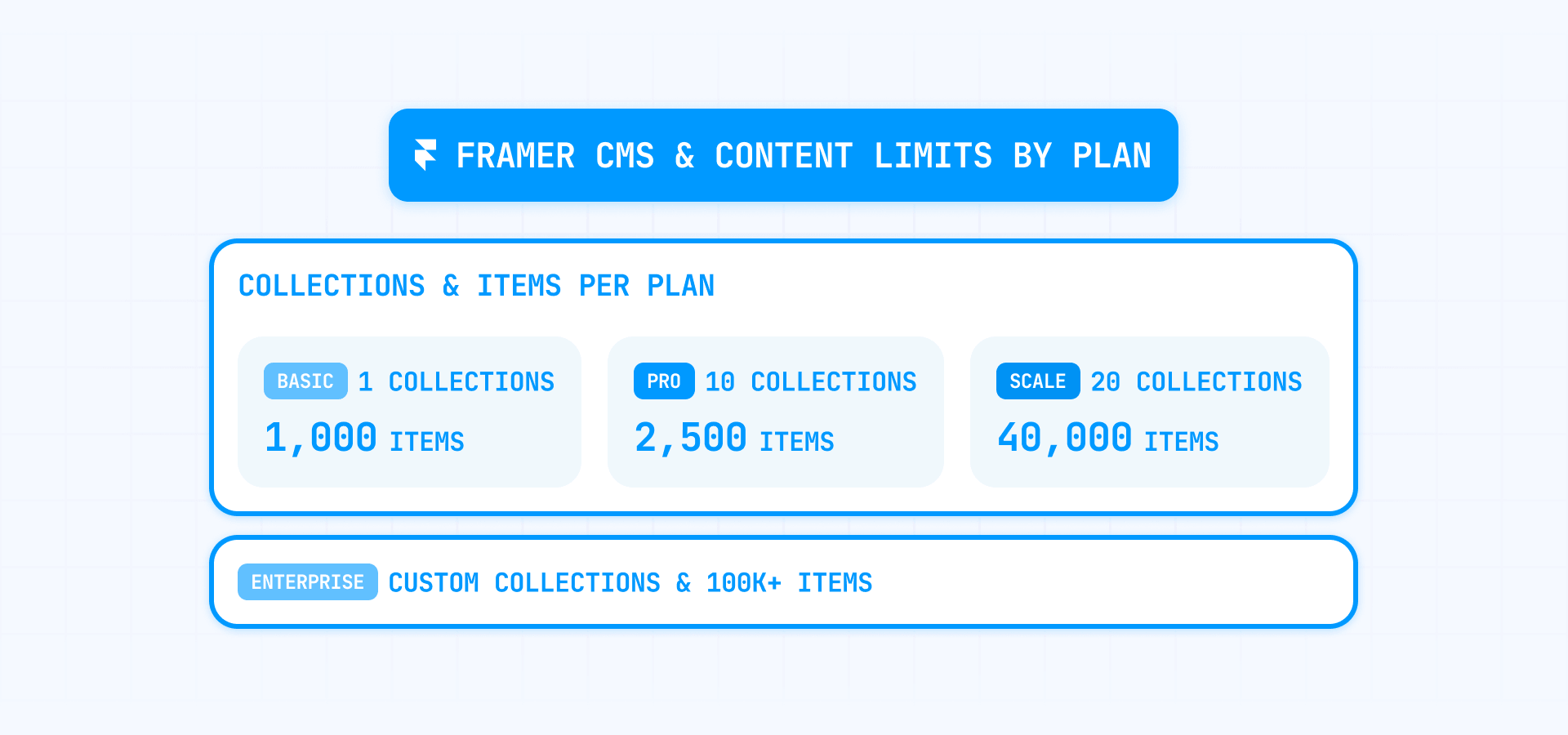
Framer's CMS caps vary by plan:
- Basic: 1 collection, 1,000 items
- Pro: 10 collections, 2,500 items
- Scale: 20 collections and 10,000 items, with paid add-ons extending to 40 collections and 40,000 items
- Enterprise: up to 100,000 CMS items
These numbers are enough for most marketing sites. The risk is roadmap drift — a team that starts with a brand site and a blog often evolves into a site with localized resource hubs, case studies, changelogs, job listings, documentation, and campaign landing pages. Each of those adds collections and items that compound against the ceiling.
Start with Scale add-ons before redesigning your architecture — Framer can expand by +10 collections at $40 each and +10,000 items at $20 each, which buys real room. For larger operations, external CMS sync plugins like Contentful, Google Sheets, Notion, or Airtable keep the source-of-truth outside Framer so your content isn't locked in.
For sites that outgrow a single project, a multi-project split with Multi Site or proxy routing separates sections into different Framer projects under one domain. And if your content roadmap genuinely points to 50,000+ items, model that future honestly during evaluation — don't price the platform against today's brochure site.
Where Framer content editing has blind spots
Framer's on-page editing lets collaborators with Content permissions edit text, images, and CMS content directly on the published site — and even create new CMS pages from the live site. But Framer explicitly says layout templates and overlay content cannot be edited on-page yet. The content team's assumption that "everything can be edited from the live site" is often wrong.
Framer also blocks publishing when certain errors exist. Missing components, broken overrides, or optimization errors can stop a publish entirely. If your process assumes someone can always click Publish at the last second, test that with your actual site before relying on it.
Design around this: use Shared Components with CMS-driven props so layout stays locked while content is editable through CMS fields. For bulk edits, the Framer CMS Find & Replace plugin works across many items at once. For editorial workflows outside the canvas, sync from Google Sheets or Notion into Framer CMS. And for client review without editor access, Noteframe enables feedback directly on the live site.
Localization limitations in Framer
Framer can localize text, page paths, CMS slugs, and regional variants. For straightforward multilingual marketing sites, it works well. The limitations appear in routing behavior, cost at scale, and how localized content interacts with delivery rules.
What Framer localization does well
Framer lets you add locales as language-plus-optional-region entries, define fallback languages, translate manually or with AI, and localize page paths for better native URLs and SEO. Automatic Locale uses browser language preferences to serve the right version to visitors. For a site with two or three languages, this is a strong, low-friction setup.
Where Framer localization gets expensive or breaks
Localization is an add-on, not included in any base plan. Current pricing:
- Basic: up to 2 locales at $20 per locale
- Pro: up to 10 locales at $20 per locale
- Scale: up to 20 locales at $20 per locale
So multilingual expansion isn't blocked by translation capabilities — it's more often limited by cost and routing complexity.
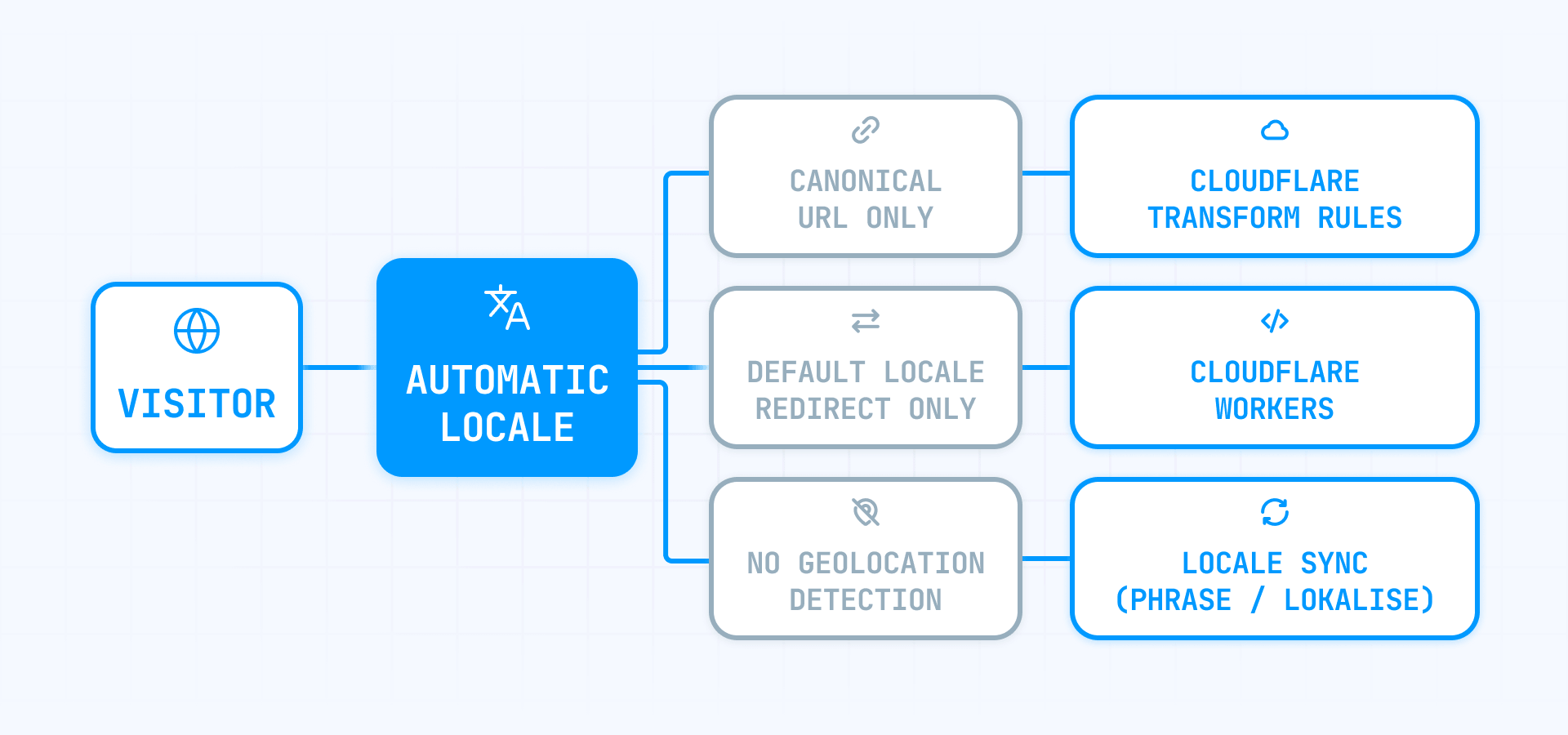
Automatic Locale has narrower behavior than most teams expect. It only works on the site's canonical URL — meaning it only functions on the custom domain, not on arbitrary URLs. It redirects only from the default locale, so if a visitor lands directly on a non-default locale URL, Framer does not re-route them. And it does not use geolocation — it reads browser language and, in edge cases, timezone.
The sharpest trap is how localized paths interact with delivery rules. Framer's locale expansion for custom headers and Multi Site rewrites only prefixes locale codes — it does not understand localized slugs. If your rules reference localized paths, you need to add separate rules per locale manually.
For translation workflows, Locale Sync with tools like Phrase or Lokalise moves locale data through XLIFF files. For simpler setups, Loka offers Google Sheets-based translations with a language switcher. For routing edge cases, Cloudflare Workers or Transform Rules handle per-locale redirects and header logic that Framer's native rules don't cover. The key takeaway: Framer localization is easy to start and progressively harder to scale.
Team collaboration and permissions limitations in Framer
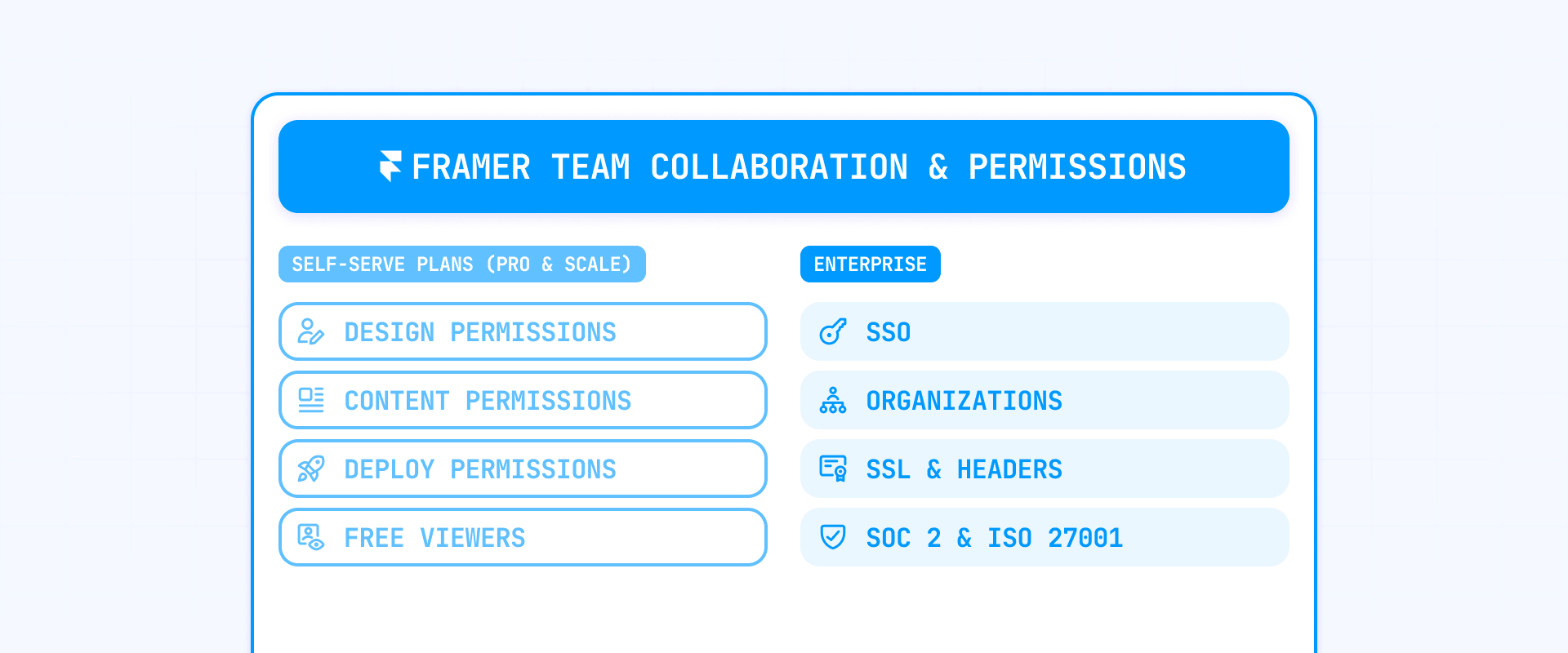
Framer's collaboration works well for most teams. The platform has live multiplayer editing, free viewers, on-page editing, and role-based permissions on Pro and Scale. The limitation isn't collaboration itself — it's how far the permission model goes before you need Enterprise.
What Framer collaboration handles well
Framer supports real-time collaboration with multiple people in a project, cursor chat, and free viewers. Collaborators with Content permissions can edit live sites through on-page editing, and users with Deploy permissions control what goes to production. For most marketing and design teams, that's a solid operating model.
Where Framer permissions fall short without Framer Enterprise
Framer's permission model is functional but compact — mainly Design, Content, and Deploy, with full access needed for project settings. If your organization needs granular access control, formal review gates, or compliance-level permission design, the self-serve model will feel thin.
Enterprise adds SSO, role-based access, organizations as a top-level layer above workspaces, custom SSL, custom security headers, advanced DDoS mitigation, and access to compliance documentation like SOC 2 and ISO 27001.
For non-Enterprise teams, layer controls strategically:
- Use Deploy permissions plus staging as your primary gate — most collaborators stay on Content or Design, and only trusted users push to production
- Use Shared Components to prevent layout drift by keeping editors within approved structures
- For path-level access on a proxied site, Cloudflare Access or NGINX auth_basic adds gating that Framer's permissions don't cover
- For client review without editor access, Noteframe handles feedback directly on the live site
If you need SSO, custom headers, or org-wide management, Enterprise is the only path.
Hosting and infrastructure limitations in Framer
Framer hosting is fast, modern, and globally distributed — AWS infrastructure, server-side rendering, global caching, Brotli/Gzip, dynamic image handling, and font optimization. That's genuinely strong. But the same architecture that makes hosting excellent is also what makes portability weak and delivery boundaries strict.
Why Framer hosting is strong but not portable
Framer does not export to HTML. You can put a reverse proxy in front of your Framer site (using Cloudflare, NGINX, or CloudFront) to control routing, headers, and caching — but Framer still serves the actual pages. Think of it like renting a great apartment: you can decorate and control who enters, but you don't own the building.
This setup works well for most teams. The important thing to know is that there are boundaries — Framer manages certain parts of the page code, and your proxy layer shouldn't try to modify those parts. As long as you keep your customizations at the proxy level (routing, security headers, access control) and don't try to rewrite Framer's page markup, the setup is solid and reliable.
How Framer bandwidth becomes a hidden cost
The first month you exceed your bandwidth limit triggers an email and banner warning. The second month prompts an upgrade. Ongoing overages may lead to auto-upgrade or fees.
The cost adds up quickly. On Scale, every additional 100 GB of bandwidth costs $40 per month. That means going from 200 GB to 1 TB costs an extra $320 per month — nearly $3,840 per year just for bandwidth. For comparison, an unmanaged server on DigitalOcean starts at $6 per month and includes 1 TB of bandwidth, with incremental bandwidth costing a fraction of what Framer charges. Framer's managed hosting is worth paying for, but it's important to understand how expensive bandwidth overages become at scale.
The biggest driver is usually video. Framer does not auto-compress uploaded videos — a 4K file gets served at full resolution to every visitor. Framer explicitly recommends YouTube or Vimeo for adaptive streaming.
The fix:
- Use Vimeo or YouTube for any significant video content
- Pre-compress natively uploaded video before uploading
- Use poster images and lazy loading
- Avoid autoplay unless genuinely necessary
- Monitor bandwidth usage monthly — don't wait for the warning email
Pricing limitations in Framer
Framer pricing is simpler than most competitors. But the assumption that it's "one clean monthly number" breaks down once you add editors, locales, experimentation, and proxy hosting.
How Framer costs add up beyond the base plan
The total cost is the sum of several layers:
- Site plan: Basic $10, Pro $30, Scale $100 per month (annual billing)
- Additional editors: $20–$40 per editor depending on plan
- Localization: $20 per locale per month
- A/B testing: $50 per 500,000 events (Scale only)
- Custom Proxy: $300 per month (Scale only)
A maxed-out Scale plan with proxy, overages, and locales can reach $8,000–$10,000 per year — a very different number than the "$100 per month" that often drives the initial decision.
Model the real cost before committing. List every editor who needs paid access, count the locales, decide on proxy and A/B testing, and compute the actual annual number.
Outdated Framer complaints that no longer apply
Some criticism you'll find online about Framer is genuinely outdated. If you're researching the platform, here's what has actually changed:
- "Framer is only for landing pages": Paid plans include CMS, localization add-ons, site search, password protection, redirects, staging, versions, real-time collaboration, and role-based permissions
- "Framer has no CMS": Framer CMS supports collections, items, on-page editing, and external sync — more than enough for most marketing content
- "Collaboration doesn't work": Live multiplayer editing, free viewers, cursor chat, and granular permissions exist on Pro and Scale
- "No staging or version control": Staging and version history are available on Pro and Scale with Deploy permissions
- "Forms are limited": Form submissions are unlimited on all paid plans
- "Drafts need a paid plan": Drafts are available on all plans including Free
The real question isn't "can Framer power a serious marketing site?" It can. The real question is whether your site is quietly evolving into something Framer wasn't designed to be.
When Framer is the wrong platform for your project
This is the direct version. Framer is the wrong choice when:
- You need to own and self-host your code: Framer does not export to HTML, and no plan changes that
- You need heavy client-side logic throughout the site: Custom code that fights Framer's server rendering will break optimization, SEO, and publishing
- You need HIPAA or PHI workflows: Framer is not designed for HIPAA compliance on any plan
- You need a massive content operation without Enterprise: Self-serve CMS limits are real, and scaling past them means a custom contract
- You need enterprise security on self-serve plans: SSO, custom SSL, custom headers, and advanced DDoS are Enterprise-only
- You need complex multi-system architecture on a simple plan: Once you add Multi Site, proxy routing, or localized rewrite rules, you're in a different class of setup
If none of these apply, Framer is likely a strong fit — genuinely excellent for brand sites, campaign sites, startup marketing, and moderate CMS-driven programs that want visual speed and strong hosting.
Frequently asked questions about Framer limitations
What are Framer's biggest limitations for a marketing website?
The biggest limitations are in portability, content scale, multilingual routing, team permissions, and hosting architecture — not visual design. Framer is strong as a marketing frontend. It gets weaker when the site evolves into a complex multilingual system, needs enterprise-level access controls, or requires backend ownership. Check the hard blockers first (no export, server rendering constraints, no HIPAA), then evaluate plan-gated limits against your actual roadmap.
Can you export a Framer site and self-host it?
No. Framer does not offer HTML export because published sites depend on backend services like pre-rendering and image resizing. Reverse proxy gives delivery control, but Framer remains the origin. You can keep content portable using CMS Export and external sync plugins — so migration stays viable even if the site itself isn't exportable.
What are Framer's CMS limits on each plan?
Basic allows 1 collection and 1,000 items. Pro allows 10 collections and 2,500 items. Scale allows 20 collections and 10,000 items, extending to 40 collections and 40,000 items with add-ons. Enterprise supports up to 100,000 items. For larger operations, external CMS sync plugins keep the source-of-truth outside Framer.
Does Framer support multilingual websites and what are the limitations?
Yes. Framer supports locales, AI translation, localized page paths, and Automatic Locale detection. The limitations are in routing: Automatic Locale only works on the canonical URL, only redirects from the default locale, and doesn't use geolocation. Localized slugs don't propagate through rewrite or header rules — you need manual per-locale rules for those. Localization costs $20 per locale as an add-on.
Is Framer collaboration good enough for teams?
For most marketing teams, yes. Framer has live editing, free viewers, on-page editing, and Design/Content/Deploy permissions. The limitation is that enterprise-level controls — SSO, org-wide management, granular role systems — require Enterprise. Non-Enterprise teams should use Deploy permissions plus staging as their primary control.
What happens when a Framer site exceeds its bandwidth?
First month triggers a warning email. Second month prompts an upgrade. Ongoing overages may cause auto-upgrades or fees. On Scale, each additional 100 GB costs $40 per month — reaching 1 TB adds nearly $3,840 per year, which is significantly more expensive than unmanaged hosting alternatives. The biggest driver is usually video — Framer doesn't auto-compress uploads, so use Vimeo or YouTube for adaptive streaming.
Can Framer handle enterprise security requirements?
On self-serve plans, not fully. SSO, custom SSL, custom security headers, advanced DDoS, and SOC 2/ISO 27001 documentation are Enterprise-only. Framer is also explicitly not HIPAA compliant on any plan.
Is Framer staging the same as version control?
Framer staging lets you preview and restore versions — solid for website operations. But it's not parallel branching like page branching in Webflow Enterprise. There's no way for two people to work on different versions of the same page and merge. For most marketing teams it's enough; for software-style releases, a code framework is the better fit.
What does a Framer site really cost beyond the base plan?
Total cost includes editors ($20–$40 each), locales ($20 each), A/B testing ($50 per 500k events), and Custom Proxy ($300/month). A maxed Scale plan with add-ons can reach $8,000–$10,000 per year. Model the real number before committing.
Should I choose Framer or a code framework like Next.js?
Choose Framer when the priority is visual design speed and low overhead for a marketing site that doesn't need backend ownership. Choose a code framework when you need self-hosted output, unrestricted server-side logic, parallel branching, or app-level functionality. The decision is about whether your site is a marketing surface or an application.
Conclusion
Framer's limitations cluster around five areas: portability, content scale, localization routing, team permissions, and hosting architecture. If you separate hard blockers from plan-gated limits, the platform becomes much easier to evaluate. Framer is genuinely excellent for brand sites, campaign sites, and marketing programs — it gets risky when the site evolves into something the platform wasn't designed for.
The smartest next step is testing with your real CMS model, real locale model, real permissions, and real ownership path before committing. That's where Framer will either look brutally efficient or reveal a mismatch.
If you're evaluating Framer for your site and want help figuring out whether it fits — or need the workarounds implemented properly — our Framer agency can help you scope the right approach.









Join readers commenting on this post!