

The short answer is yes for editing, no for building from scratch. And the difference between those two things is bigger than most teams realize.
Framer looks and feels like a design tool — closer to Figma than to a code editor. That makes people assume anyone can use it. But under the surface, building a Framer site from scratch still involves real layout decisions: stacking, spacing, responsive breakpoints, component architecture, and CMS structure. If you don't understand those concepts, trying to build something new in Framer is just as overwhelming as any other web tool.
Here's the good news: if someone who understands those concepts builds the site properly — with the right components, CMS collections, permissions, and editable properties — then editing that site afterwards is genuinely easy. In fact, Framer makes editing easier than most platforms because marketing can update content directly on the published site in a browser, without ever opening the design canvas. That feature alone — called On-Page Editing — is what makes Framer genuinely practical for marketing teams. But it only works well when the system behind it was built with intention.
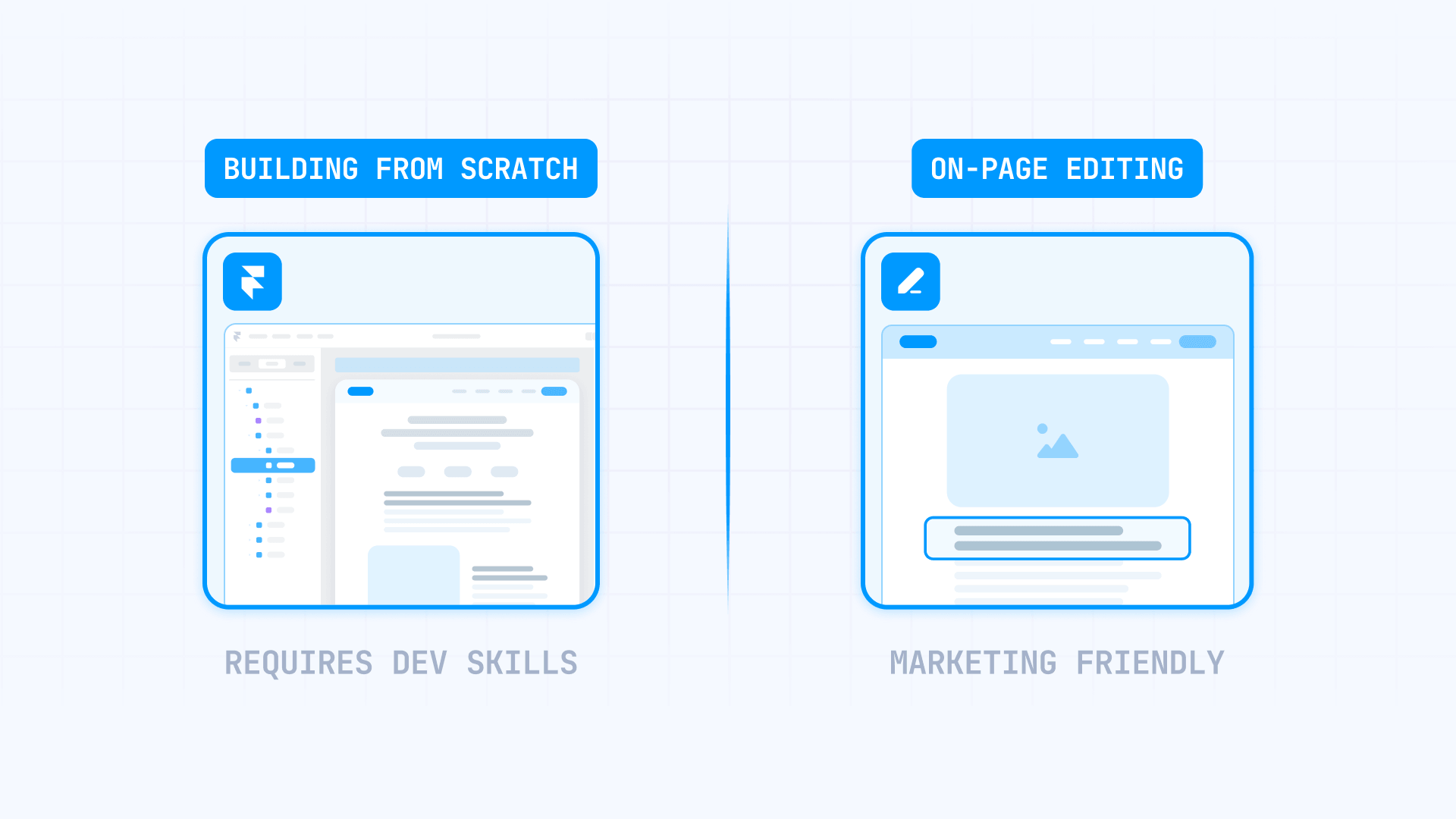
Why Framer feels no-code but building from scratch isn't for Framer sites
This is the misconception that trips up most teams. Framer's interface feels like a design tool, not a code editor. There are no HTML tags or CSS files visible. You drag elements, adjust spacing, set colors, and everything looks visual and approachable.
But what you're actually doing is composing real layouts with real structure. Every frame is a container with layout rules. Every responsive adjustment is a breakpoint decision. Every reusable section is a component with properties and inheritance logic. The visual surface hides the complexity, but the complexity is still there — and making the wrong layout decision breaks things on mobile, inside CMS templates, or across shared components in ways that aren't obvious until you publish.
That's why building from scratch requires someone who understands how Framer's layout system works. It's not writing code, but it is web design thinking. Marketing managers shouldn't be expected to understand stacking contexts or responsive behavior any more than they should be expected to write CSS.
The editing side is completely different. Once the structure exists, Framer's On-Page Editing lets anyone with the right permissions update text, swap images, change component properties, rearrange sections, and even edit localized content — all from the browser, on the live site. No canvas, no design tools, no technical knowledge required. That's where Framer actually delivers on the no-code promise.
What a marketing team can easily manage in Framer

If the site was built properly, here's what marketing can handle without any developer involvement.
Editing content directly on the live Framer site
This is Framer's strongest feature for marketing independence. On-Page Editing lets team members with Content permission open any published page in their browser, click Edit, and start making changes directly on the live site. No need to open the Framer project or understand the design canvas.
Marketing can update:
- Text, rich text, images, and videos directly on any page
- Component properties — things like headlines, button labels, toggle switches, and image selections that the developer exposed as editable fields
- CMS items — blog posts, case studies, team members, or any other content type that exists in the CMS
- Hidden CMS fields like SEO descriptions, tags, or toggles through the Show All Fields option
- Localized content — editing translated versions of pages directly in the browser
- Page-level SEO settings including titles, descriptions, and indexing controls
- Content arrangement — rearranging sections, swapping icons, and switching component variants
If the CMS is set up with clear field names and the developer built components with the right editable properties, updating content in Framer feels like filling out a form on the live site. No design skills, no layout knowledge, no technical understanding required.
Creating new pages through CMS in Framer
Marketing can also create entirely new pages — but through the CMS, not by building layouts from scratch. If the developer set up a blog, case study library, or any other CMS-driven section, marketing can add new items by opening an existing CMS page, clicking Add Page, and filling in the fields. The new page automatically uses the same template as every other item in that collection.
This is how marketing teams publish blog posts, launch case studies, add team members, or create event listings without a design ticket. The structure already exists — marketing just adds the content. It's the same concept as publishing a post in WordPress, except the page design is already handled and can't be accidentally broken by the person adding content.
Managing content from external tools for Framer sites
For teams that rarely touch Framer directly — a client who updates the blog once a month, or a content team that prefers spreadsheets — Framer's CMS sync plugins are often the better handoff than giving everyone project access.
Google Sheets, Notion, and Airtable all have official Framer sync plugins. Marketing works in the tool they already know, and Framer automatically pulls the content in and displays it on the site. This is lower risk than direct project access and usually a better experience for occasional editors who don't want to learn a new platform.
What still needs a developer or Framer specialist
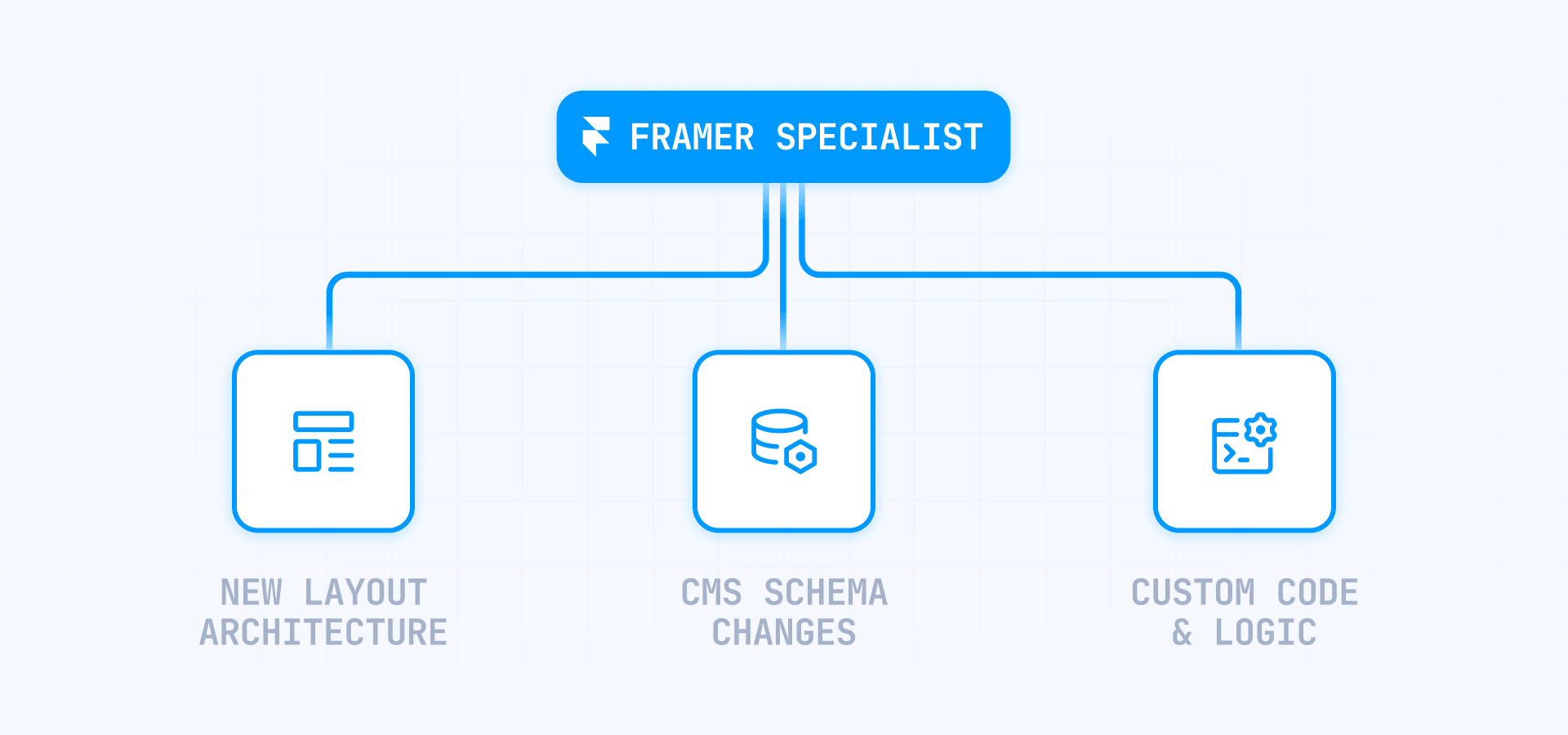
Some tasks look simple but require someone who understands Framer's underlying structure. This is where the "no-code" label gets misleading.
Building new page layouts or section designs in Framer
If marketing needs a page type that doesn't exist yet — a new landing page layout, a completely different hero section, or a page structure nobody anticipated during the build — someone with Framer design skills needs to create it. This means working in the Framer canvas, understanding layout and responsive behavior, and potentially building new components.
The same applies to new sections within existing pages. If marketing wants a comparison table, a pricing grid, or an interactive feature showcase that was never built, that's design work — even though it happens visually rather than in code.
Marketing can edit and populate within a system. Creating new pieces of that system requires someone who understands how Framer layouts work.
Changing CMS structure or site architecture in Framer
If the team decides they need a new content type — like events, job listings, customer stories, or a resource library — someone needs to create the CMS collection, define the fields, build the collection template, and configure how the content displays. Marketing permissions in Framer don't include creating or restructuring collections.
Navigation changes, restructuring how content types relate to each other, or reorganizing how pages are grouped also fall into architecture territory. These decisions affect the entire site and need someone who understands both Framer's CMS system and the broader site structure.
Custom code, integrations, and advanced hosting in Framer
Once the requirement includes Code Components, Code Overrides, the Server API, reverse proxy hosting, or advanced tracking implementations, you're in developer territory. Framer's Code Components require React knowledge. The Server API requires an API key and code-based automation. Reverse proxy setups involve DNS, canonical URLs, and hosting configuration that can break SEO if done incorrectly.
Even seemingly simple requests like "add this tracking pixel" or "embed this third-party widget" can involve custom code placement and cross-environment testing. Marketing can request these changes, but implementing them requires technical knowledge.
Framer's own developer documentation is direct about this: if you need advanced logic or real application behavior, you're often better off with a proper React application rather than stretching Framer beyond what it was designed for.
Why the quality of the initial build determines everything in Framer
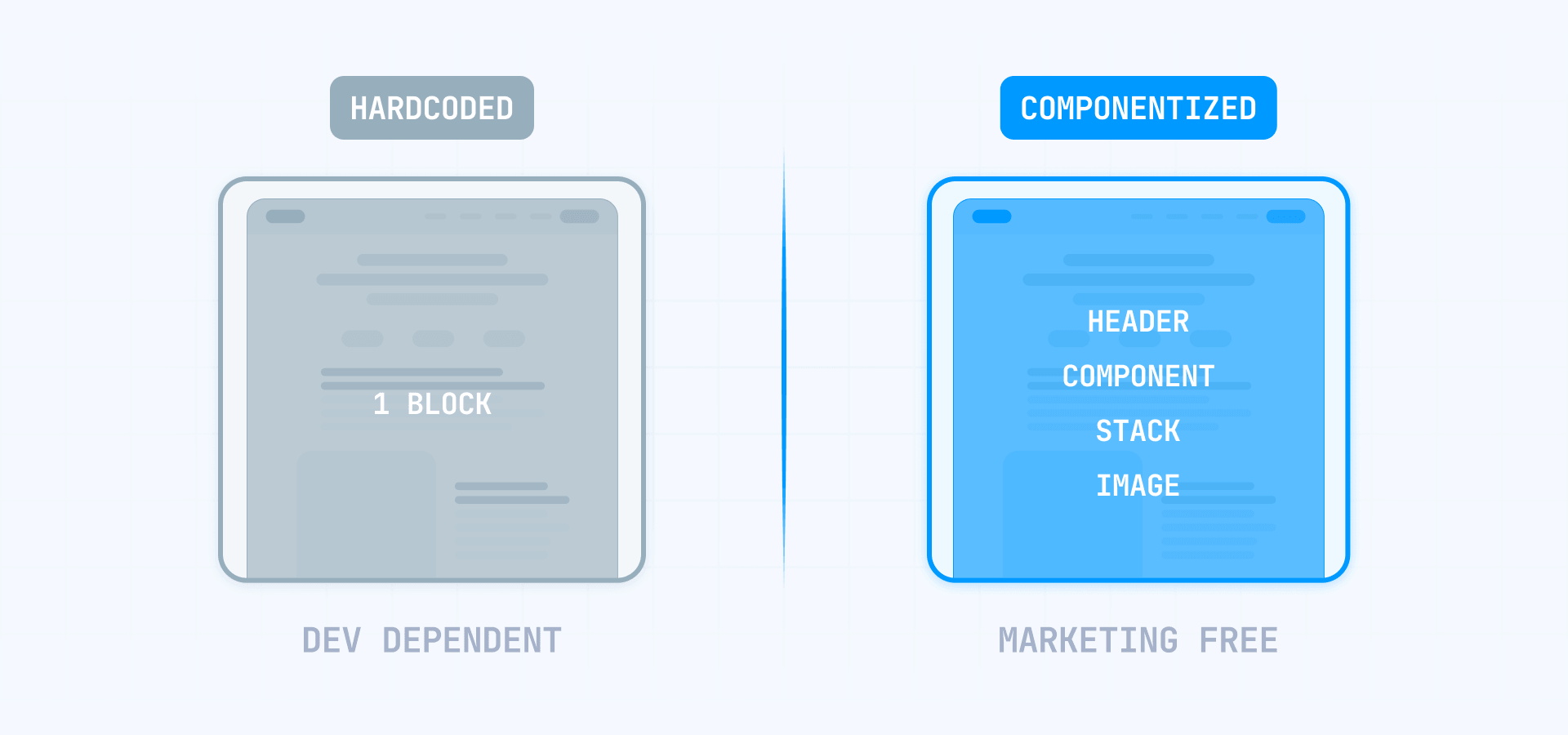
This is the most important section for anyone evaluating Framer for their team. The platform doesn't determine whether marketing can operate independently — the quality of the build does.
A well-built Framer site looks like this from marketing's perspective:
- Every repeatable section is a component with editable properties — marketing changes content through clearly labeled fields on the live site, not by opening the design canvas
- The CMS has collections for every content type marketing manages, with field names that make sense to non-technical people
- Permissions are configured so marketing has Content access and one operations lead has Deploy, while Design stays with the specialist
- Staging is enabled so marketing can preview changes before anything goes live
- External sync is set up for teams that prefer editing in Google Sheets, Notion, or Airtable instead of directly in Framer
A poorly built Framer site looks like this: marketing needs the developer for every change because nothing was componentized with editable properties, the CMS fields have confusing names, there's no staging, and the only way to update anything is by opening the canvas and understanding the layout system.
The difference between these two scenarios has nothing to do with Framer's features. It's entirely about who built the site and whether they designed it for marketing independence. A good build makes marketing self-sufficient for 90% of daily work. A bad build makes them dependent on a developer for everything. This is exactly why working with an experienced team matters — the goal isn't just building the pages, it's building the system that makes the team autonomous after launch.
Frequently asked questions about managing Framer without a developer
Can a non-technical person edit a Framer site?
Yes, if the site was built properly. Framer's On-Page Editing lets anyone with Content permission update text, images, component properties, and CMS items directly on the published site — no design canvas, no technical knowledge required. For teams that prefer external tools, Google Sheets or Notion sync means they never need to open Framer at all. The key is that someone technical built the structure first.
What's the difference between Framer's Design, Content, and Deploy permissions?
Design allows changes to layouts, components, and page structure — this stays with the developer or specialist. Content allows editing text, images, CMS items, and component properties through On-Page Editing. Deploy controls who can push changes to the live site. The practical setup: designers keep Design, marketing gets Content, and one trusted person gets Deploy. Important: new editors get full access by default unless you reduce their permissions manually.
Can marketing create new pages in Framer?
Yes, but through the CMS — not by building layouts from scratch. If the developer set up a blog, case study library, or similar CMS-driven section, marketing can create new items through Add Page and fill in the fields. The page automatically uses the existing template. Without a CMS template for that page type, creating something new requires at least basic Framer design skills.
Does marketing need to understand design or code to edit Framer?
No — not for editing. On-Page Editing works in the browser on the live site and doesn't require understanding layout, components, or responsive design. Updating copy, images, CMS items, and SEO fields is closer to filling out a form than to designing anything. Understanding Framer's layout system only matters when building new structures from scratch.
Can marketing publish changes without developer approval in Framer?
Yes, depending on how permissions are configured. If staging is enabled, marketing with Content access can publish changes to the staged version — but only someone with Deploy permission can push the staged version live to the custom domain. This is Framer's built-in approval gate. Without staging, only Deploy-enabled users can publish directly. The practical setup: let marketing stage freely, but keep Deploy with a senior owner.
Can marketing manage Framer forms without a developer?
Yes for most use cases. Framer's native forms can send submissions to email, Google Sheets, or a webhook, which covers lead capture, newsletter signups, waitlists, and campaign inquiries. For teams using HubSpot, the form can be embedded in Framer — but styling and configuration happen in HubSpot, not in Framer. The operational rule: choose one system of record per form and don't route the same lead through overlapping stacks.
What should we ask our Framer agency to set up for marketing independence?
Ask for components with editable properties for every repeatable section, CMS collections with clear field names for every content type you manage, permissions configured with Content and Deploy split properly, staging enabled for safe review before publishing, and external CMS sync set up if your team prefers editing in Google Sheets or Notion. If the agency can't demonstrate the site working from your team's perspective using Content-only access, the handoff isn't ready. For a deeper look at what to expect from this process, read our complete guide to evaluating and choosing a Framer agency.
Is Framer easier than WordPress for marketing teams?
For governed editing — where you want protected design, clean permissions, and content changes directly on the live site — Framer is often easier. Marketing can't break the site by installing plugins or editing theme files. Where WordPress can win is when the editorial workflow is already built around its ecosystem. The real comparison isn't the platforms — it's how well the site was built for the team that will use it.
Can marketing manage localized content in Framer?
Yes. Framer's On-Page Editing supports editing localized pages directly in the browser. Marketing can update translated content, manage localized page paths, and work across language versions without opening the design canvas. Adding new locales or configuring locale routing still requires someone with project settings access. Localization is also a paid add-on at $20 per locale, so plan the cost before committing to a multilingual workflow.
How do we know if our Framer site is built well enough for marketing to manage?
Run one test: have a marketing team member try every weekly task — publish a blog post, update a hero section, create a new CMS page, change SEO settings, swap an image — using only Content permission and On-Page Editing. If they can do it without asking for help, the build is solid. If they get stuck, the problem is the build, not the person.
Conclusion
A marketing team can absolutely manage a Framer site without a developer for the work that matters most: content updates, CMS publishing, page-level changes, forms, SEO fields, and even localized content. Framer's On-Page Editing makes this genuinely easier than most platforms — editing happens directly on the live site, in the browser, with no design tools required.
But that only works when the site was built with marketing independence in mind. The honest answer to "can marketing manage Framer?" is always the same: it depends on who built it. A well-structured Framer site with proper components, CMS architecture, and permissions makes marketing self-sufficient. A poorly built site turns every small change into a developer ticket.
If you want a Framer site that your marketing team can actually run after launch — not just edit text, but create pages, manage content, and publish confidently — our Framer agency builds sites specifically for marketing independence. To understand what that investment looks like, explore our full guide to Framer website costs.









Join readers commenting on this post!