
Webflow Enterprise is confusing for one simple reason: it's not one plan. It's a combination of Site plan upgrades, Workspace plan upgrades, and contract-only terms that Webflow labels as "Custom" — which hides the real differences between what you're paying for now and what Enterprise actually adds.
The result is that most teams either overpay for features they won't use, or avoid Enterprise entirely and hit ceilings that cost them more in engineering workarounds. This guide gives you a feature-by-feature breakdown of what Webflow Enterprise includes, what it costs based on publicly available references, and a decision framework to know exactly when the upgrade is justified.
You'll learn how Enterprise is structured, how its limits compare to standard plans, what pricing patterns look like across public sources, and how to evaluate whether your team actually needs it — or if scaling your current Business plan is the smarter move.
Why Webflow Enterprise matters for Webflow sites
Understanding the strategic value of Enterprise helps you evaluate it against your specific blockers, not against a generic feature list:
- Procurement-ready billing: If your finance team requires POs, invoicing, or a Master Services Agreement, Enterprise supports invoice-based annual billing — non-Enterprise plans are credit card only
- Governed releases: Features like page branching, design approvals, and publishing workflows let you ship changes with review gates instead of relying on whoever has publish access
- Identity and access controls: SSO, SCIM, and JIT provisioning are Enterprise Workspace features that matter when IT needs centralized access management across your organization
- Auditability for compliance: Enterprise unlocks activity logs and audit log APIs so you can answer "who changed what" without guesswork — critical for regulated industries
- Scale without surprise upgrades: Enterprise lets you negotiate custom bandwidth packages and higher CMS and API limits instead of living inside fixed caps that trigger automatic plan upgrades
- Operational support and SLAs: Enterprise can include contractual uptime SLAs and support response commitments, turning support into a contract instead of a best-effort promise
How Webflow Enterprise is actually structured in Webflow
How Webflow Enterprise is actually structured in Webflow
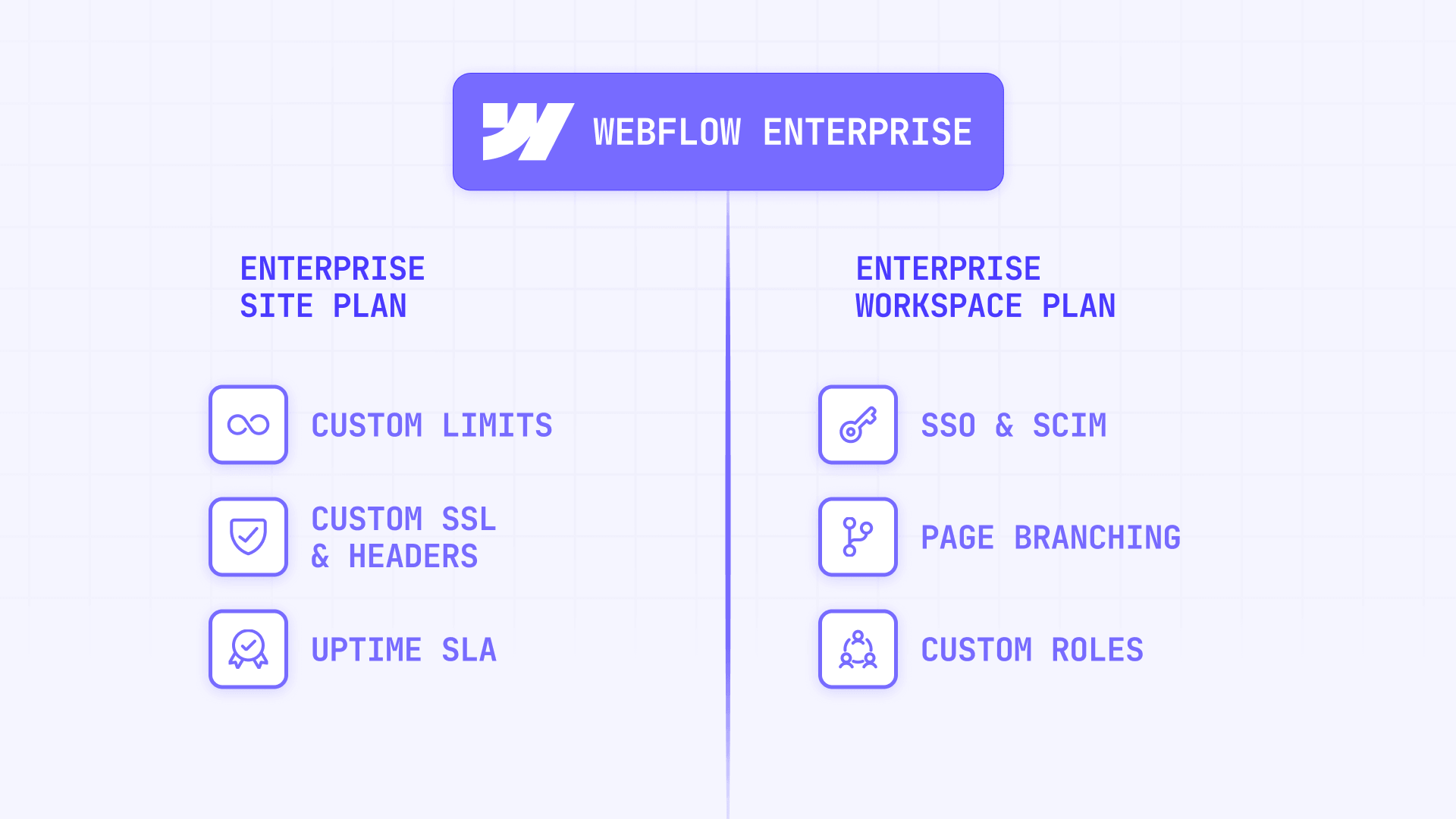
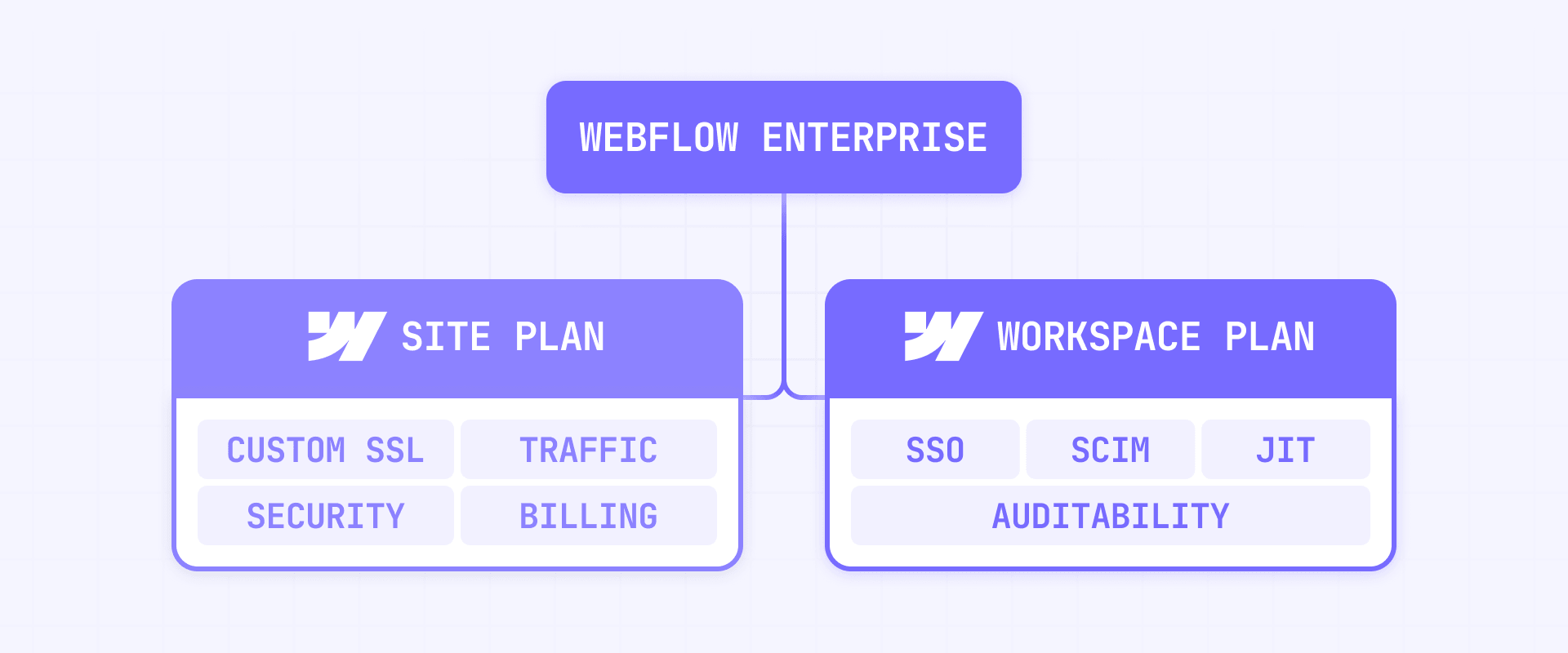
Webflow Enterprise shows up in two separate products you may buy together or separately: the Enterprise Site plan and the Enterprise Workspace plan. This distinction is critical because most teams only need one of them.
How Webflow Enterprise Site plans work in Webflow
Enterprise Site plans cover hosting, traffic, security controls, and billing terms. An Enterprise Site plan can include:
- Custom bandwidth packages instead of fixed allowances
- A contractual uptime SLA on eligible Enterprise agreements
- Enterprise-only security toggles like custom security headers and custom SSL certificate uploads
- Invoice billing as an option for annual contracts
If your primary triggers are bandwidth, security compliance, or procurement mechanics, you may only need an Enterprise Site plan.
How Webflow Enterprise Workspace plans work in Webflow
Enterprise Workspace plans cover team governance, identity management, and auditability. An Enterprise Workspace plan can include:
- SSO for Workspace login
- SCIM provisioning for centralized user lifecycle management
- JIT provisioning to auto-create users on first SSO login
- Access to Workspace audit log API
- Enterprise collaboration controls and support options, depending on your agreement
If your primary triggers are IT access control, compliance auditability, or team governance, the Workspace plan is what you need.
Don't start the Enterprise evaluation by asking "Do we need Enterprise?" Start by asking "Do we need an Enterprise Site plan, an Enterprise Workspace plan, or both?" The answer is often only one.
What Webflow Enterprise includes vs standard Webflow plans
This section replaces the typical feature comparison table with a readable, scannable breakdown by category. For each area, you'll see what Enterprise changes and why it matters.
Billing and procurement differences in Webflow Enterprise
- Enterprise: Annual billing via invoice or credit card, supports PO workflows and MSAs
- Non-Enterprise: Credit card only, monthly or annual
If your company requires purchase orders, ACH transfers, or a formal services agreement, Enterprise is the only route inside Webflow.
CMS and API limit differences in Webflow Enterprise
- Enterprise: Can unlock higher CMS items, collections, and API limits by agreement — no published ceiling
- Non-Enterprise: Fixed caps with self-serve add-ons. On the Business plan, CMS items scale up to 20,000 per site via add-ons, and API rate limits cap at 120 requests per minute
When this matters: you're building programmatic content where 50,000+ items is not hypothetical, or your integrations regularly hit API rate limits and you can't tolerate throttling.
Bandwidth and traffic differences in Webflow Enterprise
- Enterprise: Custom bandwidth packages with the possibility of pooling across sites by agreement
- Non-Enterprise: Standard allowances with self-serve add-ons. Business plan bandwidth scales up to 2.5 TB via add-ons, but exceeding limits can trigger automatic plan upgrades
This matters if your traffic is spiky, marketing-driven, or if bot traffic has historically eaten into your bandwidth allowance. Enterprise gives you predictable costs instead of surprise billing.
Collaboration and governance differences in Webflow Enterprise
- Enterprise: Page branching, publishing workflow, design approvals, and custom roles
- Non-Enterprise: Standard roles and a direct publishing model with no review gates
Page branching lets you create a snapshot of a page, make changes in isolation, and merge when ready. One critical edge case: if someone edits content on the original page while it's branched, those content changes can be lost after merging. Treat the original page as locked for content changes until merge.
Design approvals control who can merge branches into the main site. Certain roles like Designer require approval to merge, while roles like Site manager or custom roles with Approve changes permissions can approve.
Publishing workflow introduces a staged release system that moves changes through Designer, Staging, and Production with diffs between each stage. One important limitation: the pre-publish summary does not include most Site settings changes, except custom code changes in the Custom code tab. If you use settings-level changes as part of a release, you need a separate checklist.
Branch staging lets Enterprise customers publish a branch to its own staging environment for testing and review before production — one of the cleanest Enterprise upgrades for teams that need QA, stakeholder, or compliance review.
Identity management differences in Webflow Enterprise
- Enterprise: SSO, SCIM, and JIT provisioning
- Non-Enterprise: Not available
SSO requires users to be provisioned in your IdP before they can log in. Webflow does not assign Webflow roles based on IdP groups, which means role management still happens inside Webflow itself.
SCIM provisions, updates, and deprovisions users from your IdP, but SSO must be enabled first. Once configured, user management becomes IdP-driven and Webflow becomes a read-only destination for those actions. The critical limitation is that Webflow does not currently support assigning roles or groups via the IdP — you still need an internal process for role assignment.
JIT provisioning creates a Webflow account on first SSO login if the user is approved in the IdP, and requires SSO enforcement to prevent unauthorized user additions.
Security control differences in Webflow Enterprise
- Enterprise: Custom security headers, custom SSL certificate upload, enhanced DDoS options
- Non-Enterprise: Baseline platform security with fewer configurable toggles
Custom security headers are only available to Enterprise customers and must be unlocked by contacting Sales before you can configure them in Site settings. On non-Enterprise plans, HSTS is enabled automatically and can't be disabled — on Enterprise, you can enable or disable HSTS as needed.
Custom SSL certificate upload is Enterprise-only. Webflow does not issue the certificate — you must obtain it from a third-party CA and manage renewals manually.
DDoS protection exists across all Webflow-hosted sites at a baseline level. Enterprise plans can include enhanced DDoS options depending on your contract. If your site faces constant or heavy attacks, it's worth exploring dedicated solutions like Cloudflare's advanced DDoS services, which offer more granular control and are purpose-built for that use case.
Compliance and auditability differences in Webflow Enterprise
- Enterprise: Workspace audit log API, Site Activity log, SOC 2 Type II and ISO 27001 artifacts available by agreement
- Non-Enterprise: Not available
Webflow maintains SOC 2 Type II compliance and is ISO 27001 certified. However, how these certifications apply to your specific agreement depends on the contract. Enterprise customers can request the exact security package and audit artifacts their contract grants access to.
The Site Activity log is available in the Designer for Enterprise customers and tracks class, component, variable, CMS, and custom code changes with up to one year of retention. It does not track descriptions of changes or Workspace settings changes.
For vendor reviews and procurement security questionnaires, ask Webflow for the specific audit artifacts, penetration test summaries, and compliance documentation that apply to your contract — then document what you receive in your internal security review.
Staging and environment differences in Webflow Enterprise
- Enterprise: Custom staging domains and private staging
- Non-Enterprise: Standard webflow.io staging subdomain
Enterprise customers can add a custom staging domain, but only one per site — and once added, the webflow.io staging subdomain is no longer available. Make sure stakeholders know the new staging URL before making the switch.
Private staging requires authentication to access staging, including the custom staging domain and staged branches. If your Workspace has SSO enabled, SSO is required for private staging access.
Enterprise-only API differences in Webflow Enterprise
- Enterprise: Configuration APIs for robots.txt, 301 redirects, well-known files, and Site Activity logs
- Non-Enterprise: Not available
These APIs matter when you want CI-like automation around site configuration:
- robots.txt API lets you read and replace robots.txt rules programmatically — useful for teams managing SEO directives across multiple environments
- 301 redirects API lets you create and update redirects via API instead of manually — valuable when managing large-scale URL migrations or frequent routing changes
- Well-known files API lets you upload files like verification tokens or app-association files, with limits of 100 KB per file and 30 total files
- Site Activity log API lets you export activity data programmatically with the site_activity:read scope — essential for compliance automation
If your team manages configuration manually today and it works, these APIs are a nice-to-have. If you're managing dozens of redirects or need auditable configuration changes, they become a strong justification for Enterprise.
SLA and support differences in Webflow Enterprise
- Enterprise: Contractual uptime SLA and support response SLAs on eligible agreements, onboarding support, and often a dedicated success function
- Non-Enterprise: No contractual SLAs — support and uptime operate on a best-effort basis
Webflow states Enterprise can include a 99.99% uptime SLA, but qualifies that select Enterprise customers are covered based on their agreement. The key point is not the marketing number — it's what your contract says. Ask for the SLA document and confirm scope, exclusions, and measurement method before you sign.
How much Webflow Enterprise costs in Webflow
Webflow does not publish fixed Enterprise pricing — it's custom-quoted based on your needs. The pricing page shows "Talk to us" for both Enterprise Site and Enterprise Workspace plans. There is no self-serve checkout.
However, public references from Webflow forums, Reddit threads, procurement platforms, and agency guides reveal consistent pricing patterns that help you understand what to expect before talking to Sales.
Webflow Enterprise Lite pricing patterns in Webflow
The term Enterprise Lite has appeared in Webflow forum posts and community discussions, though Webflow's current pricing page only shows "Enterprise." Multiple public sources point to a consistent pattern:
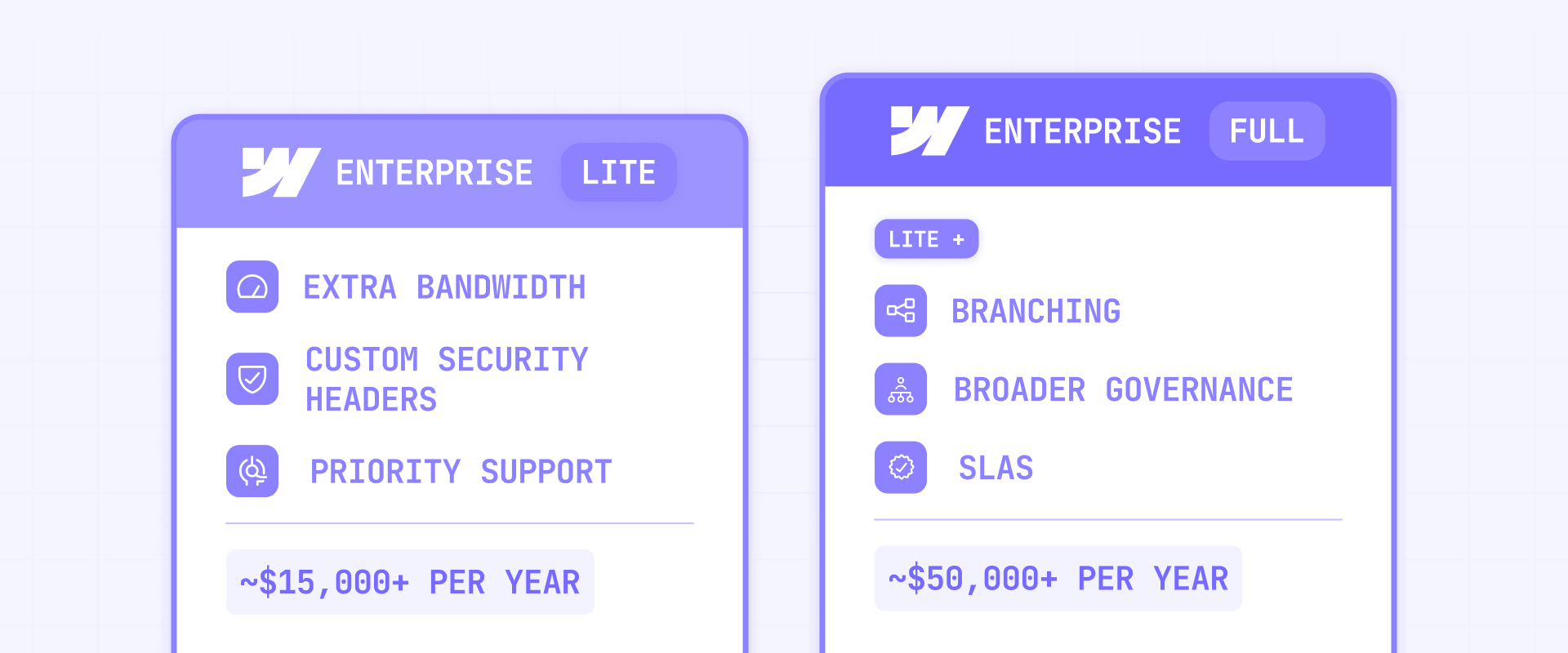
- ~$15,000 per year is the repeatedly mentioned starting point for Enterprise Lite
- This tier has been described as covering extra bandwidth, custom security headers, and priority support
- It typically does not include governance features like page branching, design approvals, or full collaboration tools
Enterprise Lite appears to be triggered most often by security compliance needs (like custom HSTS headers for SOC 2) or bandwidth overages on sites handling 6–10 TB of traffic per month.
Webflow Enterprise full pricing patterns in Webflow
Full Enterprise packages — including branching, permissions, SLAs, and broader governance — show a different price range:
- ~$50,000 per year is the starting point described by multiple agency guides for full Enterprise
- $60,000–$80,000 per year is the recurring band in public anecdotes when companies hit real scale or governance needs
What drives Webflow Enterprise pricing up or down in Webflow
Enterprise pricing varies dramatically based on which trigger is driving the upgrade:
- Bandwidth and traffic volume: High-traffic sites consuming multiple terabytes per month push pricing toward the higher end
- CMS item count: Crossing the 20,000 item self-serve ceiling is a common trigger for Enterprise conversations
- User and seat count: Larger organizations with more Workspace members tend to see higher quotes, especially with SSO requirements
- SSO and governance needs: Adding identity management and collaboration controls pushes pricing beyond the Lite tier
- SLA requirements: Contractual uptime and support commitments add to the base cost
For context, a maxed-out Business plan with 20,000 CMS items and 2.5 TB of bandwidth costs roughly $12,500 per year. The jump to Enterprise Lite at $15,000 per year is incremental — but the jump to full Enterprise at $50,000 or more is a significant step. Know exactly which trigger is driving the upgrade so you don't overpay for features you won't use.
How to decide if Webflow Enterprise is worth it in Webflow
Most "is Enterprise worth it?" articles list features and say "it depends." Here's a trigger model that makes the decision concrete.
Webflow Enterprise hard-requirement triggers in Webflow
If any of these are true, Enterprise is not optional — it's a requirement:
- You need SSO for Webflow access: SSO is Enterprise Workspace only — there is no alternative
- You need SCIM or JIT provisioning: Both depend on SSO and are exclusively Enterprise paths
- You need a contractual SLA: Non-Enterprise plans have no contractual uptime or support response guarantees
- You need invoice billing or PO workflows: Non-Enterprise is credit card only
- You need Enterprise-only configuration APIs: The robots.txt, redirects, well-known files, and activity log APIs are Enterprise-only
Webflow Enterprise scale triggers in Webflow
Enterprise becomes financially rational when you're spending engineering time to work around fixed ceilings:
- You need CMS capacity beyond what add-ons allow, including the 20,000 items per site ceiling
- You need higher-than-published API throughput and can't tolerate throttling at 120 requests per minute
- Bandwidth cost volatility is unacceptable and you need custom packages with better incident handling
Webflow Enterprise governance triggers in Webflow
Enterprise is worth it if publishing mistakes have real cost:
- You need page branching to isolate changes safely before they go live
- You need design approvals to gate merges from junior roles or external contributors
- You need publishing workflow to promote changes from staging to production intentionally
- You need auditable change history via the Site Activity log and related APIs
How to run a Webflow Enterprise evaluation in Webflow
Use this process so you don't get sold vibes instead of deltas:
- List your non-negotiables — Write down requirements across procurement, IT access, compliance, release governance, scale, and support SLAs
- Map each requirement to a plan surface — Decide if it's a Site plan need, a Workspace plan need, or both. Don't buy both if you only need one
- Compute the non-Enterprise workaround cost — If you can solve it with Business plan add-ons, internal process, or a reverse-proxy layer, estimate the real operational cost over 12 months
- Demand contract-level precision — Ask Webflow for the exact SLA terms, the exact limit sheet for CMS, API, bandwidth, and Cloud capacity, which add-ons are bundled vs purchased separately (like Localization, Optimize, and Analyze), and the exact support model including onboarding and response SLAs
- Decide with a single sentence — If Enterprise removes a blocker that would otherwise force a platform change or create unacceptable risk, buy it. If it only adds controls your team won't operationalize, skip it
Frequently asked questions about Webflow Enterprise in Webflow
What is the difference between Webflow Enterprise Site plans and Workspace plans?
A Webflow Enterprise Site plan covers hosting, bandwidth, security controls, and billing — while an Enterprise Workspace plan covers team governance, identity management, and auditability. You can buy them together or separately, which is the single most important thing to understand before talking to Sales. If you only need custom security headers or bandwidth relief, you likely need the Site plan alone. If you only need SSO or audit logs, you need the Workspace plan. Map your specific requirements to the correct surface using the structure breakdown earlier in this guide, and don't let Sales bundle both if you only need one.
How much does Webflow Enterprise cost per year?
Webflow does not publish fixed Enterprise pricing — it's custom-quoted based on your requirements. Public references consistently show Enterprise Lite starting around $15,000 per year for security or bandwidth needs, while full Enterprise packages start around $50,000 per year and can reach $60,000–$80,000 for larger organizations. The key factor is which trigger drives the upgrade: a narrow security need costs dramatically less than a full governance and SSO package. Always ask Webflow for an itemized breakdown so you can see exactly what you're paying for.
Can I scale my Webflow Business plan instead of upgrading to Enterprise?
Yes, and you should explore this first. The Business plan now supports CMS item scaling up to 20,000 items and bandwidth scaling up to 2.5 TB through self-serve add-ons. A maxed-out Business plan costs roughly $12,500 per year, which is less than Enterprise Lite. If your only pain point is bandwidth or CMS capacity within those ceilings, Business add-ons are the smarter move. Enterprise only becomes necessary when you exceed those self-serve limits or need features like SSO, branching, or contractual SLAs that simply don't exist on Business.
Does Webflow Enterprise include SSO and how does it work?
SSO is exclusively available on Enterprise Workspace plans — there is no way to get it on standard plans. Users must be provisioned in your IdP before they can use SSO, and Webflow does not assign roles based on IdP groups, so role management still happens inside Webflow. You can make SSO optional or mandatory for your Workspace, though guests don't require SSO even when it's enforced. If centralized identity management is a hard requirement from IT, Enterprise is non-negotiable.
What are Webflow Enterprise CMS limits compared to the Business plan?
On the Business plan, CMS items max out at 20,000 per site through self-serve add-ons. Enterprise can negotiate custom CMS limits beyond that ceiling, with no published cap. If your site needs 50,000+ items for programmatic content, directory listings, or large-scale catalogs, Enterprise is the contract path. Before upgrading, validate whether splitting content across multiple sites is operationally feasible — if it creates SEO fragmentation or editorial complexity, Enterprise is the cleaner solution.
What is Webflow Enterprise page branching and why does it matter?
Page branching is an Enterprise-only feature that lets you create an isolated snapshot of a page, make changes without affecting the live version, and merge when ready. It's the foundation of safe release workflows — especially for teams where multiple people edit the same site. The critical thing to know is that content edits to the original page while it's branched can be lost after merging. Treat any branched page as locked for content changes until the merge is complete. If publishing mistakes cost your team real money or reputation, branching alone can justify Enterprise.
Does Webflow Enterprise include a guaranteed uptime SLA?
Webflow states Enterprise can include a 99.99% uptime SLA, but qualifies that coverage depends on your specific agreement. Non-Enterprise plans have no contractual uptime guarantee — meaning you have no enforcement mechanism if the platform goes down. The important action is to ask Webflow for the actual SLA document before signing, confirm what's excluded, and understand how uptime is measured. Don't assume the marketing number matches your contract terms.
What Enterprise-only APIs does Webflow offer and when are they useful?
Webflow Enterprise unlocks configuration APIs for robots.txt, 301 redirects, well-known files, and Site Activity logs. These matter when you need CI-like automation around site configuration: managing SEO directives across environments, handling large-scale URL migrations programmatically, uploading verification tokens, or exporting activity data for compliance systems. If your team manages these things manually today and it works fine, these APIs are nice-to-haves. If you manage dozens of redirects or need auditable configuration exports, they're a strong Enterprise justifier.
Is Webflow Enterprise worth it for small teams or single-site projects?
For most small teams, no. If you're running a single marketing site without SSO requirements, compliance audits, or CMS capacity beyond 20,000 items, the Business plan with self-serve add-ons covers you at a fraction of the cost. Enterprise is designed for organizations hitting procurement friction, governance gaps, security requirements, or scale ceilings. The right test is simple: list your hard requirements, check if any are Enterprise-only features, and compute whether Business plan workarounds cost less over 12 months. If nothing on your list requires Enterprise, don't buy it.
How do I negotiate the best Webflow Enterprise pricing?
Start by identifying exactly which features you need and whether they fall under the Site plan, Workspace plan, or both. The narrower your scope, the lower the price. Ask Webflow for an itemized breakdown that separates base plan costs from bundled add-ons like Localization, Optimize, and Analyze — these are sometimes included, sometimes extra. Bring your current spend as a benchmark: if you're already paying $12,000 per year on a maxed Business plan, the delta to Enterprise Lite is small and gives you leverage. Finally, ask what the contract length options are — multi-year commitments sometimes unlock better terms.
Conclusion
Webflow Enterprise is worth it when it removes a real blocker: procurement requirements, IT identity controls, auditability, contractual SLAs, Enterprise-only APIs, or governed release workflows. If you're not enforcing governance, don't need IAM, and aren't hitting scale ceilings, Enterprise often becomes expensive overhead that adds complexity without value.
The sharpest evaluation approach is simple: list your non-negotiables, map them to the correct plan surface, compute the cost of workarounds, and demand contract-level precision from Sales before you sign anything. Enterprise is a contract-tier product — treat the buying process accordingly.
If you want a second opinion on whether Enterprise is justified for your specific Webflow setup — and how to design your governance and release process so you actually use what you pay for — our Webflow Enterprise agency can help you evaluate the decision with precision.







Join readers commenting on this post!